
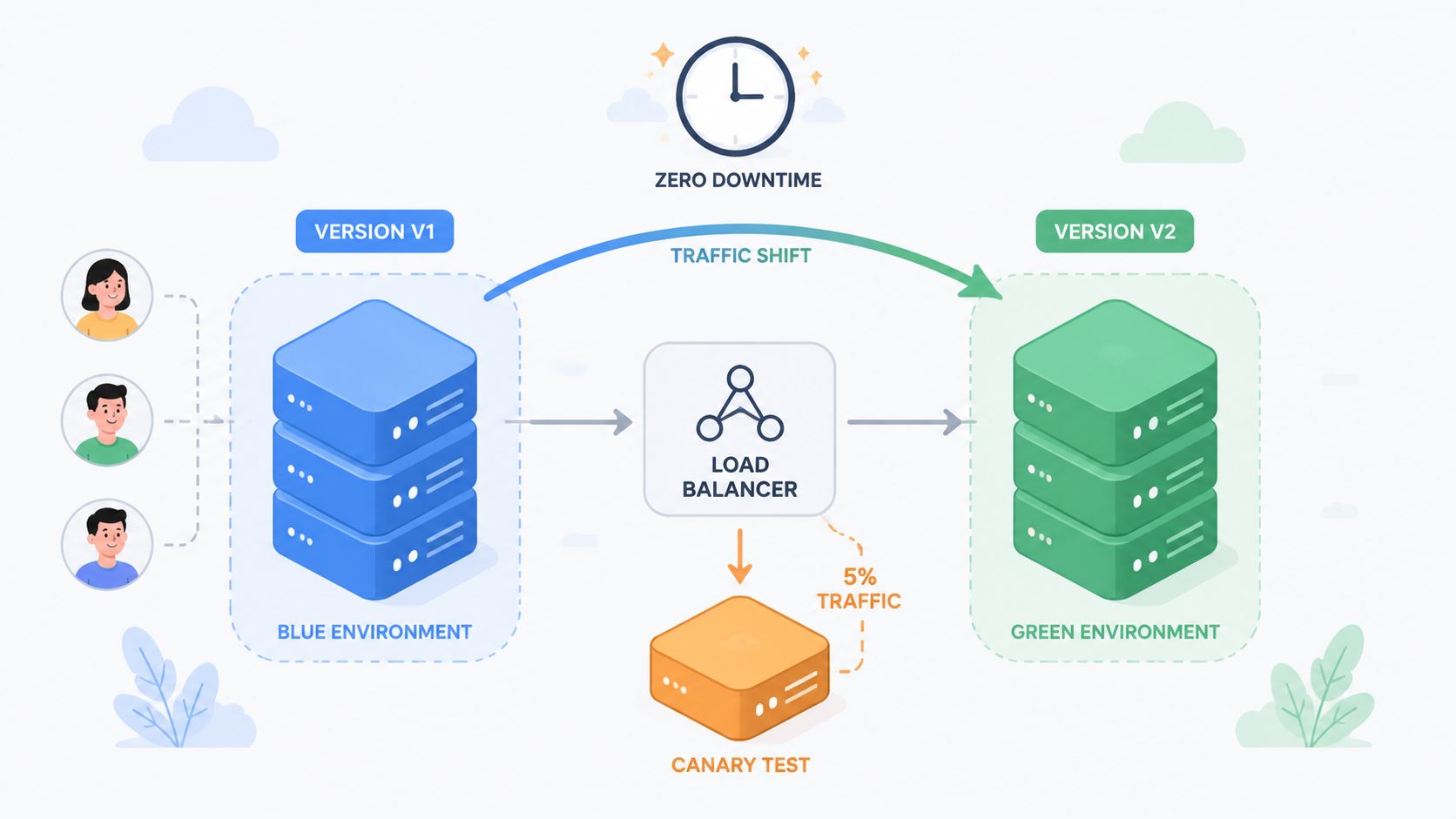
You're staring at the same problem every platform team eventually inherits. A release is due, the product team wants it out, the business wants no drama, and somebody suggests a “quick” cutover in the middle of the night because that's when the risk feels smallest. Then the old version is still serving traffic, a config or schema change doesn't survive the switch, the health check lies, and the executive Slack channel lights up before dawn.
That's not a deployment failure in the narrow sense. It's a sign the team treated release as a single event instead of a release discipline. Zero downtime deployment works when the old version keeps serving users until the new one is healthy, traffic shifts only after verification passes, and rollback is a real option rather than a prayer. In mission-critical systems, the bar has long been set by five nines, which is 99.999% uptime, or about 5 minutes of total downtime per year. That standard is why blue-green, rolling, and canary patterns exist at all, and why they're still the baseline for teams that can't afford visible maintenance windows (performance benchmarks for zero-downtime deployments).
The 2am Release That Should Not Have Happened
The pattern is familiar because it keeps repeating. A team schedules a release after midnight, drains traffic from the old version, flips the switch, and discovers one of three things immediately: the new build isn't ready, the old connections don't drain cleanly, or the database change that looked harmless in staging breaks the live app. The release note said “low risk.” The pager said otherwise.
The real failure was the cutover model
Teams often blame the missing checklist item. The deeper issue is that the release was handled as a single moment, not a controlled transition. A healthy deployment keeps the old version serving traffic while the new version proves itself under live conditions, with traffic moved only after automated checks say the release is stable (zero downtime deployment guide).
Practical rule: if the old version is gone before the new version has earned traffic, you don't have a safe release, you have a scheduled outage with nicer branding.
That distinction matters because even a short interruption becomes obvious at scale. The reason modern teams talk about blue-green, rolling, and canary patterns is not fashion, it's blast-radius control. A bad deploy should affect a slice of users, not everyone.
The other common mistake is assuming the deployment tool is the solution. It isn't. Kubernetes, a load balancer, a CI pipeline, or a feature flag system can all help, but none of them replace the discipline of parallel versioning, traffic shifting, and automated verification. If those pieces aren't in place, the rollout is still just a gamble.
For a useful companion on the relationship between release mechanics and delivery flow, PullNotifier's continuous deployment for developers guide is worth reading. It frames the broader delivery model, which helps teams stop treating deploys as isolated events.
The lesson from the 2am incident is usually blunt. The problem wasn't that the team lacked effort. It's that they tried to compress a live transition into a binary switch.
What Zero Downtime Deployment Means
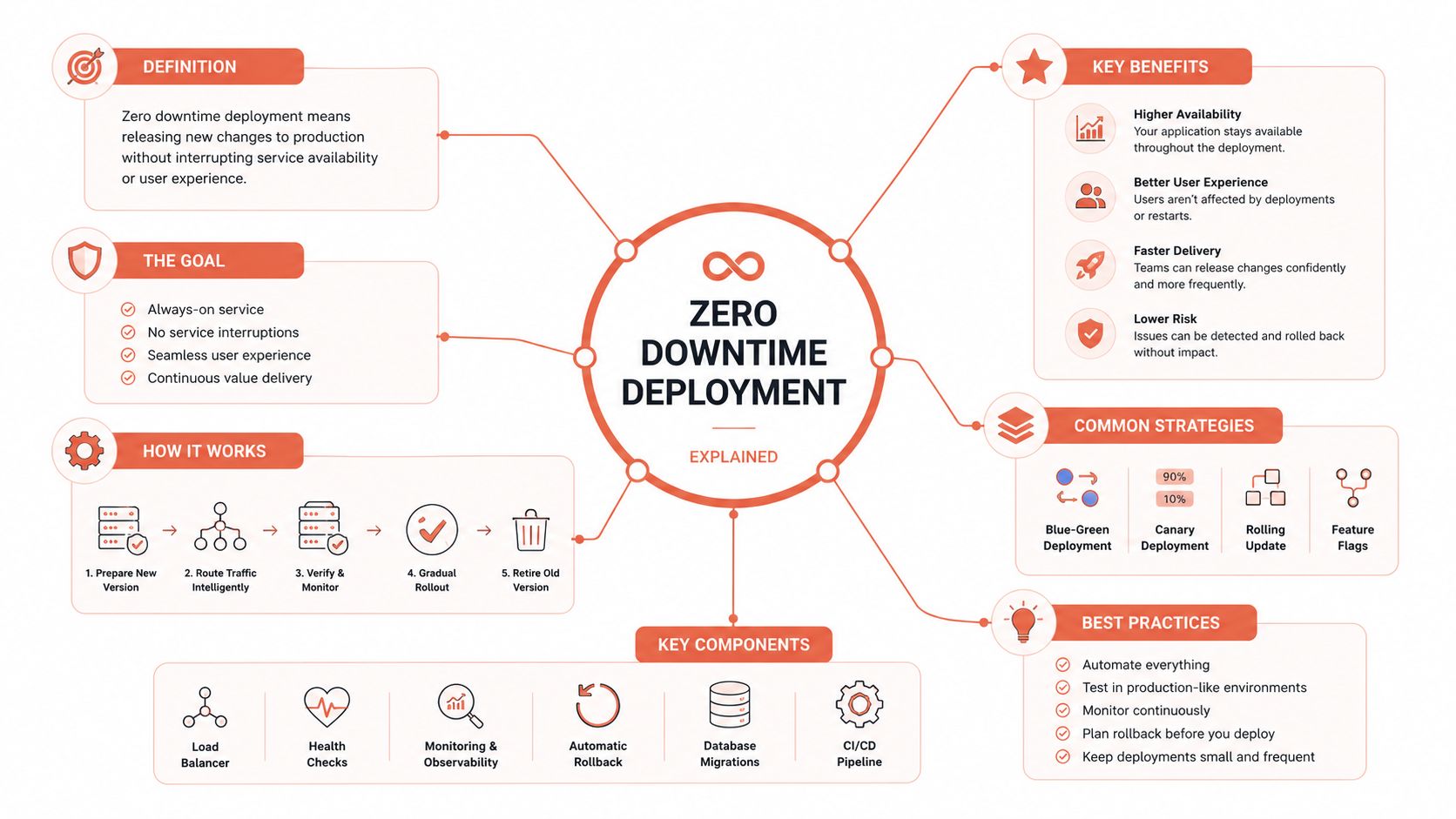
Zero downtime deployment is a release discipline, not a single tool. It combines parallel versioning, traffic shifting, and automated verification so the old and new builds can overlap during the transition. The point is simple, keep production serving while the new version proves it belongs there.
The mechanics behind the phrase
The old version stays in service because it is the fallback. The new version comes up beside it, answers real traffic, and only then gets a larger share. That is the operational difference between a controlled release and a maintenance window with better wording, as described in HashiCorp's zero-downtime deployment guidance.
The Kubernetes-style prerequisites are easy to state and easy to get wrong. Keep at least 2 replicas in production, allow shutdown time for in-flight requests to finish, and make readiness return 200 only when the instance is ready to serve. One implementation guide also recommends setting the shutdown timeout slightly above p99 request latency so SIGTERM does not cut active traffic mid-request (zero-downtime deployment guide).
Backward compatibility is the other hard requirement. The deployment model assumes old and new versions may both be active while traffic is in flight, so schema and application changes have to survive that overlap. If a new pod cannot coexist with the previous one, the pattern fails before traffic reaches the new version.
Operational truth: a healthy rollout is not defined by “the new version is live.” It is defined by “the old version can be retired without exposing users to broken behaviour.”
That is why teams moved away from all-at-once maintenance releases. Modern continuous delivery depends on staged transition, not blind cutover. If you want a simpler mental model, validate while live, then promote. The mechanics are implementation detail, but the release discipline is the part that keeps users out of the blast radius.
Some teams build that discipline into their own platform stack. Others use a managed platform that already handles the traffic shifting, verification, and rollback wiring. The practical trade-off is not just tooling effort, it is the gap between no outage and no disruption. A deploy can keep the site up and still create a bad user experience if requests slow down, sessions reset, or state changes land out of order. That gap is what many guides skip.
Blue-Green, Rolling, and Canary Compared
Teams often discuss these patterns as if one is universally better. That's a bad way to choose. Each one solves a different release risk, and each one asks for a different amount of infrastructure, observability, and schema discipline.
| Pattern | Traffic Shift | Rollback Speed | Infrastructure Cost | Best For |
|---|---|---|---|---|
| Blue-green | Switch all traffic from one identical environment to the other | Very fast, because the old stack stays warm | Higher, because you keep two environments ready | Risky changes, schema-adjacent releases, teams that want the cleanest rollback path |
| Rolling | Replace instances gradually behind the same load balancer | Slower, because rollback happens per instance | Lower, because you reuse the same fleet | Routine stateless updates, Kubernetes fleets, steady production traffic |
| Canary | Route a small slice of traffic to the new build first | Fast once automated promotion or rollback is wired in | Moderate, because traffic splitting and observability add complexity | Error-rate regressions, performance-sensitive services, higher-traffic APIs |
How each one behaves in practice
Blue-green is the closest thing to a clean handoff. One environment serves production, the other is built and tested beside it, then the load balancer flips to the new one. AWS's blue-green deployment guidance for API Gateway follows that same flow, deploy the green environment, test it while blue still serves live traffic, then switch and keep blue ready for immediate rollback (AWS blue-green deployments). That makes it a strong choice when the release touches code and schema together.
Rolling spreads the risk across the fleet. One instance is drained, updated, verified, then the next one follows. It's usually the cheapest path on infrastructure, but it asks for strict backward compatibility because old and new versions coexist during the window (cozcore zero-downtime deployments guide).
Canary is the most honest choice when you don't trust the new release yet. You give it a sliver of live traffic, watch the error rate and latency, then promote or rollback based on what the system tells you. That's also why canary is the best fit when your main worry is regression under actual traffic, not the mechanics of the cutover itself.
If you want a deeper pattern comparison in a more implementation-focused format, this blue-green deployments vs canary deployments explainer is a useful companion.
Prerequisites That Decide Whether the Pattern Actually Works
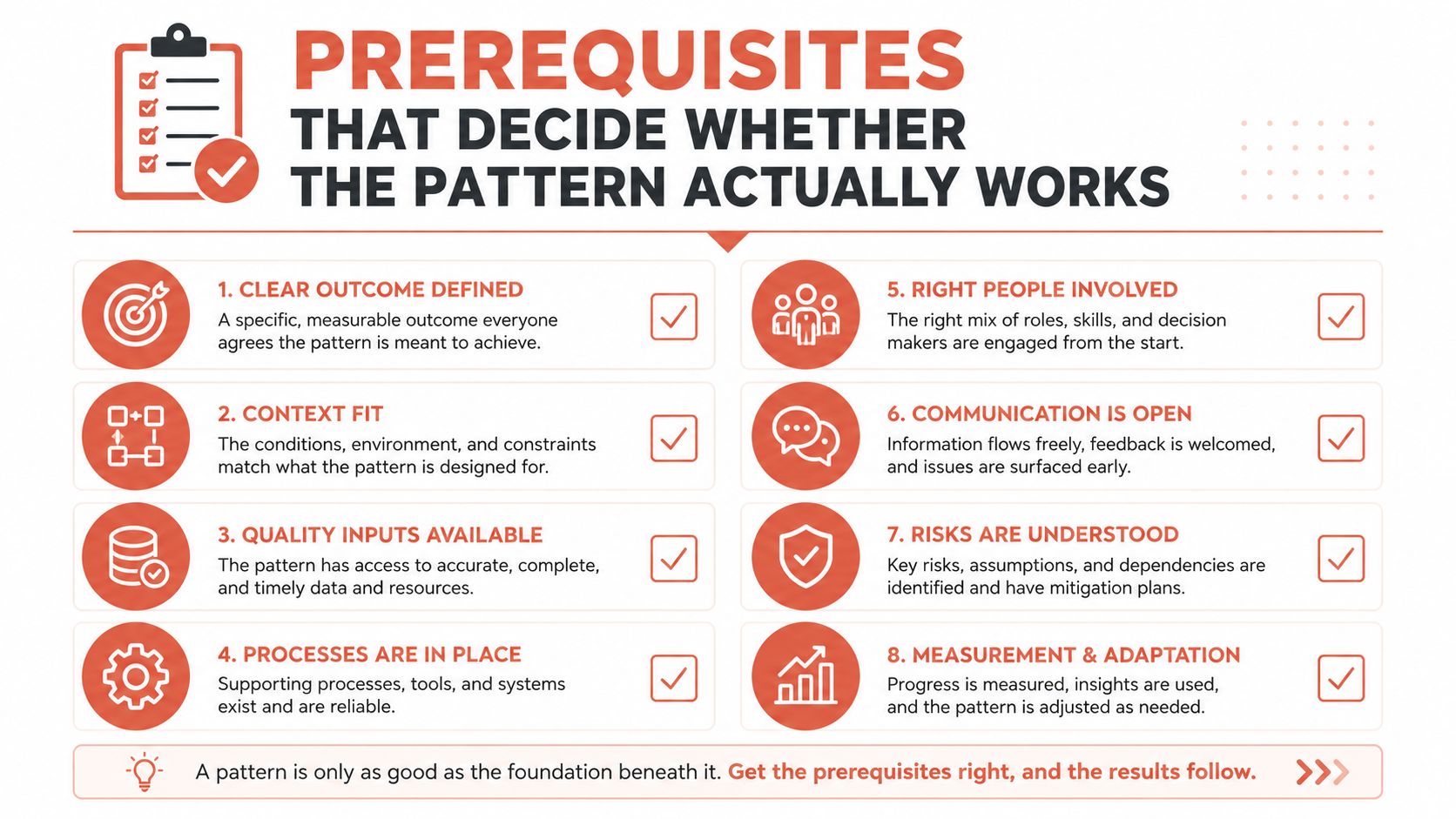
The pattern is never the hard part on its own. The prereqs are. A blue-green rollout or a rolling update can look elegant in diagrams and still fail because readiness checks are sloppy, the load balancer trusts a container too early, or a database migration breaks the version that is still serving real users.
The release only works if the platform is honest
Readiness probes have to mean something. If they return success before the app can serve traffic, the load balancer will route requests into a half-initialised process and the rollout will look “successful” right up until users start seeing errors. Graceful shutdown matters for the same reason. SIGTERM should stop new traffic, not abort requests that were already in flight (zero-downtime deployment guide).
Database migrations are where the hidden risk tends to live. The safe path is expand-contract. Add nullable or additive schema first, backfill later, and remove old structures only after the new version has been stable long enough to stop depending on them (cozcore zero-downtime deployments guide). That sequence matters because the deploy is live across both versions while traffic is still being routed.
Rule of thumb: if a migration requires both versions to be impossible at the same time, it's not a rollout plan, it's a rollback waiting to happen.
The same backward-compatibility rule applies across caches, queues, and background jobs. Old workers can still be processing queued tasks while new workers start consuming updated payloads. If the schema or message format changes in a way the old code can't tolerate, you've created an intermediate state that's much more fragile than the final one.
For teams formalising release readiness, GitDocAI's launch preparation checklist is a practical reference point. It's useful because it forces the conversation away from “did we deploy?” and towards “did we prepare every dependency that has to survive the cutover?”
The best zero-downtime teams don't treat these checks as paperwork. They treat them as the actual release gate. The toolchain can be perfect and the release can still fail if the app, data model, and traffic layer were never made safe to coexist.
The User Impact Gap Most Guides Miss
A rollout that stays “up” can still hurt users. That is the gap most guides skip. They stop at uninterrupted service, then ignore the release that keeps the site reachable while customers hit failed checkouts, broken sessions, rising latency, or pages that feel stuck as traffic shifts (What zero downtime deployment actually means).
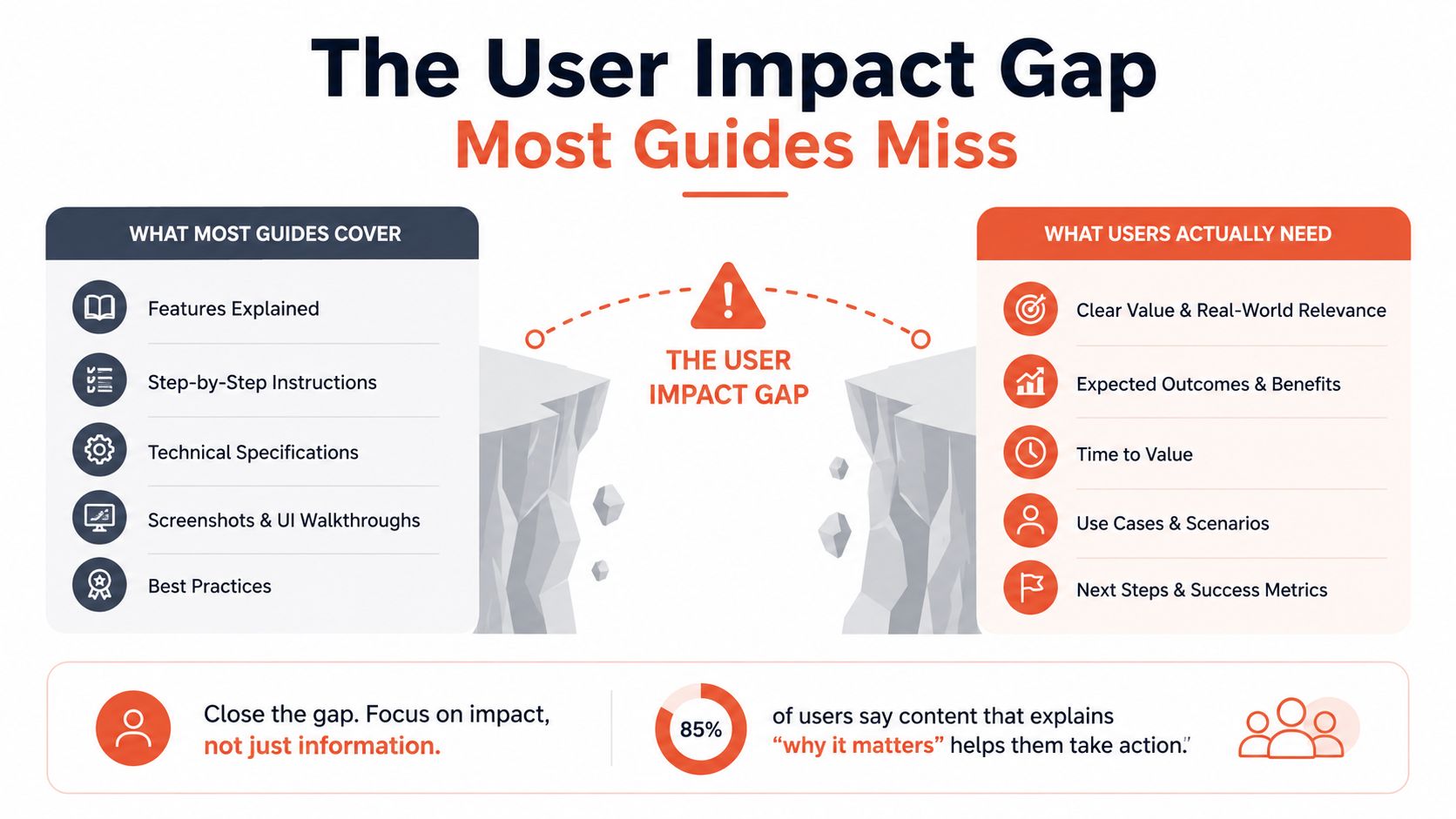
No outage is not the same as no disruption
That distinction matters in real releases. Traffic may already be on the new version, the old stack may be gone, and the pager may stay quiet while users deal with timeouts, stale sessions, or requests that hang just long enough to feel broken. A release is only clean when it stays inside the thresholds you set for live traffic, not when the status page looks calm.
The signals that matter are the ones tied to user pain. HTTP 5xx error rate, p95 and p99 latency, and saturation indicators such as CPU, memory, and connection-pool usage show whether promotion should keep going or stop (zero-downtime deployments guide). If those move the wrong way during the shift, rollback should start before full exposure.
A release discipline treats those checks as part of the rollout itself, not as postmortem material. Zero downtime is the baseline. No visible disruption is the bar that users notice.
For teams that want a broader view of release-side observability, PageSpeed Plus has a guide to user experience metrics that complements deployment monitoring, and the same thinking applies to feature flags and safe releases. The tools are different, but the standard is the same. Users judge the release by what it feels like, not by whether the service stayed reachable.
That is why zero downtime belongs in release discipline, not tool shopping. You can build a system that never goes fully offline and still ship a release that feels risky to every customer who touches it.
The Hidden Cost of Building It Yourself
Most startup and scale-up teams don't fail at zero downtime because they lack talent. They fail because they keep absorbing more platform surface area than they wanted in the first place. Kubernetes, CI/CD, monitoring, security controls, cost allocation, and multi-cloud wiring across AWS, GCP, and Azure turn into a second product that never ships features.
The bill shows up as engineering distraction
The hidden cost isn't just tooling. It's senior engineers pulled into release plumbing, on-call rotations filled with infrastructure incidents, and policy logic scattered across scripts, YAML, and tribal knowledge. That's how teams end up with fragile internal developer platforms that require more care than the software they're supposed to support.
A managed platform changes the equation by absorbing the repetitive work. Provisioning production-ready foundations, release automation, observability, security enforcement, and cost controls become defaults instead of side projects. That matters because the alternative to a managed platform usually isn't “more control.” It's “hire more DevOps people and keep rebuilding the same stack.”
The strongest argument against DIY is not philosophical. It's operational. Every hour spent maintaining rollouts, environments, and guardrails is an hour not spent on product, and every custom integration becomes another thing that can fail during a release. That's especially painful for teams that want the flexibility of multi-cloud without maintaining separate runbooks for each provider.
Simple test: if your release process needs a platform team to stay humane, you've already crossed the line where platform work is eating product velocity.
For microservice-heavy teams, automation has to extend beyond just shipping code. The automated deployments for microservices explainer is a useful reminder that release orchestration, service coordination, and operational safety have to be solved together, not as separate afterthoughts.
A modern multi-cloud DevOps platform earns its keep by reducing tooling and eliminating countless custom decisions. Setup, scaling, monitoring, security, and cloud spend become part of the platform contract instead of the team's permanent homework.
Choosing the Right Path for Your Team
The right answer depends on the failure mode you're trying to avoid. If your releases are mostly routine and stateless, rolling can be enough. If rollback speed matters more than infrastructure cost, blue-green is the cleaner fit. If regressions only show up under live traffic, canary gives you the fastest warning signal.
A practical decision checklist
- Pick the release pattern first. Don't start with the tool. Decide whether the next release needs blue-green, rolling, or canary protection.
- Set deployment-specific SLOs. Wire error rate, latency, and saturation into the release gate so promotion stops when users would feel the impact.
- Validate schema compatibility. Additive migrations, backward-compatible contracts, and careful queue handling aren't optional in live systems.
- Decide who owns the stack. Either your team keeps carrying the platform work, or you move it to something managed and reclaim the time.
For many startups and scale-ups, the threshold is not technical sophistication, it's attention. If the team is spending more time making the platform reliable than building product, it's time to question whether owning the entire stack is still the right trade.
A useful working model is this, zero downtime deployment is a discipline first, a pattern second, and a platform decision third. Get the discipline wrong and no tool will save you. Get the pattern wrong and rollback gets expensive. Get the platform choice wrong and your engineers become the platform.
If your team is tired of debugging pipelines, managing release edge cases, and stitching together Kubernetes, monitoring, security, and cloud cost controls by hand, take a hard look at PushOps. It gives you a production-ready multi-cloud DevOps platform for AWS, GCP, and Azure so you can spend less time maintaining deployment infrastructure and more time shipping the product your customers came for.

