


A familiar pattern plays out in growing software companies. Product teams are under pressure to ship. Sales wants enterprise features. Legal wants cleaner answers on data handling. Security wants evidence, not good intentions. Then someone asks a deceptively simple question: “Is our stored customer data encrypted everywhere?”
The first answer is usually confident. The second answer gets messier. One database is covered. Object storage is covered in one cloud but not another. Backups were inherited from an older setup. A few internal tools still write sensitive values into logs. Someone enabled provider defaults years ago, but nobody is fully sure which keys are in use, who can rotate them, or what the audit trail looks like.
That's where encryption at rest stops being a checkbox and becomes an operating model. The concept is straightforward. The implementation, especially across multiple teams and clouds, is where costs pile up.
Your Data Is a Target Are You Prepared
A CTO at a scale-up usually doesn't wake up thinking about block devices, key hierarchies, or backup archives. They wake up thinking about release timelines, hiring plans, customer churn, and whether the platform will hold up through the next launch. Security enters the room when one of those priorities collides with reality.
That collision often starts with a customer questionnaire, an investor diligence request, or an internal review after an engineer discovers that an old reporting system still stores exported data in a place nobody has touched in months. At that point, the issue isn't only whether data is encrypted. It's whether the team can prove how, where, and under whose control.
Stored data creates risk in unglamorous places:
- Primary systems: production databases, file stores, search indexes
- Operational copies: snapshots, backups, archives, temporary exports
- Forgotten sprawl: old environments, support dumps, analyst downloads
One reason this gets harder than it should is that storage security doesn't end when data leaves production. If hardware is retired, moved, or disposed of carelessly, the risk continues. That's why practical data handling needs to include the end of the lifecycle too, including procedures like secure data destruction for Arizona businesses when physical media or decommissioned equipment are involved.
Stored data is usually most vulnerable in the places teams stop thinking about. Backups, replicas, exports, and retired disks create long tails of risk.
Encryption at rest belongs in the foundation, not in the backlog. But the decision isn't whether to use it. It's whether your team wants to own every policy, key path, exception, and audit detail itself while still trying to ship product at pace.
What Encryption at Rest Means and Why It's Non-Negotiable
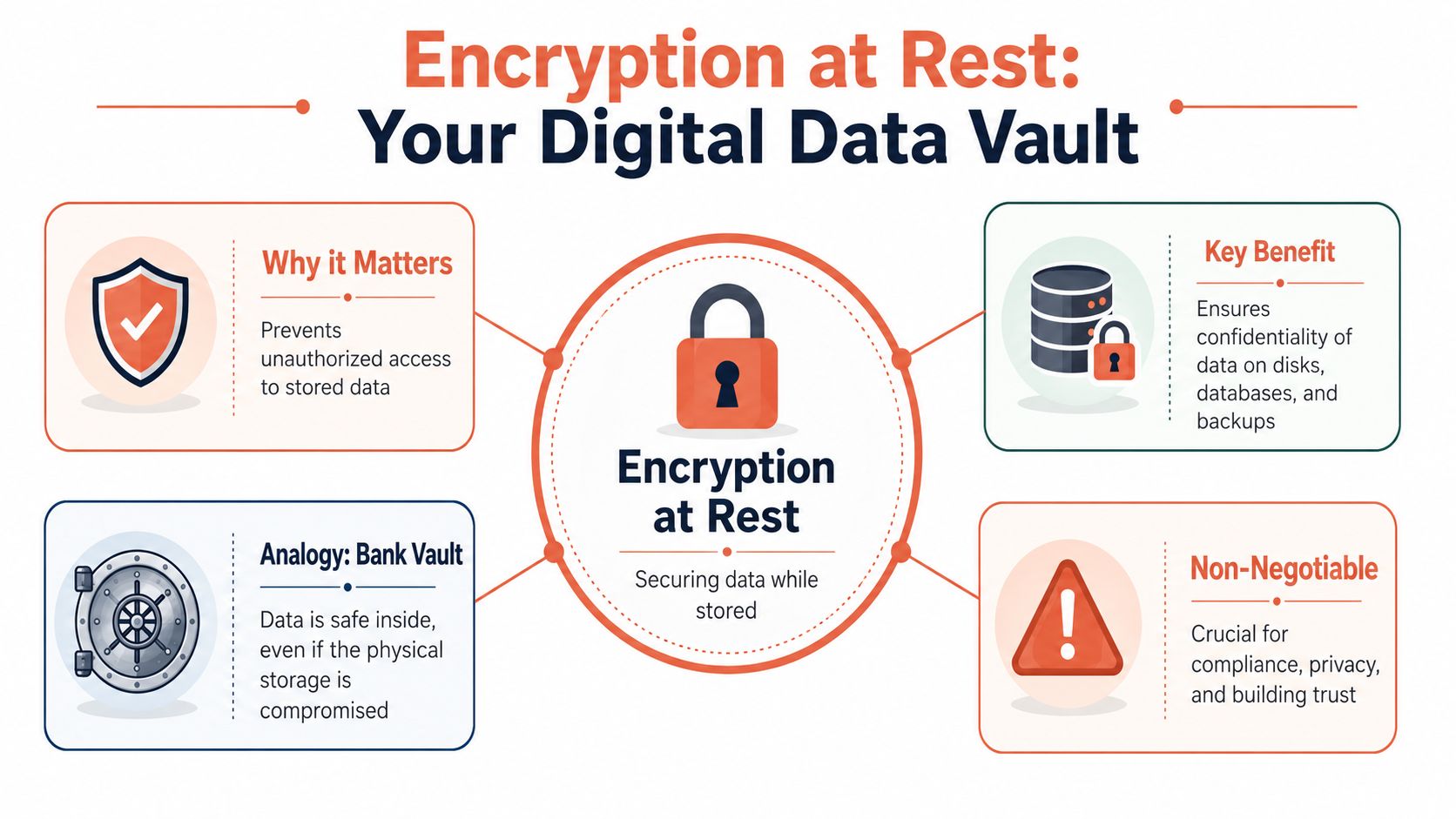
Encryption at rest protects data while it's stored. Think of it as putting data in a vault before it sits on a disk, in a database file, or inside a backup archive. If the storage media is lost, stolen, copied, or accessed without authorisation, the raw contents aren't readable without the right key.
That differs from the other two states of data:
- In transit: data moving between systems, such as between a browser and an API
- In use: data that has already been decrypted so an application, user, or service can process it
The distinction matters because many teams say “our data is encrypted” when they only mean one of those states.
The business case is plain
If you handle customer records, employee data, financial information, or health-related data, encryption at rest isn't an optional hardening task. It supports risk reduction, customer trust, and market access. Enterprise buyers expect it. Security reviewers ask for it. Regulators care whether you applied appropriate safeguards to stored personal data.
For organisations operating in Europe, the compliance angle is explicit. In the EU's GDPR, Article 32 requires controllers and processors to implement “appropriate technical and organisational measures” such as encryption where appropriate, and the law applies across the EEA including Lithuania from 25 May 2018 onward, with local enforcement in Lithuania by the State Data Protection Inspectorate as described here.
Why leaders treat it as non-negotiable
A good rule is simple. If your company stores data that would create legal, commercial, or reputational damage if exposed, encryption at rest belongs in the baseline platform.
That baseline should cover more than the obvious production database. It should also include:
| Storage area | Why it matters |
|---|---|
| Backups and archives | Old data can be as sensitive as live data |
| Snapshots and replicas | Infrastructure copies often outlive the original workload |
| Developer and test environments | Lower scrutiny often creates higher risk |
| Exported files | CSVs and support bundles routinely bypass stricter controls |
Practical rule: If a system stores personal or commercially sensitive data, assume it needs at-rest protection unless you can clearly justify why it doesn't.
The strategic mistake isn't failing to understand the concept. It's underestimating the operational discipline required to make that protection consistent across every place data settles.
The Technical Details Under the Hood
A storage service can report that data is encrypted, and an audit can still get uncomfortable fast. The gap usually sits below the headline feature, in how encryption is applied across disks, databases, snapshots, caches, exports, and the temporary paths engineers forget until an incident review forces the issue.
At a technical level, encryption at rest is usually straightforward. The data itself is encrypted with symmetric encryption, because it is fast enough to handle large volumes without creating avoidable performance drag. Asymmetric encryption is used far less for bulk storage. It usually shows up in supporting roles such as protecting encryption keys or establishing trust between systems.
Why AES keeps showing up
The algorithm name executives see most often is AES-256. That is not because every team made a fresh design choice. It is because cloud providers, storage products, and compliance programs have largely standardized around a small set of well-understood primitives.
That standardization matters. It reduces the risk of teams inventing their own crypto patterns, and it shifts the engineering question from "which cipher should we pick?" to "where is encryption enforced, and is coverage consistent?"
The strongest implementations apply encryption in the storage path itself, before data is written to disk. That is very different from bolting crypto onto one application while leaving adjacent systems, file exports, worker volumes, or backups on a different control path.
The algorithm is rarely where teams fail
In practice, the risky part is not picking AES over something else. The risky part is everything wrapped around it. I have seen teams spend weeks debating crypto libraries, then discover months later that debug logs, support bundles, and snapshot copies were stored under weaker controls than the primary database.
The operational questions are harder, and they are the ones that matter:
- Where encryption is enforced across each storage layer
- Which identities can trigger decryption
- How temporary files, logs, and exports are handled
- Whether snapshots, replicas, and backups inherit the same controls
- How policy changes are rolled out and verified
- What evidence the team can produce during an audit
A system can be technically encrypted and still be hard to defend in front of customers, auditors, or your own security team.
What good implementation looks like
Good implementation usually has a few common traits:
- Provider-native encryption for broad default coverage
- Infrastructure-as-code for repeatable policy assignment
- Clear separation between workload access and security administration
- Consistent treatment of primary storage, replicas, and recovery artifacts
- Logging that shows who changed encryption settings and when
What fails more often is familiar to any CTO who has inherited a fast-growing platform:
- One-off console changes that never made it back into code
- Custom application-level crypto added without a clear requirement
- Manual exceptions for test environments, support workflows, or data exports
- Service-by-service policy drift across AWS, Azure, and GCP
- Encryption settings that exist on paper but are difficult to prove at audit time
The hidden cost becomes apparent. The cryptography is mature. The hard part is keeping implementation consistent across a multi-cloud stack, proving that consistency, and doing it without turning every key policy change into a platform project.
Strong encryption with weak operations still produces weak outcomes. That is why mature teams standardize the control plane, reduce exceptions, and avoid DIY patterns that add audit scope and operational drag.
The Real Challenge Managing Your Encryption Keys
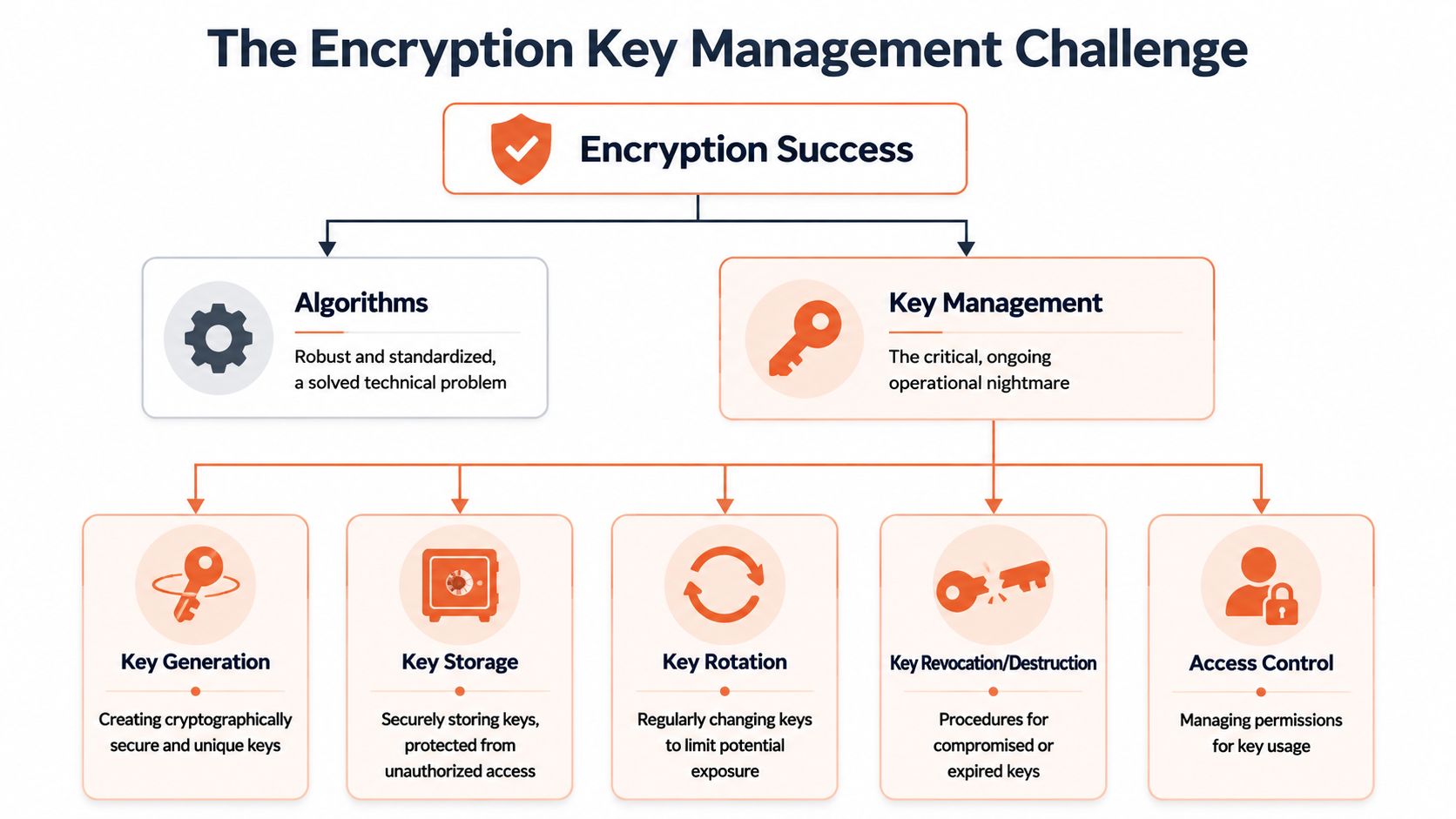
If encryption algorithms are the lock, keys are the thing that decides whether the lock means anything. Consequently, many teams discover that they didn't really buy security. They bought another class of operational burden.
A cloud console can make encryption look effortless. Tick a box. Pick a managed service. Move on. But the minute your customers ask who controls the keys, who can use them, how they're rotated, and how revocation works during an incident, the easy story disappears.
Platform-managed versus customer-managed
The broad trade-off is straightforward.
Platform-managed keys are easier to adopt. The provider handles most of the lifecycle. Coverage is usually broad, fast to enable, and well integrated with storage services.
Customer-managed keys give you more control. They also give you more responsibility. Now your team owns policy design, access boundaries, operational recovery, and governance detail that can't be hand-waved away during an audit.
Microsoft documents that Azure data is encrypted at rest by default using platform-managed keys, and that all Managed Disks, Snapshots, and Images are encrypted by default with Storage Service Encryption. Microsoft also states that organisations can choose customer-managed keys when they need more control in its Azure encryption guidance.
The hidden workload nobody budgets for
Key management creates work in places executives don't always see at first:
- Access design: deciding which identities may encrypt, decrypt, rotate, or administer
- Lifecycle control: rotating keys without breaking production dependencies
- Incident handling: revoking or replacing keys under pressure
- Audit readiness: proving who changed what, when, and why
- Cross-environment consistency: keeping dev, staging, and production policies aligned without making them identical in unsafe ways
Each one sounds manageable in isolation. Together they become a standing operational programme.
Here's the blunt version. If your team loses a key, protects it poorly, grants access too broadly, or rotates it carelessly, the rest of the encryption story can collapse. It doesn't matter that disks were encrypted if too many people can reach the material that decrypts them.
What secure key operations actually require
A competent setup usually involves some mix of a Key Management Service (KMS), controlled use of Hardware Security Modules (HSMs) for stricter assurance requirements, and policy around rotation, separation of duties, and emergency access. None of that is conceptually exotic. All of it requires careful implementation.
A few practical tests separate strong environments from fragile ones:
| Question | Weak answer | Strong answer |
|---|---|---|
| Who can use production keys? | “A few senior engineers” | Clearly scoped service identities and limited admin roles |
| How are rotations handled? | “Manually, when needed” | Defined process, tested before incidents |
| Can you audit key usage? | “We think so” | Access and changes are visible and attributable |
| What happens if a key is compromised? | “We'd work it out” | Revocation and replacement path is already designed |
The hardest part of encryption at rest isn't turning it on. It's living with it safely every day after that.
DIY platform work carries significant costs. Teams don't just need cryptographic correctness. They need repeatability, documentation, permission boundaries, change control, and operational resilience. That's a lot to own internally if your actual business advantage comes from product, not infrastructure.
Encryption Across Your Multi-Cloud Stack
A common multi-cloud failure starts with a simple request. A customer asks for one workload in Azure, an acquired team still runs core services in AWS, and analytics lands in Google Cloud because that is where the data team built first. Encryption at rest is enabled in all three places. Six months later, nobody can answer the same audit question consistently across the estate.
Provider defaults reduce setup work, not operating burden
The major cloud providers now encrypt stored data by default across many core services, as noted earlier. That is useful, but it does not give a security team one way to manage exceptions, one approval model for key usage, or one audit trail that spans every account and region.
Significant work shows up after the checkbox is on. Teams still have to decide which services use provider-managed keys, where customer-managed keys are required, who can create or rotate them, how deletion protection is handled, and how evidence gets collected when an auditor asks for proof.
Those decisions get expensive fast in a mixed estate.
Where multi-cloud encryption gets expensive
AWS, Azure, and Google Cloud all support strong encryption controls. Each one also brings its own IAM model, KMS behavior, policy syntax, logging format, and service-specific caveats. The problem is not lack of capability. The problem is the operating model around it.
In practice, the hidden costs usually land in four places:
- Staff specialization: platform teams need people who understand each provider well enough to avoid risky shortcuts
- Policy inconsistency: the same intent, such as restricting key use to a narrow production service identity, gets implemented differently in each cloud
- Audit assembly: evidence lives in different consoles, log systems, and account structures, so reviews become manual work
- Change latency: routine requests stall because only a small group can safely modify encryption settings without breaking workloads
I have seen teams spend more time reconciling naming, permissions, and approval paths than configuring encryption itself. That is the part many architecture diagrams leave out.
Consistency matters more than another script
Multi-cloud security breaks down at the edges. Backup copies land in a different account. A replica database uses a different key policy than production. One team rotates on schedule, another postpones because the application owner is worried about downtime. All of those decisions are survivable in isolation. Together, they create an estate that is encrypted, but hard to govern.
That is why a shared control plane matters. A platform built for multi-cloud management approaches that reduce operational fragmentation gives leadership something DIY setups rarely sustain for long. Consistent policy handling, repeatable provisioning, and audit evidence that does not depend on tribal knowledge.
Private key hygiene still matters upstream
Cloud-native encryption does not remove the need for disciplined credential handling. Teams still need to protect administrative credentials, service identities, and any key material they manage outside the provider boundary. For a concise reference on that part of the problem, this guide on how to secure your private keys is worth reviewing.
Multi-cloud encryption usually fails at the policy and operations layer, not at the algorithm layer.
For a CTO, that trade-off is the core decision. Building everything in-house can work, but it means carrying the ongoing cost of provider-specific expertise, control drift, and audit overhead. A managed platform earns its keep when it reduces that burden without weakening the controls.
Choosing the Right Implementation Pattern
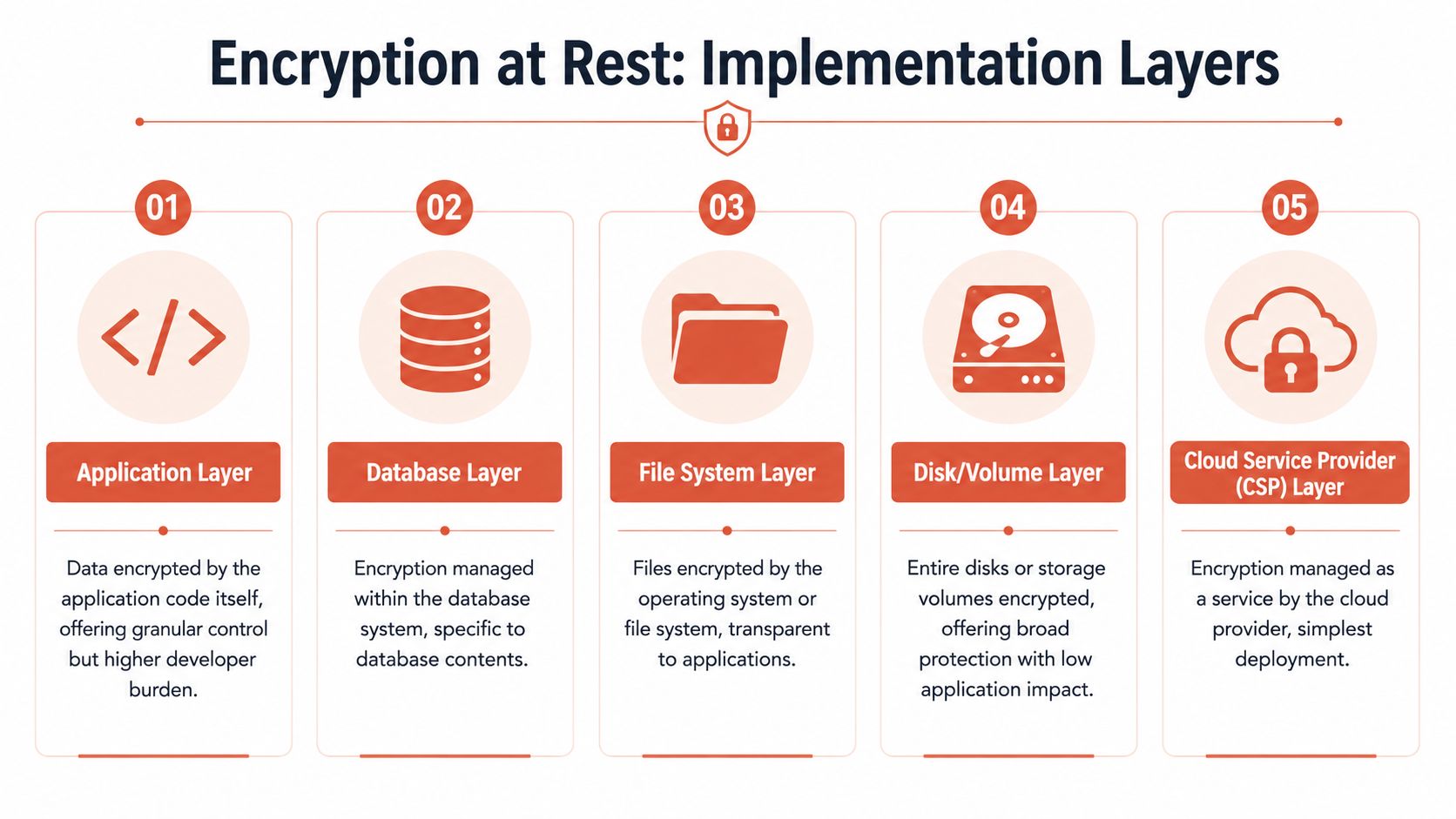
“Encrypted at rest” can mean several different implementation patterns. They don't solve the same problem, and they don't fail in the same way. Choosing the wrong layer creates either a false sense of security or a lot of avoidable engineering work.
The main layers and their trade-offs
Here's the practical view:
| Layer | Good for | Limitation |
|---|---|---|
| Disk or volume encryption | Broad coverage with low application impact | Doesn't help much if the running host is already compromised |
| File system encryption | Protecting stored files transparently | Application and admin access paths still matter |
| Database encryption | Structured data inside database systems | May not cover exports, logs, or downstream copies |
| Object storage encryption | Buckets, archives, backups, media assets | Access policies still determine real exposure |
| Application-level encryption | Fine-grained control over especially sensitive fields | Highest developer burden and most operational complexity |
None of these is universally “best”. They solve different parts of the problem.
Where teams overestimate coverage
A common mistake is treating encryption at rest as a complete solution. It does not protect data once it's decrypted for processing, searching, or API responses. A system can be fully encrypted on disk and still leak plaintext through application logs, analytics pipelines, or privileged database access as explained in this discussion of common mistakes.
That's why architecture decisions matter more than storage settings alone.
- Disk encryption is excellent for broad baseline protection.
- Database-native encryption works well when you want strong coverage without changing application code.
- Application-level encryption is often reserved for the most sensitive fields because it pushes complexity directly onto engineers and support workflows.
A good pattern for most teams
For most startups and scale-ups, the sensible path is layered rather than pure:
- Use provider or platform defaults to cover storage broadly.
- Add database or service-level controls where the data model requires it.
- Reserve application-level encryption for specific high-sensitivity fields and narrow use cases.
- Manage the whole setup through repeatable infrastructure definitions, not manual settings. Teams standardising this work often benefit from an infrastructure as code approach because it makes reviews, drift detection, and policy reuse far easier.
The right question isn't “Do we have encryption at rest?” It's “At which layer are we protecting which data, and what remains exposed after decryption?”
That question changes the conversation from compliance theatre to actual system design. It also keeps leadership from overspending on custom controls where simpler managed defaults would have done the job.
From Theory to Practice Adopting Encryption Securely
The teams that handle encryption at rest well don't treat it as a one-off project. They treat it as part of platform discipline.
Start with an inventory. You need a current map of where sensitive data is stored, copied, backed up, cached, exported, and logged. Most organisations discover gaps in secondary systems first, not primary ones.
Then review control ownership. Somebody should be able to answer, without guesswork, which services rely on provider-managed defaults, where customer-managed keys exist, who can administer them, and how changes are audited. If those answers are spread across people rather than systems, the process is too fragile.
A practical adoption sequence looks like this:
- Audit your current estate: identify databases, disks, object stores, backups, archives, and forgotten environments
- Classify the data: decide where baseline controls are enough and where granular protection is justified
- Standardise key operations: rotation, access approval, break-glass procedures, and revocation need to be documented and tested
- Migrate carefully: moving existing unencrypted data requires planning around downtime, re-indexing, compatibility, and rollback
- Monitor continuously: encryption settings, IAM drift, and logging behaviour need ongoing review
The sharpest trade-off is still organisational. Your best engineers can spend their time building customer value, or they can spend it stitching together security controls across clouds, environments, and audit requirements. Sometimes that's justified. Often it isn't.
For teams that want a cleaner path to secure foundations, consistent delivery workflows, and less platform overhead, it's worth looking at a DevOps cloud infrastructure platform that bakes in secure defaults instead of asking every engineering squad to become its own infrastructure department.
PushOps helps software teams run secure, production-ready infrastructure across AWS, GCP, and Azure without building the whole platform layer themselves. If your team is spending too much time on cloud setup, deployment pipelines, environment management, observability, and policy enforcement, PushOps is worth a closer look.

