

The AWS bill usually arrives the same way. A product team ships, traffic looks healthy, and then finance forwards a number that feels too high for what the platform delivered. The instinct is to hunt for a bigger discount or a cleverer dashboard, but the underlying problem is usually deeper. Cost control has been treated like a monthly bookkeeping exercise instead of an operating discipline.
That's why the teams that stay calm on AWS don't just “watch spend”. They build a system around measurement, ownership, and guardrails, then keep it running every week. AWS itself frames cost management that way, through Cost Explorer, Budgets, Cost and Usage Reports, Savings Plans, and Reserved Instances inside its broader Cloud Financial Management suite (AWS billing and cost management overview). If you want a practical primer before going deeper, CloudOrbis has a useful piece on optimizing cloud costs for SMBs that's worth a read.
For CTOs, the hidden bill isn't only the invoice. It's the engineering time spent stitching together tags, exports, alerts, and reports, then maintaining those pieces as environments change. That's why many teams end up paying twice, once to AWS and once to the internal platform they had to build to understand AWS. A managed DevOps platform changes that equation by handling the repeatable operational work so the team can focus on shipping features instead of running a permanent cost-ops side project.
Beyond the Bill Shock An Introduction
A surprise AWS bill rarely means one thing went wrong. It usually means no one had a clean enough view of how spend maps to products, environments, or owners. Finance sees the total, engineering sees the cluster, and leadership sees friction between both. Ultimately, cost management was never embedded into the delivery flow.
AWS already treats this as an engineering problem, not a spreadsheet problem. Its guidance starts with measurement, allocation, and governance, then builds from there with tags, categories, Cost Explorer, the Cost and Usage Report, and Budgets (AWS cost management guidance). That's the right model, because cloud costs move with workload shape, pricing model, and architecture choices. If you only inspect the invoice after the month closes, you're always late.
Practical rule: if a cost cannot be tied to a workload owner, it's already too expensive to manage well.
That's where DIY DevOps becomes a tax. Teams often build their own tagging rules, reporting jobs, alerting scripts, and spreadsheet rituals, then spend months keeping those artefacts alive. A platform approach removes a lot of that maintenance work by standardising delivery, observability, and cost controls in one system instead of scattering them across hand-built glue.
The question isn't whether AWS spend should be controlled. It's whether your engineers should be the ones rebuilding the control plane around it. For many startups and scale-ups, especially across Europe, Singapore, the UK, and the US, that's the wrong use of talent.
The Three Pillars of Effective Cost Management
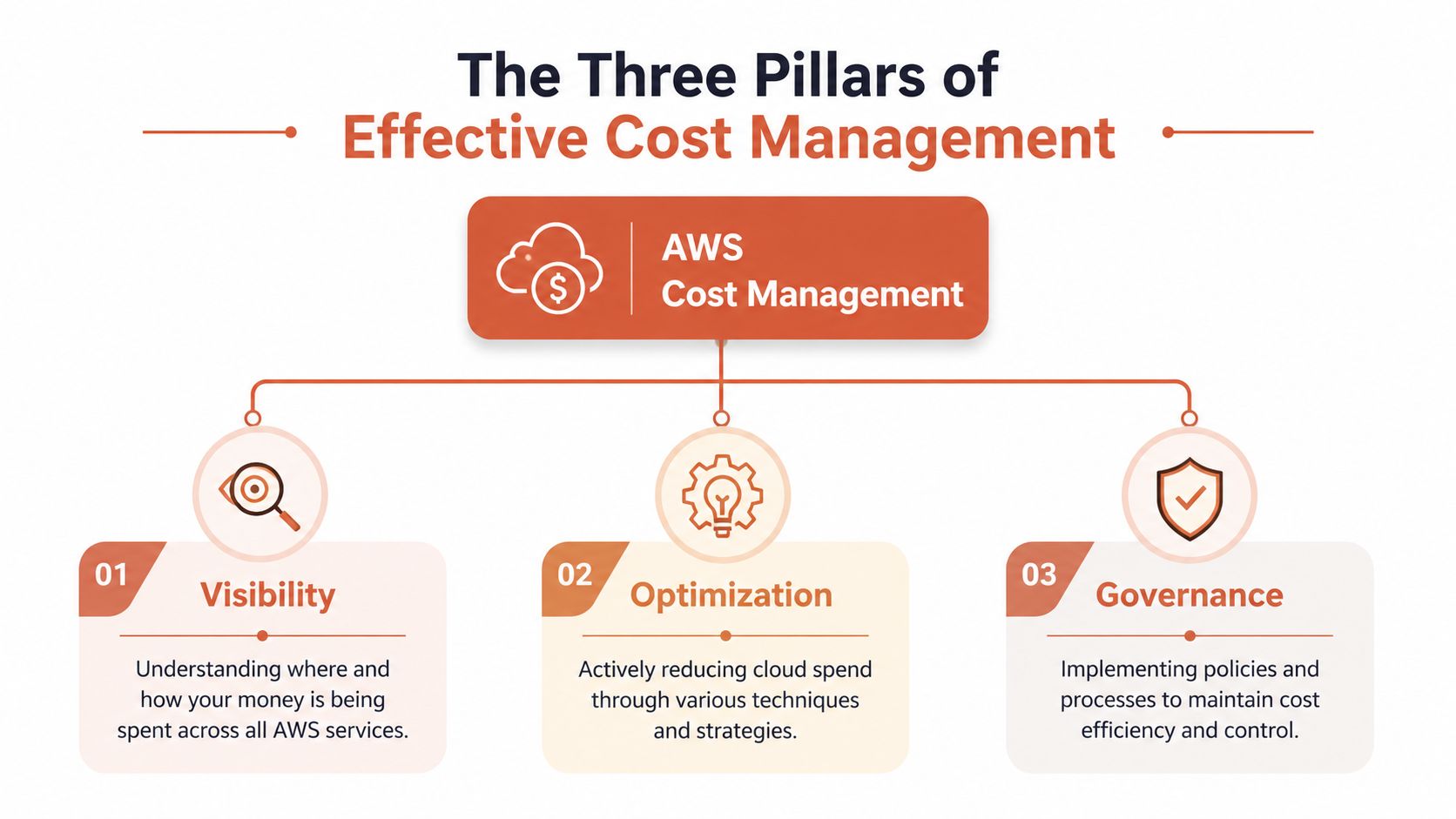
AWS cost management becomes much easier once you stop treating it as a single task. There are really three jobs here, Visibility, Optimisation, and Governance. If one of those is weak, the whole model gets noisy and the team ends up arguing about symptoms instead of fixing causes.
Visibility
Visibility means knowing where spend lands, by account, service, region, and owner. AWS's own billing and cost tools are built for exactly that kind of breakdown, and Cost Explorer is the main place to analyse usage over time (AWS cost management guidance). Without visibility, every later decision is guesswork.
Optimisation
Optimisation is where you remove waste. That includes idle resources, over-provisioned instances, and poor pricing choices. AWS explicitly groups those levers with rightsizing, Savings Plans, and Reserved Instances, which is a strong signal that optimisation isn't a one-off cleanup, it's a repeated engineering task (AWS decision guide).
Governance
Governance is how you keep the bill from drifting back up. AWS Budgets can track spend and usage, and it can also monitor reservation coverage and utilisation, which matters when teams are trying to prove that discount programmes are working (AWS Budgets guide). Good governance turns thresholds into action instead of after-the-fact discomfort.
A lot of internal platform work starts here and then balloons. The tags need rules, the budgets need owners, the alerts need routing, and every new service needs another exception. That's why a managed platform such as PushOps' explainer on DevOps cloud infrastructure platforms can be useful as an operating model reference, even if you're only comparing architecture choices right now. The cost question and the platform question are really the same question, who owns the operational overhead?
Gaining True Visibility into Your AWS Spend
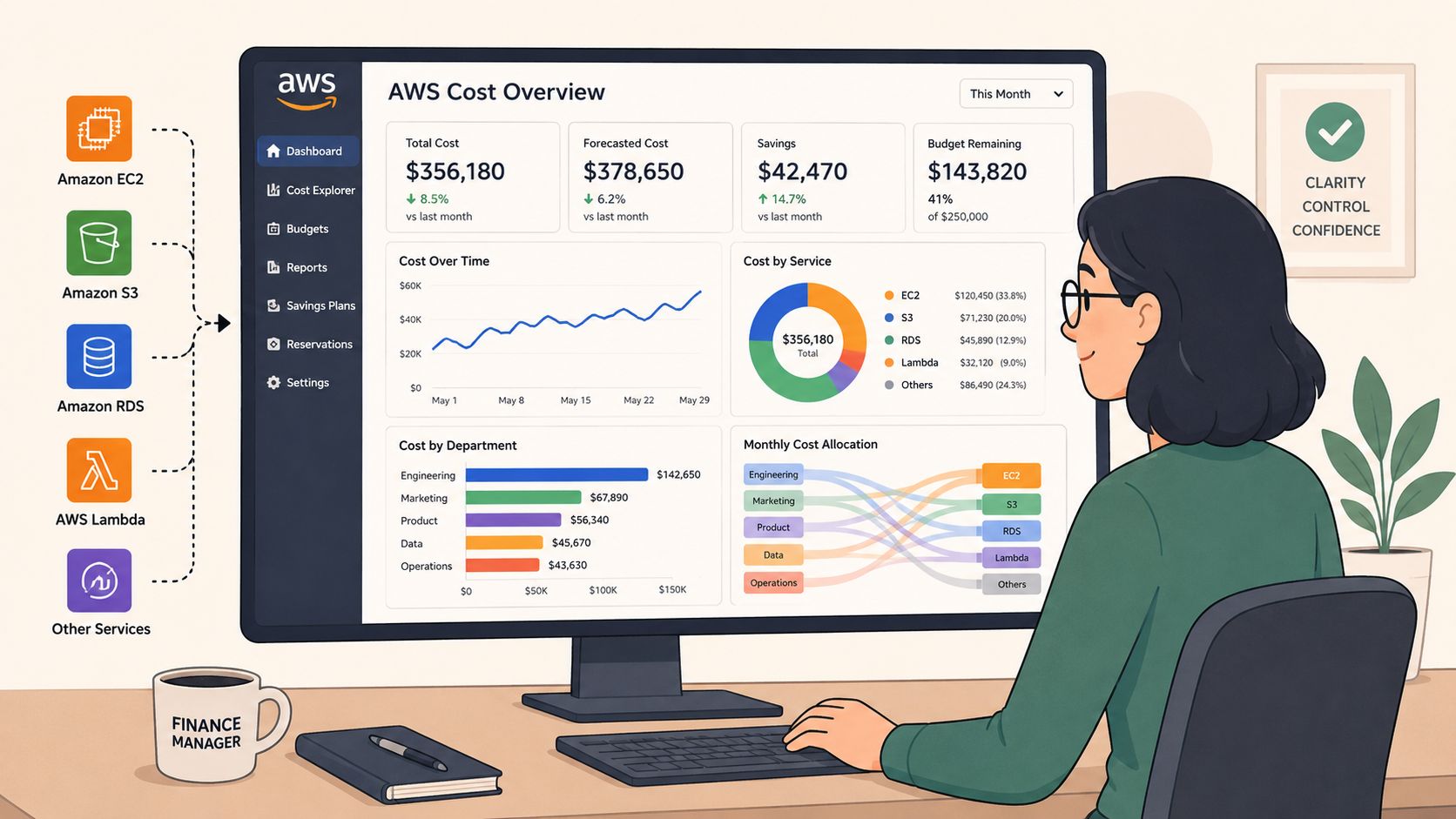
The first step is brutally simple. You need to know which account, service, and tag is driving the bill, and you need that answer without digging through exports by hand. AWS says the highest-value control is grouping spend by linked account, service, and cost allocation tags in Cost Explorer. It also recommends defining KPIs, tagging consistently, and tracking monthly project cost with Cost Explorer and the Cost and Usage Report (AWS whitepaper on cost management).
Tags are the backbone, not decoration
Teams often treat tags like documentation. That's a mistake. Tags are how you decide whether an EC2 instance belongs to a product, an experiment, a shared platform, or a forgotten sandbox. Without them, your regional spend becomes one blended number that hides the operational truth.
The hard part is that tagging only works when people apply it consistently. In a DIY environment, someone has to define the schema, enforce it at creation time, audit drift, and keep up with new services and teams. That's exactly the kind of operational overhead a platform should absorb.
Cost Explorer only helps if the data is clean
Cost Explorer is useful because it filters and groups by the dimensions operators need. But its output is only as good as the allocation rules behind it. That's why local finance teams and engineering leads in the LT region benefit when they can see cost by account and region instead of relying on a single regional summary.
When the same workload shows up under several names, nobody owns the fix.
If you already use budget-vs-actual reviews, a finance-oriented walkthrough like improving profitability with variance analysis can help align cloud spend conversations with the way leadership reads performance. The useful mindset shift is to treat cloud spend like any other operating variance, not a special category that gets reviewed only when the invoice hurts.
A strong visibility layer takes engineering effort to build and more effort to keep honest. That's why many teams move toward a managed platform that creates the reporting structure for them, instead of asking developers to preserve a separate analytics stack just to answer basic ownership questions.
Practical Plays for Active Cost Optimisation
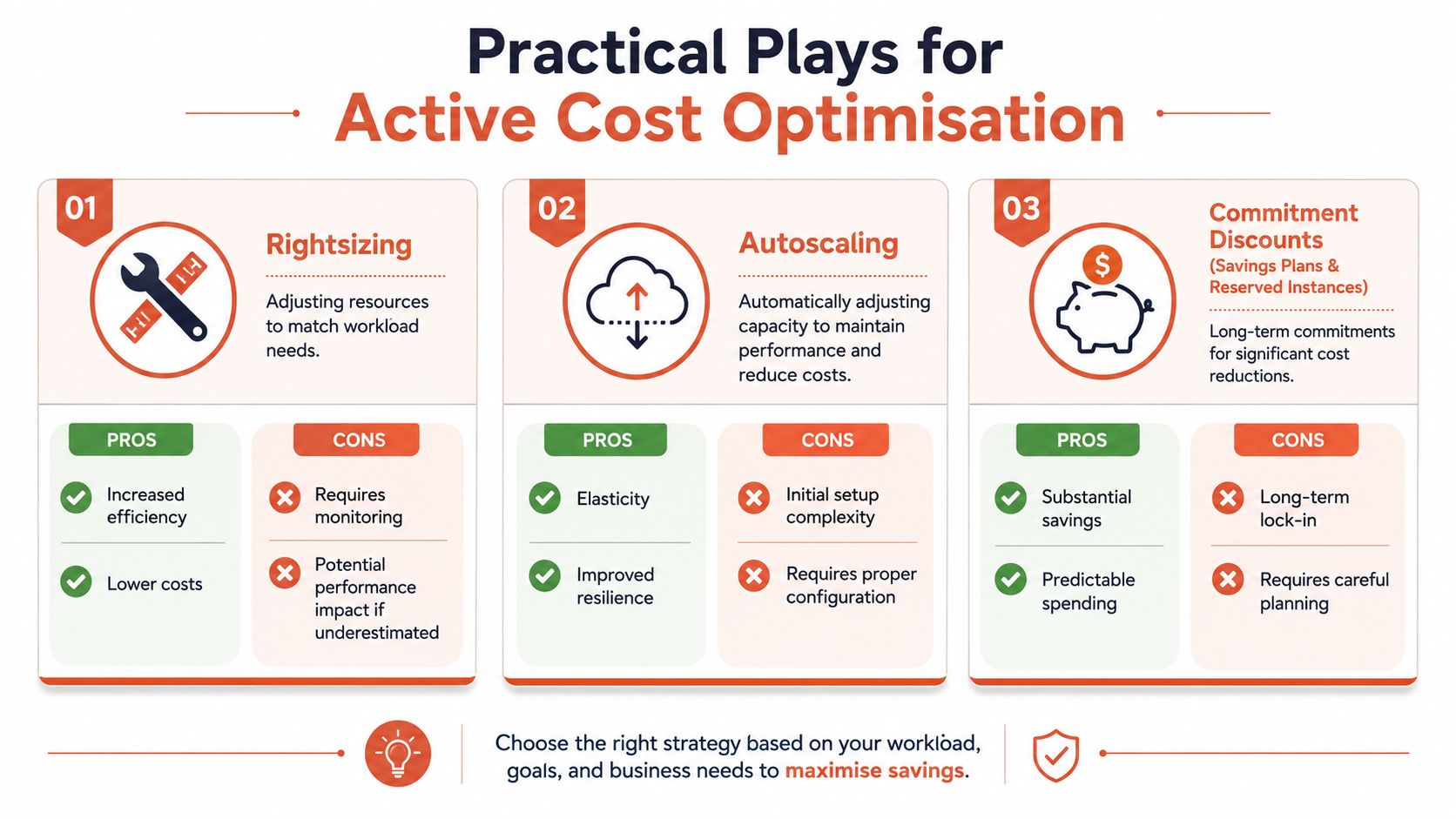
Optimisation works best when you treat it as a series of deliberate plays, not a vague ambition. AWS recommends reducing idle or over-provisioned resources, pairing rightsizing with Auto Scaling and Elastic Load Balancing, and using the right pricing model for the workload shape (AWS decision guide). That's the right starting point, but each move creates its own operational burden.
Rightsizing is a measurement problem first
Rightsizing sounds simple, shrink what's too large. In practice, it needs performance baselines, rollout discipline, and a way to detect regressions if the new size can't absorb peak load. AWS positions Cost Explorer as the place to surface resource recommendations and to understand historical spend before changing course (AWS cost management guidance).
The hidden cost is the review cycle. Someone has to validate the workload, test the change, and monitor the result after deployment. That is why rightsizing often stalls in busy teams. The savings are real, but so is the change-management load.
Autoscaling lowers waste, but it needs constant tuning
Autoscaling is the cleaner answer for variable demand because it lets capacity rise and fall with traffic. AWS explicitly calls out Auto Scaling and Elastic Load Balancing as ways to reduce idle capacity during off-peak hours (AWS decision guide). That lowers the fixed baseline, which is exactly where a lot of waste hides.
The catch is configuration. Scaling policies need enough headroom to protect availability, but not so much slack that the environment sits under-used all day. Most internal platform teams end up tweaking these thresholds again and again because the workload changes faster than the docs.
Commitment discounts are powerful, but they're commitment management
Savings Plans and Reserved Instances can materially improve unit cost, but they also create a forecasting problem. AWS treats them as part of the core optimisation model, not an afterthought (AWS cost management guidance). That's useful, yet it also means the team has to predict usage well enough to avoid paying for capacity it won't use.
For teams that want more automation around recurring optimisation decisions, a platform like Discover Server Scheduler for AWS optimisation is worth comparing because it focuses on recurring resource scheduling and right-sizing workflows rather than one-time cleanup. That kind of automation is where in-house cost tooling often becomes expensive to maintain.
If you already have an internal platform, the economics of DIY optimisation can be sobering. Every recommendation has to be reviewed, every threshold tuned, and every schedule maintained. A managed platform compresses that work into a repeatable workflow instead of asking your engineers to keep inventing it.
From Reactive Alerts to Proactive Governance
AWS Budgets is more useful than many teams realise. It can track and take action on costs and usage, not just display them, and it can also monitor utilisation and coverage for Reserved Instances and Savings Plans (AWS Budgets guide). That matters because raw spend alone doesn't tell you whether your commitments are effective.
Governance is where mature teams stop waiting for bad news. They set thresholds early, route alerts to the right owners, and decide in advance what happens when a budget slips. They also enforce tagging and environment boundaries at creation time so that non-production resources don't unintentionally persist for weeks.
A budget alert after overspend is a report. A budget action before overspend is control.
The practical gap is automation. AWS gives you the primitives, but a modern engineering organisation usually needs more than notifications. It needs scheduled shutdowns for non-production, role-aware spending limits, and policy enforcement that happens when resources are created, not after the monthly review.
That's where native tools often stop short. They can flag the issue, but they don't fully sit inside the development workflow. Teams then bolt on scripts, ticketing rules, and manual reviews, which works until the platform grows and the exceptions multiply.
The decision is architectural as much as financial. If your governance model requires a small internal team to babysit it, the overhead becomes part of your cloud bill in a different form. A managed platform can reduce that drag by embedding cost controls into the deployment path itself.
The Hidden Costs Most AWS Guides Ignore
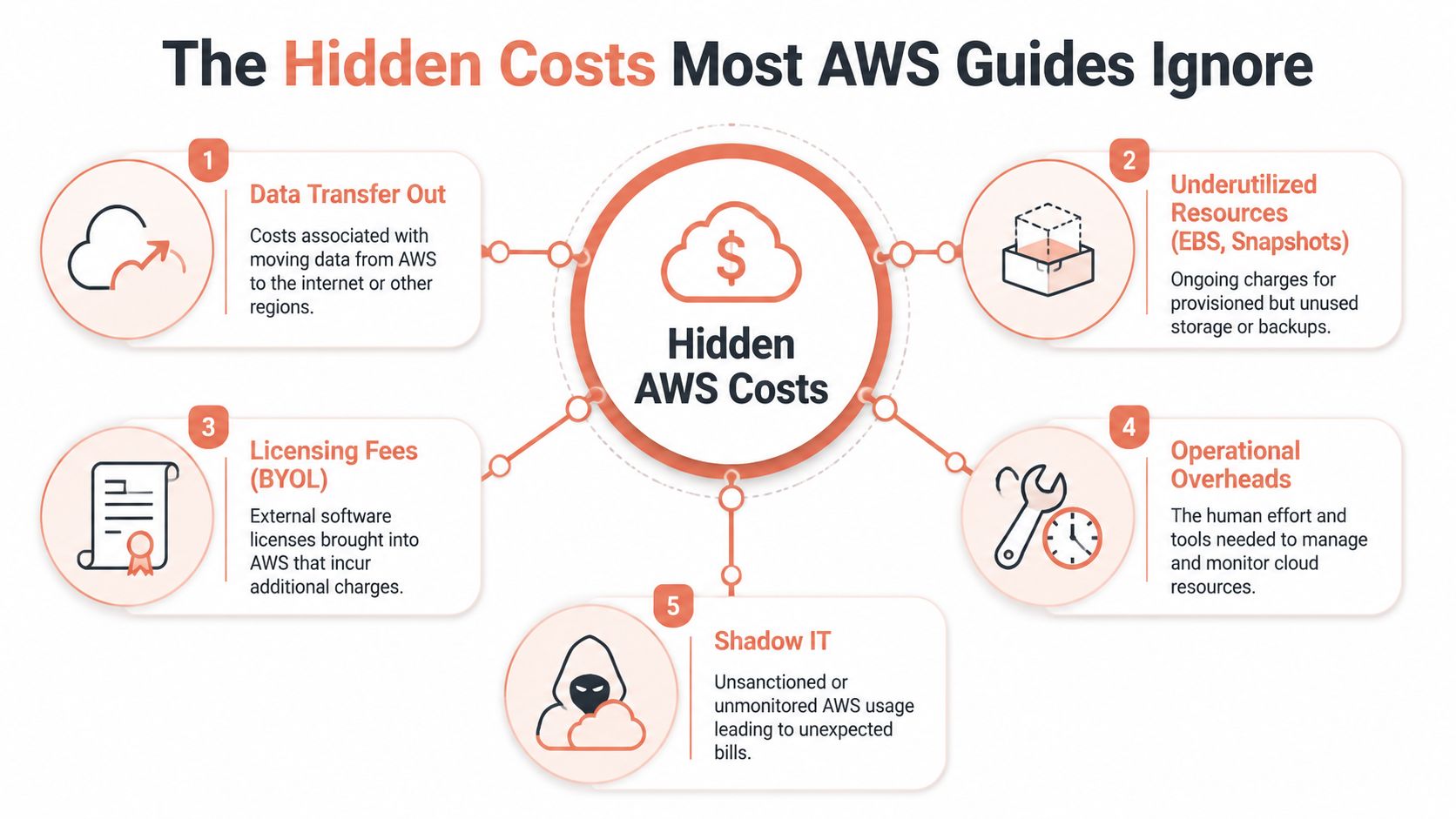
The most expensive part of AWS often isn't the instance. It's the stuff around the instance, the network path, the storage residue, the logging sprawl, and the human effort needed to keep all of it tidy. Many guides stay at the server level because that's easier to explain, but it misses where real inefficiency can hide.
Network design can outweigh instance tuning
Third-party analysis notes that cross-AZ traffic can add $0.01/GB, and that VPC endpoints can eliminate NAT Gateway data processing fees for S3 and DynamoDB traffic (Finout analysis). That matters because it shifts the optimisation question from “Which instance is smaller?” to “Where does the data move?”
Often, DIY cost tooling falls short. It sees service totals, but not always the request path or the architectural reason behind them. If your architecture keeps bouncing traffic across zones, the monthly bill won't tell you that clearly on its own.
Storage and operational drag keep accumulating
Underused storage, snapshots, and other long-lived artefacts are classic cost leaks. They're easy to create and easy to forget. The same goes for logging and operational overhead, where the price of visibility grows because nobody wanted to spend time deciding what should be retained and for how long.
The broader point is that cost management now has to include system design choices, not just spend reports. If you're trying to answer “What is our cost per customer?” or “What is our cost per API call?”, you need unit economics, not just a savings checklist. AWS's cost guidance points toward that kind of product-level thinking, but organizations typically still have to build the framework themselves (AWS decision guide).
DIY visibility still leaves unanswered business questions
That's the gap. Finance can see the bill, and engineers can see the infrastructure, but neither side gets a clean product view without extra modelling. A platform approach helps because it can tie spending back to workloads, environments, and deployment patterns without another round of custom scripts.
The bill is a symptom. The architecture and operating model are the cause.
The teams that solve this well usually stop asking only how to cut spend and start asking how to measure it in product terms. That shift is what turns cloud cost management from cleanup work into a decision system.
Building a Culture of Cost Accountability
The teams that stay in control of AWS spend don't rely on a single monthly review. They create a culture where engineers expect cost to be visible, owners expect accountability, and leadership expects the numbers to map to business output. That culture is hard to fake with dashboards alone.
AWS makes the missing question very clear, how do I know if my AWS spend is healthy for this product or team? Its own guidance says the answer should be framed in unit economics, such as cost per environment, deployment, or customer transaction (AWS cost management decision guide). That is a much better conversation than “the bill was high again”.
The strategic choice is simple. You can keep building and maintaining your own cost-control stack, along with the Kubernetes, CI/CD, monitoring, security, and scheduling layers it depends on. Or you can adopt a managed, multi-cloud DevOps platform that already handles those moving parts across AWS, GCP, and Azure, so your team spends less time wiring systems together and more time shipping product.
If you're ready to reduce the hidden operational cost of DIY infrastructure and make AWS spend easier to govern, start a conversation with PushOps and see how much of that platform work you can stop owning yourself.

