
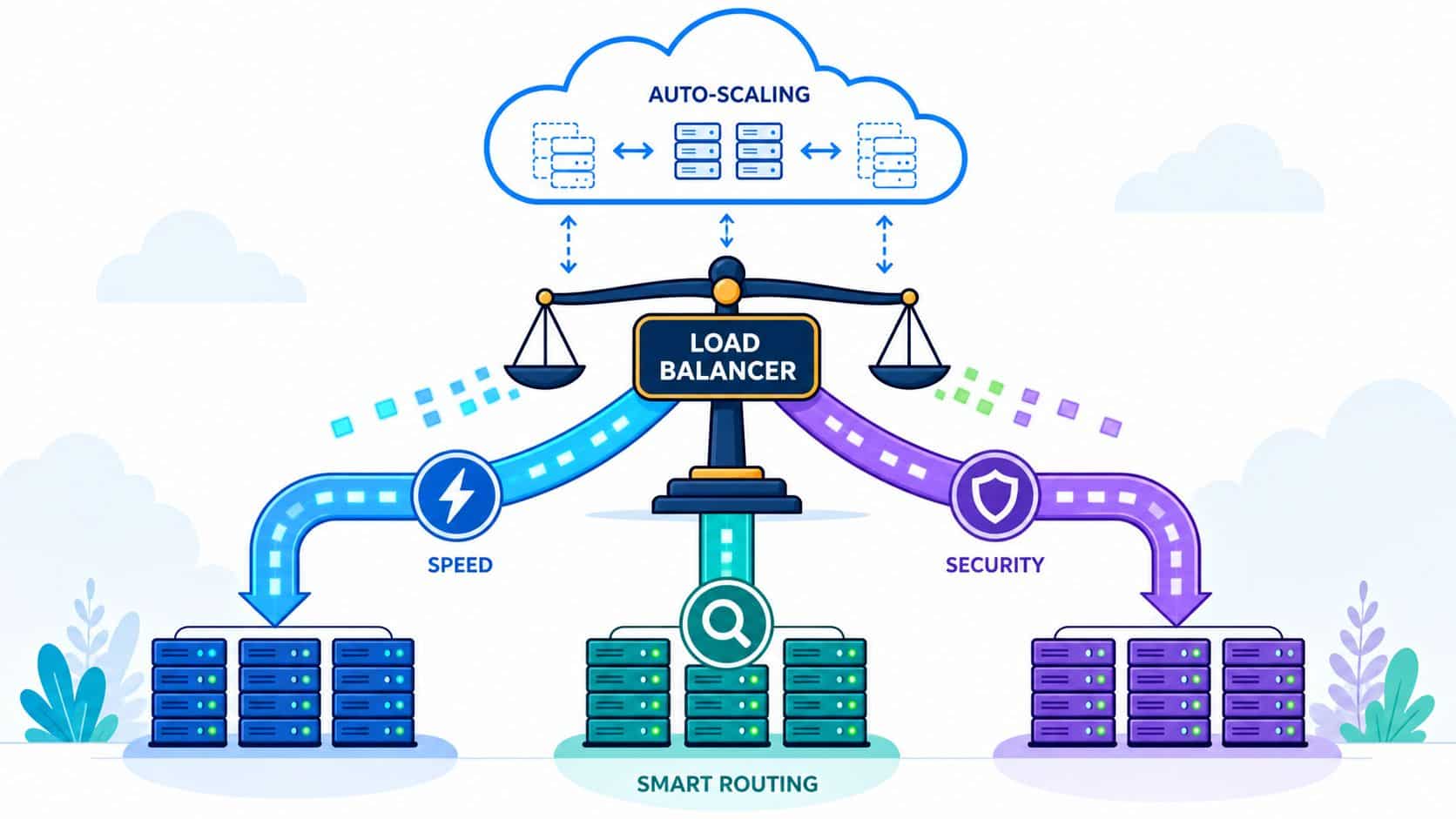

Your product has finally found traction. Sign-ups are climbing, traffic is spiky, and your team should be celebrating. Instead, engineers are restarting services, chasing timeouts, and debating whether the problem sits in Kubernetes, the app, the database, or the ingress layer.
That moment is where load balancing stops being a networking term and becomes a business decision. If requests don't get distributed cleanly, users feel it immediately through slow pages, failed checkouts, broken sessions, and incidents that steal roadmap time. The issue usually isn't that the team built something badly. It's that growth exposed infrastructure work that was easy to postpone when traffic was small.
For startups and scale-ups across Europe, Singapore, the UK, and the US, the bigger question arises. Do you keep assembling your own stack for traffic management, deployments, monitoring, security, and cost control, or do you stop building plumbing and adopt a production-ready platform? Many teams say they want control. What they usually want is reliability without turning senior developers into part-time operators.
Your Application Is Popular Now What
A traffic spike rarely breaks a system in one dramatic move. It usually starts with small failures. One node gets hot. Response times drift. Retries stack up. Session handling becomes inconsistent. Then the team adds another instance, only to learn that adding servers doesn't help if traffic still lands unevenly.
That is the practical job of load balancing. It spreads requests across available compute so no single backend becomes the choke point. Done well, it improves reliability, smooths performance, and gives your team space to scale without rewriting the application every month.
What changes when traffic stops being predictable
At low scale, teams get away with simple routing and manual fixes. At higher scale, the costs become operational:
- Engineers lose feature time: They start babysitting deployment pipelines, scaling rules, and ingress behaviour instead of shipping product.
- Incidents get harder to reason about: An outage may be caused by app code, but poor traffic distribution often makes the blast radius much larger.
- Growth becomes risky: Every launch, campaign, or customer onboarding event feels like a capacity gamble.
A lot of teams respond by adding more DevOps tooling. That's often the wrong instinct. More tooling can mean more YAML, more dashboards, more integrations, and more maintenance work just to keep the basics stable.
Practical rule: If traffic management is forcing your product engineers to think like network operators every week, the platform layer is underbuilt.
A good starting point is to design for scale before the failure arrives. This guide to scalable software design is useful because it connects architecture choices to the operational realities teams hit later. The same applies to release workflows. If you're running many services, automated deployments for microservices matter because traffic distribution and deployment safety are tightly linked.
The real decision behind the technical one
Most load balancing discussions focus on products and algorithms. The more important choice is organisational. Will your company keep investing in a home-grown DevOps stack across Kubernetes, CI/CD, monitoring, security, and cloud cost management, or will it standardise on a platform that already handles these jobs well?
For a CTO, the answer should come down to strategic advantage. Building your own traffic layer can work. Maintaining it while the company is trying to ship faster is where the hidden cost appears.
The Core Concepts of Traffic Distribution
In software, load balancing distributes incoming requests across multiple backend servers or services so one busy node does not become the point of failure for the whole application.
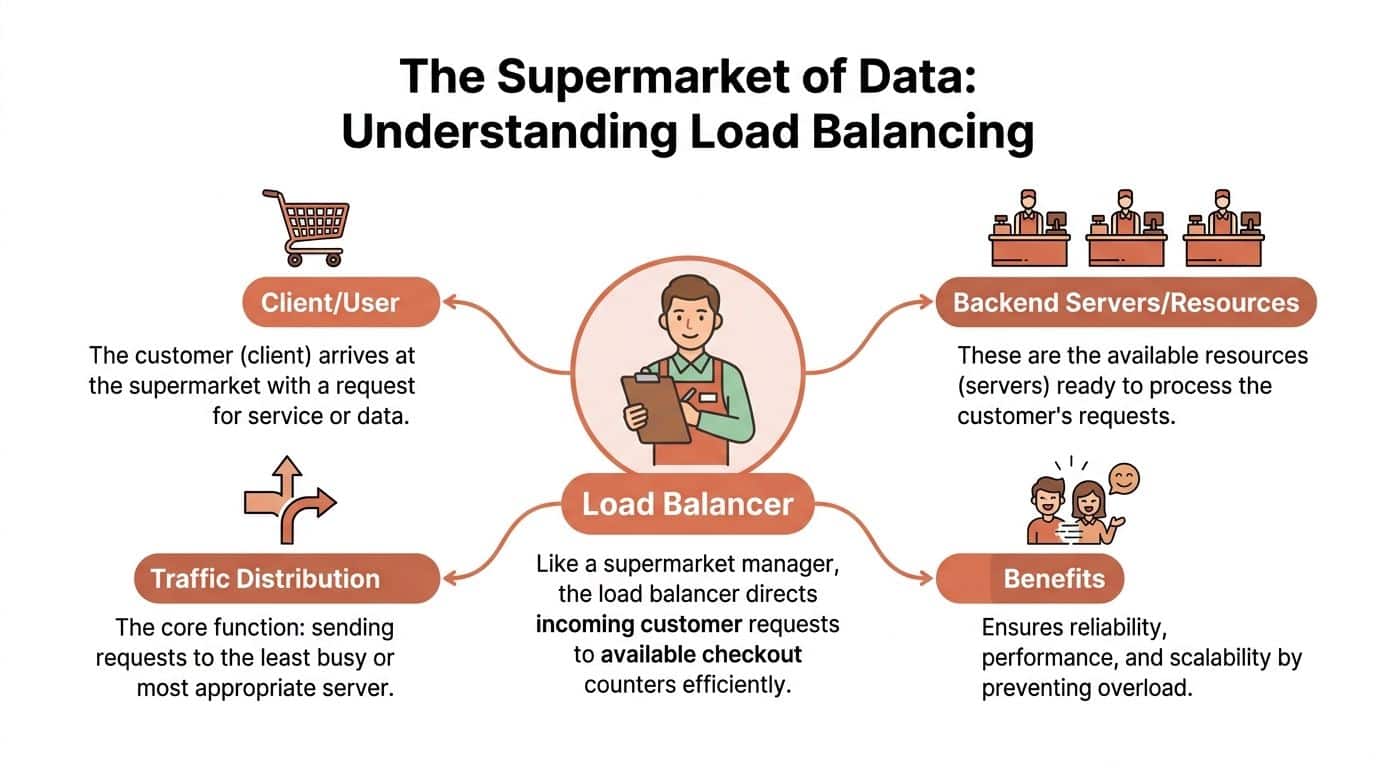
That sounds straightforward until traffic becomes uneven, requests take different amounts of time, and one service depends on another. At that point, traffic distribution stops being a networking detail and becomes part of your reliability model, your latency budget, and your cloud bill.
Layer 4 and Layer 7 solve different problems
Modern load balancers usually operate at Layer 4 or Layer 7. Layer 4 works at the transport level and routes traffic using information such as IP address, port, and protocol. Layer 7 works at the application level and can inspect HTTP details such as host, path, headers, cookies, or methods.
The trade-off is practical. Layer 4 is lighter and often faster to operate because it makes fewer decisions. Layer 7 gives you much more control, but every rule you add increases configuration surface, observability requirements, and failure modes.
AWS explains the distinction clearly in its overview of elastic load balancing. Application-aware balancing lets teams route requests based on content, terminate TLS, and apply policies closer to the entry point. That matters if your product includes APIs, admin traffic, tenant-specific routing, or multiple services behind one domain.
What this means in production
Layer 4 is a good fit for straightforward TCP or UDP traffic, especially when the main requirement is high-throughput distribution with minimal inspection. It is often enough for simpler architectures.
Layer 7 is usually the better choice for web applications and microservices because the request itself contains the routing context. A request to /api, a login callback, and an asset download should not always be treated the same way. Once you need canary releases, path-based routing, sticky sessions, Web Application Firewall rules, or per-service policies, application-level balancing becomes hard to avoid.
| Option | Best fit | Trade-off |
|---|---|---|
| Layer 4 | Transport-level routing for TCP or UDP services | Limited awareness of application behaviour |
| Layer 7 | HTTP apps, APIs, microservices, policy-driven routing | More moving parts to configure, monitor, and secure |
The hidden cost is not only the balancer itself. It is the surrounding work. Health checks need tuning. TLS certificates need rotation. Logs need centralisation. Metrics need thresholds that distinguish a noisy deploy from a real incident. Security rules need testing so they do not block good traffic during a launch.
DIY DevOps often appears cheaper than its actual cost, as teams assemble ingress controllers, cloud balancers, certificate managers, dashboards, alerting, and cost tools across multiple providers, then spend engineering time keeping the whole chain coherent. A platform like PushOps reduces that operational drag by standardising setup, scaling, monitoring, security controls, and cost visibility across clouds, which lets product teams spend their time shipping features instead of debugging traffic paths.
If your system also carries media or broadcast-style workloads, network behaviour matters in different ways. This OctoStream on streaming networks is a useful companion read because it clarifies traffic distribution patterns that many application teams overlook.
For a CTO, the decision here is architectural and financial at the same time. The wrong traffic layer creates latency, avoidable incidents, and platform toil. The right one supports growth without turning your engineers into full-time operators.
Common Load Balancing Algorithms and Strategies
Once you've chosen where the balancer operates, the next question is how it decides where a request goes. Teams often underestimate the complexity involved. The algorithm that looks fine in staging can behave badly once request duration becomes uneven, user sessions get sticky, and one service path is heavier than another.
Three common approaches
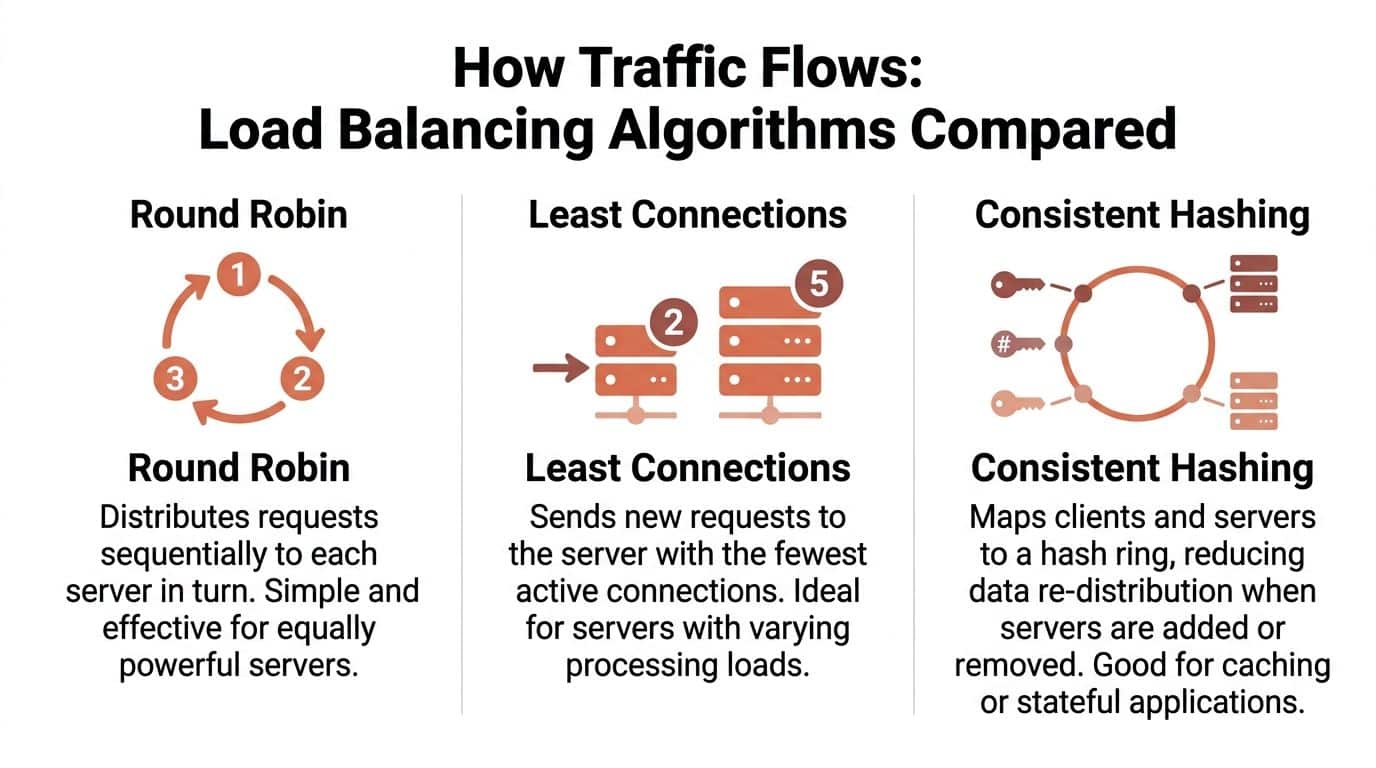
Round robin sends each new request to the next server in sequence. It's easy to understand and easy to implement. If your servers are identical and your requests are roughly similar, it can work well.
Least connections sends traffic to the server with the fewest active connections. It sounds smarter because it reacts to current load. In moderate conditions, it often is.
Consistent hashing maps users or keys to specific backends. This is useful for caches, stateful applications, or systems where you want to reduce reshuffling when nodes are added or removed.
Here's the practical comparison:
| Algorithm | Works well when | Breaks down when |
|---|---|---|
| Round robin | Backends are similar and requests are uniform | Requests vary a lot in cost or duration |
| Least connections | Connection count reflects real server load | Long-tail latency makes connection count misleading |
| Consistent hashing | Session affinity or cache locality matters | Rebalancing and hotspot management get tricky |
The failure mode many teams miss
The most common mistake isn't picking round robin. It's assuming least connections is always the safe upgrade. It isn't.
According to Sam Who's load balancing analysis, standard least-connections behaviour fails badly when request latency variance exceeds 10x. The same source highlights that 68% of enterprise teams in high-latency regions still rely on round-robin or static weighting despite documented performance degradation. That's a useful warning for any CTO running across mixed regions, noisy neighbours, or backend paths with very different execution times.
Operational insight: Connection count is only a good proxy for load when the work behind each connection is comparable.
That sounds obvious, but many DIY stacks still treat algorithm choice as a one-off setup task. In reality, it needs review as application behaviour changes.
Strategies that matter more than the algorithm name
A good balancer also needs rules around state and health.
- Session persistence: If your application stores session state in memory or depends on request affinity, you may need sticky sessions. They reduce user-facing breakage, but they can also create uneven traffic patterns if you don't manage them carefully.
- Health checks: These are essential. A balancer must stop routing traffic to unhealthy instances quickly, and the health signal has to reflect real application readiness, not just whether a process is alive.
- Weighted routing: Useful when backends aren't equal, such as during gradual rollouts or mixed instance types.
Some teams build all of this themselves with ingress controllers, cloud-native services, custom metrics, and a pile of alerting rules. That can work, but it becomes an ongoing tuning burden. The more dynamic the workload, the less likely a static algorithm will stay correct for long.
Advanced Functions for Modern Architectures
Traffic spikes rarely fail at the algorithm layer first. They fail at the integration points around the load balancer. A checkout flow slows down because certificates were not renewed cleanly. New instances come online, but health checks mark them ready before caches are warm. An incident starts at the edge and then spreads into autoscaling, monitoring, and security controls.
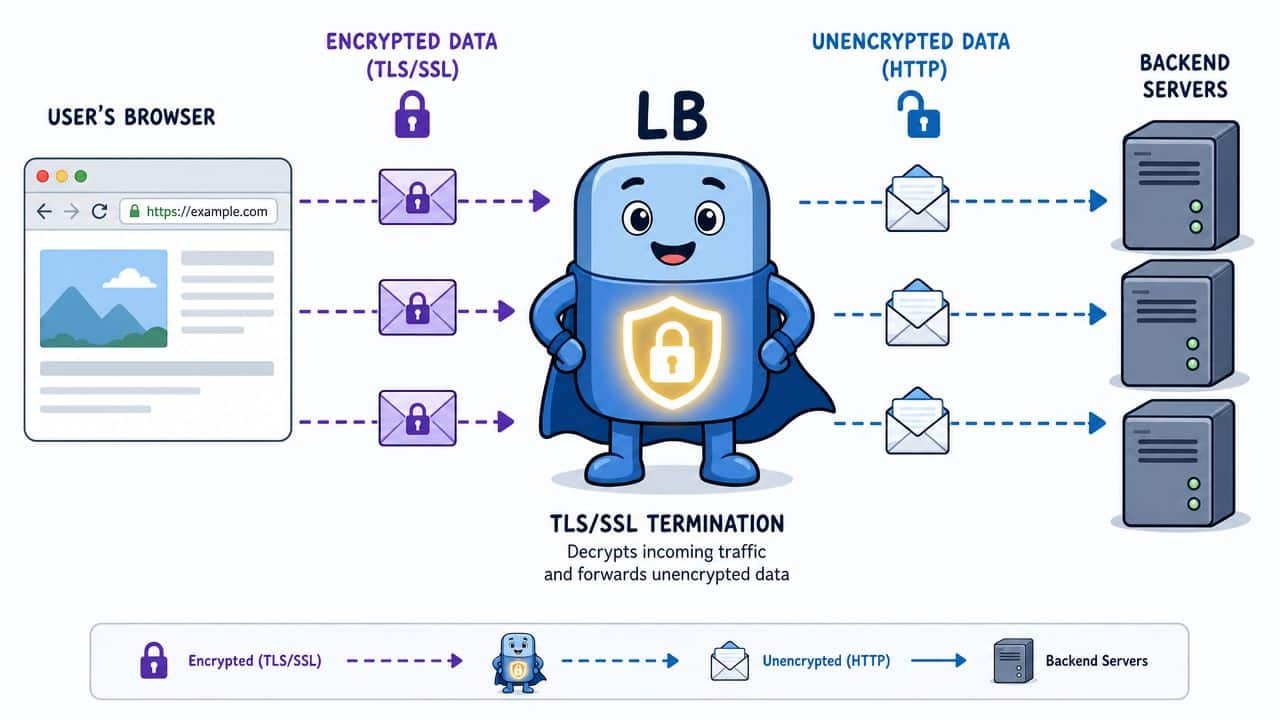
TLS termination changes where complexity lives
With TLS or SSL termination, the load balancer decrypts incoming traffic before passing requests to backend services. That reduces CPU work on application nodes and gives teams one place to apply certificate policy, redirect rules, and protocol settings. It also concentrates operational risk at the edge.
The trade-off is straightforward. Centralising certificates is easier to govern, but it creates a component that has to be configured correctly every time. Teams running a DIY stack often spread that work across cloud load balancers, ingress controllers, secret stores, CI pipelines, and security reviews. The result is rarely one clean control plane. It is a chain of small dependencies that fail in different ways.
That matters to the business. Edge misconfigurations do not only create security exposure. They create downtime, slower releases, and engineering time spent tracing issues across tools instead of shipping product.
Autoscaling and observability have to agree
A load balancer is often the first place you can see queueing, retry storms, regional imbalance, or a bad rollout. If those signals are not tied closely to autoscaling and health policy, the platform reacts to the wrong thing.
For example, CPU may look fine while request latency climbs because connection pools are saturated. A basic autoscaler misses that. The balancer can already see it, but only if metrics, readiness checks, and scaling rules are wired together with care. DIY setups usually stitch this together with several products and custom thresholds. That gives flexibility, but it also creates tuning debt that grows with every new service and every cloud account.
Google Cloud's guidance on load balancing and autoscaling patterns makes the broader point clearly. Scaling decisions work better when they use signals tied to user-facing demand and real application capacity, not a single infrastructure metric in isolation.
Modern edge layers also carry policy
In regulated environments, the load balancer is part of the control surface. It affects audit trails, traffic filtering, availability targets, and incident response. If your team operates in Europe or serves regulated customers, this practical DORA guide for SMEs is useful context for how resilience requirements start to shape platform design.
Here, DIY costs become less visible and more dangerous. Each feature looks manageable on its own. WAF rules. mTLS. rate limits. regional failover. certificate rotation. trace headers. Together, they become a platform engineering problem with real ownership, testing, and compliance implications.
Why platform integration matters
Teams get better results when edge routing, telemetry, rollout controls, and cloud operations are managed as one system. That is especially true across providers, where multi-cloud management practices need consistent policy, monitoring, and cost controls rather than separate per-cloud fixes.
PushOps reduces that integration burden. Instead of asking engineers to assemble traffic policies, observability, security controls, and scaling logic from raw cloud primitives, it gives teams a managed operating layer across multi-cloud environments. That shortens setup time, reduces configuration drift, and makes failures easier to diagnose. The practical benefit is simple. Engineers spend less time maintaining edge plumbing and more time improving the product.
Pragmatic Load Balancing Patterns
The architecture patterns that matter most to scaling teams aren't abstract. They show up in specific moments. A product splits into microservices. A customer asks for regional resilience. A release needs to go out without dropping active users. Each step adds another layer of traffic management.
Microservices need application-aware routing
In a monolith, one entry point can hide a lot of routing simplicity. In microservices, traffic often passes through an API gateway, ingress controller, or service mesh before it reaches the backend that can handle the request.
That introduces practical decisions:
- Path-based routing for service boundaries.
- Header-aware routing for versioning or tenancy.
- Internal service balancing so east-west traffic doesn't become the hidden bottleneck.
The business value is clear. Teams can deploy services independently and scale hotspots without scaling everything else. The operational cost is also clear. Routing logic, retries, timeouts, and service discovery now need to stay coherent across many moving parts.
Multi-cloud shifts the problem from local to global
More teams now need traffic policies that span providers, not just zones. According to Straits Research on the load balancer market, the market is projected to grow from USD 8.09 Billion in 2026 to USD 24.25 Billion by 2034 at a 14.72% CAGR, driven by multi-cloud adoption and the need for fault tolerance in distributed systems. The same source says software-based load balancers achieve 30–40% higher throughput per node than hardware appliances in containerised environments.
That matters because software balancers fit the operating model most startups already use. They work with Kubernetes-native tooling, scale more naturally in containerised environments, and don't lock the team into hardware-style assumptions.
Release patterns live or die at the traffic layer
Blue-green and canary releases depend on precise traffic control. You need to shift some traffic, observe behaviour, and either continue or roll back fast. The balancing layer is what makes that possible without a full cutover.
The safest release strategy isn't the one with the fanciest pipeline. It's the one where routing, health checks, and rollback behaviour are predictable under pressure.
DIY systems often begin to fray. A team can wire together cloud load balancers, CI/CD tools, and monitoring products to support these patterns. But every custom integration becomes another piece that somebody has to maintain when APIs change, traffic grows, or a new cloud enters the picture. That's why mature teams increasingly want these patterns available out of the box rather than as bespoke engineering projects.
The True Cost of a DIY DevOps Stack
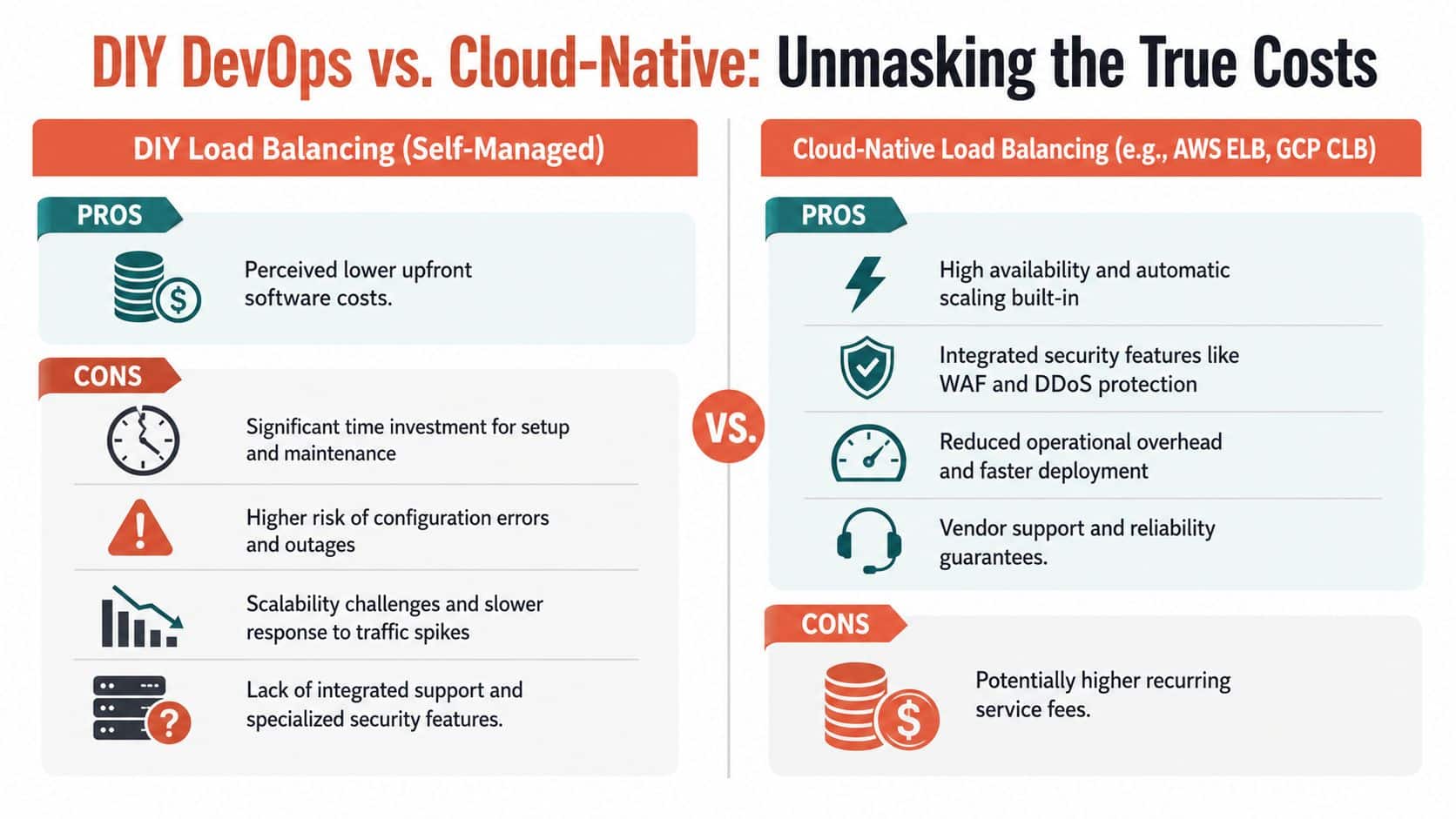
The line item for a load balancer rarely looks frightening. The total cost of running a self-managed platform usually does. That cost is spread across salaries, delayed features, deployment friction, cloud waste, and the time senior engineers spend stitching together systems that customers never see.
Hiring your way out is expensive
If the answer to platform complexity is "we'll add another DevOps engineer", the numbers get real quickly. In Amsterdam, senior DevOps engineers command annual salaries between €100,000 and €140,000, while specialised cloud architects charge €80 to €180 per hour, according to Abbacus Technologies on DevOps hiring costs in Amsterdam. The same source notes that developers waste 40% of their time on manual deployment tasks and infrastructure maintenance.
That combination is brutal for early-stage and growth-stage companies. You pay premium rates for scarce specialists, and your product developers still lose time to infrastructure chores.
Cloud-native services help, but they don't solve the platform problem
Using AWS ELB, GCP Cloud Load Balancing, or Azure-native services is usually better than manually running everything yourself. You get managed availability, basic scaling, and tighter integration with each provider. But a startup running across clouds still has to reconcile different interfaces, metrics, security controls, deployment flows, and cost models.
The hidden work shows up in places like:
- CI/CD integration: Routing decisions need to match release strategy.
- Monitoring and alerting: Teams need one operational picture, not provider-specific fragments.
- Security and policy: Edge controls have to be consistent across environments.
- Cloud spend: Traffic architecture influences overprovisioning, data transfer, and idle capacity. That is why cloud cost optimisation belongs in the same conversation as reliability.
The strategic question for CTOs
A DIY stack can look cheaper because the software pieces are often open source or bundled into cloud services. The expensive part is the coordination burden. Someone has to own Kubernetes networking, ingress behaviour, certificates, scaling rules, rollout safety, observability, and incident response.
If your best engineers are building an internal platform that still isn't giving teams a smooth path from commit to production, the company is funding infrastructure as a side business.
At some point, the smart move isn't adding more tooling or more platform headcount. It's reducing surface area and standardising on a managed approach that makes production readiness the default rather than a recurring internal project.
Focus on Product Not a Second-Rate Cloud
Load balancing is foundational, but it isn't where a startup creates differentiation. Customers don't choose your product because your team spent another quarter refining ingress rules, tuning health checks, and hand-building release logic across clouds. They choose it because the product solves a problem well and improves quickly.
That is why so many teams end up over-investing in DIY DevOps. They start with sensible decisions, then slowly accumulate Kubernetes maintenance, CI/CD upkeep, monitoring drift, security gaps, and cloud cost sprawl. Load balancing is often the first visible symptom because it's where performance, reliability, and scale collide.
The better approach is to treat the platform layer as something that should already be organised, secure, observable, and ready for growth across AWS, GCP, and Azure. Your engineering team should spend its energy on features, customer workflows, and product quality. It shouldn't be busy building a second-rate cloud inside your company.
If you're tired of spending senior engineering time on infrastructure plumbing instead of shipping product, PushOps is worth a serious look. It gives teams a production-ready multi-cloud foundation, automates deployments and environments, bakes in observability and security, and helps control cloud spend without forcing you to assemble and maintain the entire stack yourself.

