
Your product roadmap probably looks healthy. Your release calendar probably doesn't.
A familiar pattern shows up in startups and scale-ups across Europe, Singapore, the UK, and the US. The team says it wants faster shipping, but senior engineers spend their week fixing GitHub Actions workflows, untangling Kubernetes manifests, chasing environment drift, and stitching together monitoring, secrets, access control, and rollback scripts. The work is technical, urgent, and often impressive. It's also a poor use of expensive engineering time.
Release management is supposed to solve that. Not by adding ceremony, but by making software delivery repeatable, safe, and boring enough that developers can get back to product work. When it works, releases stop depending on tribal knowledge and late-night Slack threads. When it doesn't, every deployment becomes a mini incident review waiting to happen.
The trap is that DIY DevOps feels like control. You choose the tools. You customise the pipeline. You own the process. Then six months later, your best backend engineer is still the only person who understands why production deploys fail on Azure but not AWS, and your platform effort has become a side business nobody intended to run.
Why Your Best Engineers Waste Time on Deployments
A CTO notices the symptom before the root cause. Velocity looks uneven. A straightforward feature takes days to reach production after code review. Release day needs three people on standby. The strongest engineers get pulled into “just one quick deploy issue” often enough that roadmap work slips without anyone saying it out loud.
That's rarely a coding problem. It's a release management problem.
The work nobody planned for
In most growing companies, deployments accumulate hidden labour. Someone maintains Helm charts. Someone manages branch rules and build runners. Someone updates security scans after a breaking change. Someone checks whether staging still resembles production. Someone writes rollback notes that haven't been tested. None of that is the product, but all of it sits between shipping and not shipping.
If you want a clean primer on the deployment side of the equation, Otter A/B's guide on what is software deployment is a useful baseline. It helps separate the act of pushing code from the broader operational discipline around releasing it safely.
Release management is a business capability
Teams often treat release management like process overhead because they only see the visible parts. Calendars, approvals, and deployment checklists. In practice, it's the mechanism that decides whether engineering effort turns into customer value quickly or gets stranded in infrastructure chores.
Practical rule: If your highest-paid engineers are the fallback for routine releases, you don't have a release process. You have heroics.
The irony is that startups build internal tooling to move faster, then end up maintaining a fragile stack of Kubernetes configs, CI/CD glue, cloud permissions, dashboards, and cost controls just to preserve the illusion of autonomy. What they usually want is much simpler: a production-ready platform that handles setup, scaling, monitoring, security, and spend management across AWS, GCP, and Azure without demanding a platform team to babysit it.
What good teams stop doing
Mature teams don't win by making deployments clever. They win by removing custom work.
That means fewer bespoke scripts, fewer one-off release paths, fewer manual environment fixes, and fewer internal tools that only two engineers understand. It also means accepting a trade-off many teams resist at first. Standardisation beats customisation for most release workflows, because standardisation is what makes delivery predictable.
The question isn't whether your team can build its own release machinery. It probably can. The question is whether building and maintaining that machinery deserves the same talent as your product does. In most startups and scale-ups, it doesn't.
The Modern Release Lifecycle and Its Hidden Traps
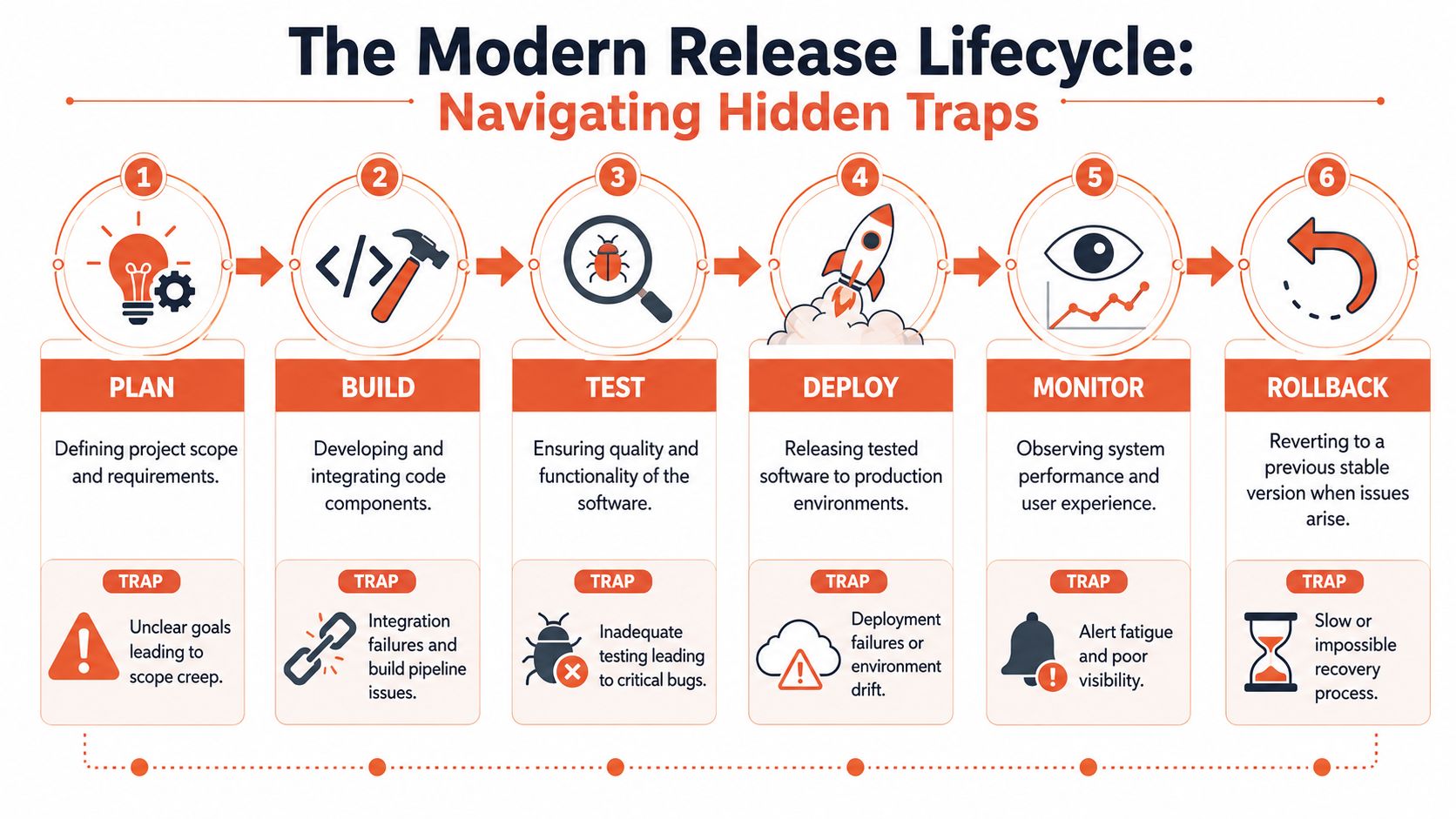
Release management spans the full path from planning to rollback. Every stage sounds straightforward on a whiteboard. Every stage becomes operationally expensive when the stack is homemade.
Plan and build
Plan looks simple until dependencies start crossing teams, services, and cloud accounts. Release scope expands inadvertently when nobody owns the cut line between “must ship now” and “can wait”. In a DIY setup, planning usually lives across tickets, spreadsheets, and chat threads. That fragmentation causes mistakes before a single build starts.
Build is where custom stacks begin to tax the team. The code compiles, but the pipeline often doesn't stay still. Build images drift. Dependency scanning breaks after a plugin upgrade. A secret expires. An artifact repository policy changes. Engineers who should be improving product quality end up maintaining the conveyor belt.
A standardised platform helps here because it removes the constant negotiation between tooling choices and delivery needs.
Test and deploy
Test isn't just automated checks. It's environment management. It's knowing that the service under test behaves the same way in staging as it will in production. DIY environments drift because people patch them under pressure. The result is false confidence: green pipelines, red releases.
Deploy is where complexity gets exposed. Credentials, network policies, cloud APIs, database migrations, and service order all need to line up. Multi-cloud adds another layer because AWS, GCP, and Azure don't fail in the same way. Teams often underestimate how much operational knowledge gets embedded in deployment scripts.
For European tech startups, automation matters at this layer because automated DevOps infrastructure reduces infrastructure setup time by 40–60%, enabling a production environment that previously required 3 days of manual work to provision in just 30 minutes. The point isn't just speed. It's removing repetitive setup work that steals attention from shipping features.
Monitor and rollback
Once code is live, monitoring determines whether your team learns quickly or guesses badly. A fragmented stack often creates the worst of both worlds: too many alerts and too little context. Teams see symptoms across separate tools for logs, traces, metrics, incidents, and cost anomalies, then reconstruct the story by hand.
Rollback is where many internal platforms reveal their weakness. They can deploy, but they can't recover cleanly. That usually means redeploying old versions, reversing config changes manually, or hoping the previous image still works with current state.
A strong release lifecycle needs all of these pieces to work together:
- Clear planning controls that stop scope creep before release week
- Repeatable build pipelines that don't depend on one engineer's local fixes
- Consistent test environments that mirror production behaviour
- Deployment workflows that abstract cloud-specific complexity
- Integrated observability so release health is obvious
- Reliable recovery paths that don't require improvisation
Teams rarely struggle because they don't understand release stages. They struggle because each stage adds maintenance overhead when every layer is assembled by hand.
That's why “we'll just wire the tools together” stops scaling early. The lifecycle keeps expanding, and the maintenance burden expands with it.
Choosing the Right Release Strategy
Release strategy is where many teams move from “we can deploy” to “we can deploy safely”. The concepts are easy to explain. Running them reliably across AWS, GCP, and Azure is not.
Blue green deployments
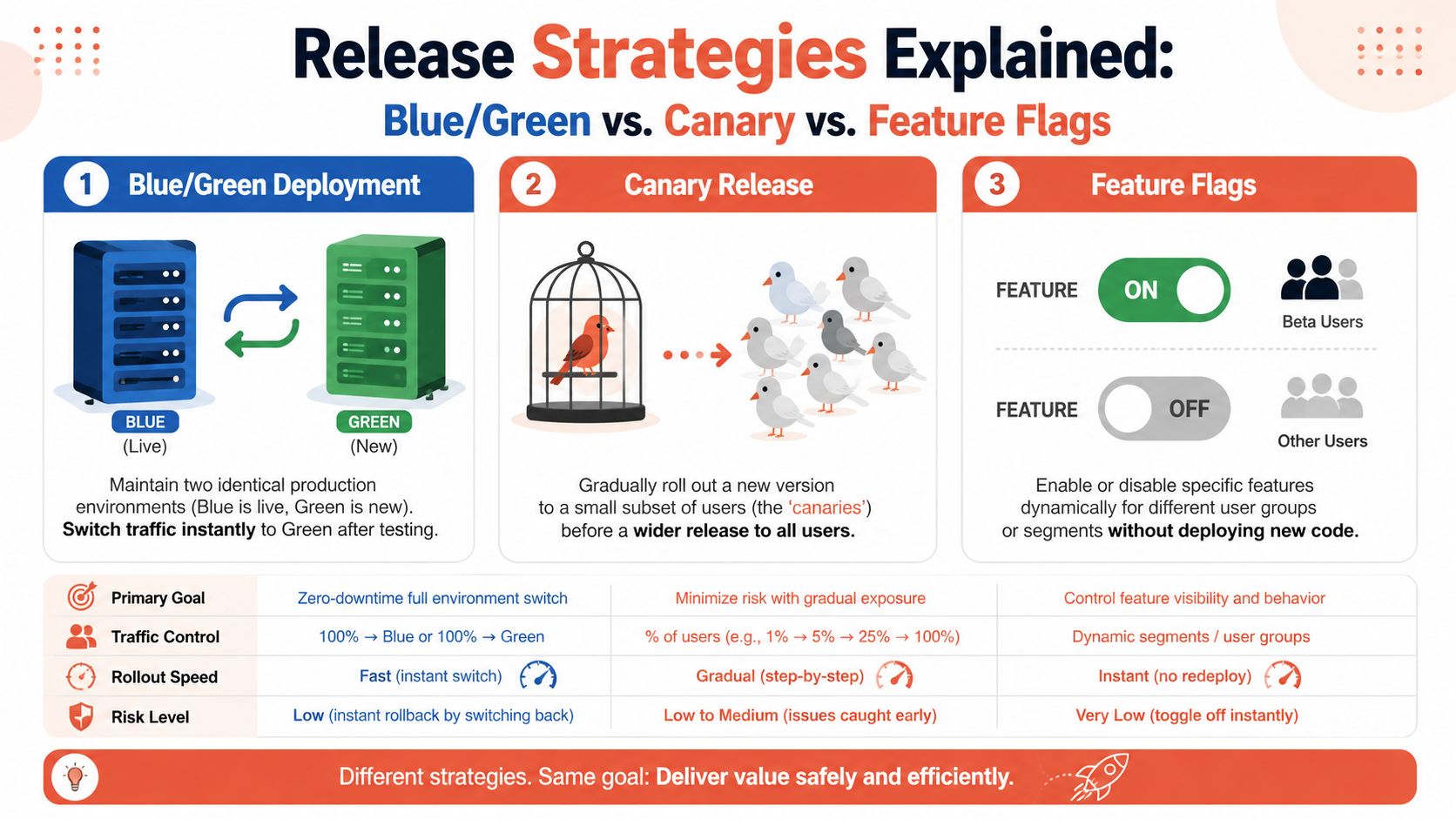
Blue/green is the cleanest mental model. You keep two production environments. One serves traffic. The other receives the new version. When you're satisfied, you switch traffic over.
That's attractive when downtime is unacceptable and rollback needs to be immediate. The trade-off is infrastructure duplication, synchronisation overhead, and the operational discipline required to keep both environments equivalent. On paper, it's elegant. In a DIY estate, it often becomes expensive and brittle.
Canary releases
Canary releases push a new version to a small slice of users first. If the system behaves well, you expand exposure. If it doesn't, you stop before the blast radius widens.
This strategy is excellent for reducing release risk, but it depends on tight routing controls, good segmentation, and trustworthy observability. Without those, canary turns into guesswork. Teams say they're doing canary when they're really doing partial rollout with poor visibility.
For organisations comparing workflow models, this matters because your delivery approach shapes how safely you can operate progressive releases. PushOps has a helpful explainer on GitOps vs traditional CI/CD that's worth reading if your team is deciding how much deployment state and change control should live in Git versus pipeline tooling.
Feature flags
Feature flags separate deployment from release. The code can reach production while the functionality stays off until the team enables it for the right users at the right time.
This is one of the few release practices that consistently pays off fast because it changes recovery behaviour. In release management, separating deployment from release using feature flags reduces MTTR by 60–70% because it enables instant rollback via toggles instead of redeployments, which can take 15–45 minutes depending on infrastructure complexity.
That difference is operationally significant. A toggle is not the same as a rollback plan, but it often gives the team a much safer first response.
Which strategy fits which risk
A simple comparison helps:
| Strategy | Best fit | Main strength | Main burden in DIY setups |
|---|---|---|---|
| Blue/green | High-stakes cutovers | Fast environment switch | Duplicate infrastructure and sync complexity |
| Canary | Risk-sensitive rollouts | Limits blast radius | Needs strong routing and observability |
| Feature flags | Continuous delivery | Separates release from deploy | Requires disciplined flag management |
If your team can describe a strategy but can't automate the guardrails around it, you don't have a strategy yet. You have a manual procedure.
The mistake many startups make is treating these patterns like simple add-ons. They aren't. Each one pulls in traffic control, environment consistency, monitoring, rollback logic, and access governance. Building those pieces yourself can become an internal platform project disguised as a release improvement.
Measuring What Matters for Release Management
Teams often say they want faster releases. That's too vague to manage. Release management improves when teams measure the system, not just the last incident.
The four metrics that matter
The standard frame is the DORA metrics:
- Deployment frequency, how often code reaches production
- Lead time for changes, how long it takes for a code change to go live
- Change failure rate, how often releases cause problems
- Mean time to recovery, how quickly the team restores service after an issue
These metrics matter because they expose trade-offs. A team can increase deployment frequency while making failures more painful. Another can keep failure rates low by shipping too cautiously. Looking at all four together gives a more honest view.
According to The Business Research Company's release management market report, elite-performing DevOps teams deploy on demand, achieve a lead time for changes of less than one day, maintain a change failure rate below 10%, and recover from incidents in less than one hour.
Why dashboards alone don't fix performance
Leaders often ask for better numbers before they build a better system. That order is backwards.
If releases still depend on manual approvals, environment fixes, custom scripts, and scattered monitoring, metric pressure just pushes toil onto engineers. Teams chase deployment frequency while hiding risk in untested rollback paths. They try to lower lead time while carrying brittle pipelines that fail for reasons unrelated to product code.
A healthier approach is to treat platform reliability as the precursor to metric improvement.
Better DORA metrics are usually a side effect of standardised delivery, not the result of asking teams to move faster on unstable foundations.
What to examine before setting targets
Before pushing teams on release KPIs, check the underlying mechanics:
- Pipeline stability so builds don't fail for environmental reasons
- Environment consistency so test outcomes mean something
- Observability coverage so incidents are visible quickly
- Recovery design so teams can reverse course without panic
- Self-service workflows so releases don't queue behind specialists
For CTOs and VPs Engineering, that changes the conversation. Don't ask only, “Why aren't we deploying more often?” Ask whether your current tooling makes safe, repeatable releases likely in the first place. If the answer is no, hiring another DevOps engineer won't solve the structural issue. It will only add another person to maintain the machinery.
The True Cost of a DIY DevOps Platform
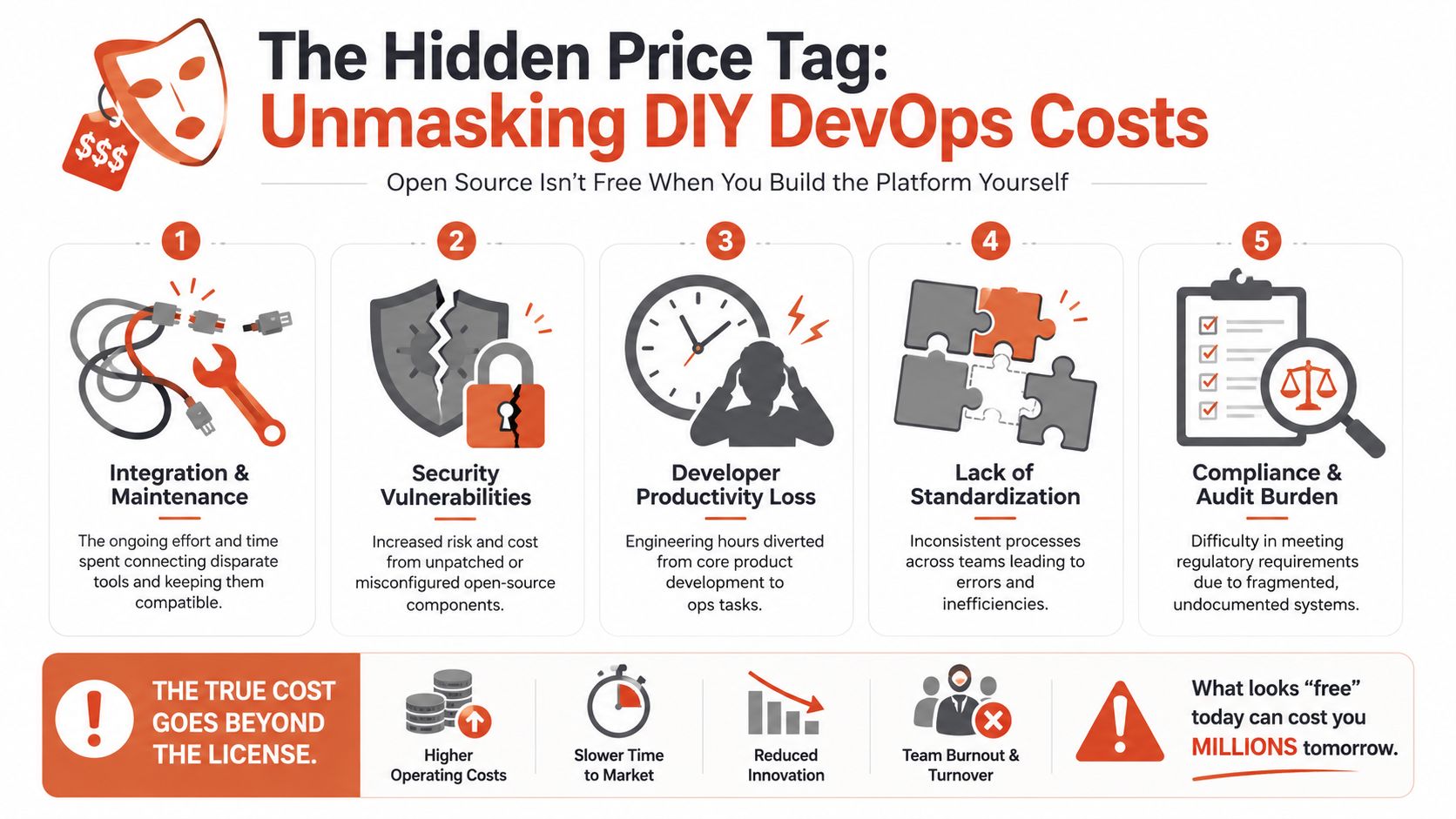
Open source tooling is not free once your team depends on it in production. It just moves the bill from procurement to payroll, delays, and operational drag.
Where the cost actually lands
The direct tools rarely tell the full story. The true cost sits in engineering attention.
That number resonates because it matches what many engineering leaders see in practice. Platform work expands to fill available talent. First it's CI/CD. Then Kubernetes operations. Then observability. Then security controls, cloud cost policies, incident management, access rules, audit logs, and internal documentation. Each piece looks justified in isolation. Together they become a second product with no external users.
The comparison leaders should make
If you're evaluating internal build versus managed platform adoption, compare the whole operating model, not just licence line items. PushOps' overview of developer platform automation is useful context for what a consolidated alternative can replace.
| Aspect | DIY DevOps Stack | Managed Platform (e.g., PushOps) |
|---|---|---|
| Initial setup | Multiple tool choices, integration design, custom pipeline work | Standardised starting point with production-ready defaults |
| Ongoing maintenance | Continuous updates, broken integrations, script ownership | Platform vendor carries core maintenance burden |
| Release workflows | Often depend on bespoke scripts and internal knowledge | Consistent workflows designed for repeatability |
| Security and governance | Teams wire policies, permissions, logging, and auditability themselves | Security controls and governance built into the platform model |
| Multi-cloud operations | Separate handling for AWS, GCP, and Azure quirks | Unified operational layer across providers |
| Developer productivity | Engineers split time between product and platform toil | Developers focus more on shipping features |
| Cost visibility | Tool sprawl and hidden labour obscure real spend | More predictable operational model |
Why DIY feels cheaper than it is
DIY wins the internal argument because the first steps look inexpensive. A few open source components. Some Terraform. A handful of GitHub Actions or GitLab runners. A metrics stack. Maybe Argo CD or Flux. The architecture diagram looks manageable.
Then reality sets in:
- Integration maintenance keeps breaking as versions change
- Security ownership stays with your team, not the tools
- Documentation debt grows because custom workflows need explanation
- Operational coverage requires on-call confidence, not just build success
- Standardisation becomes political once every squad has its own way of doing things
The hidden cost of DIY DevOps isn't just money. It's the strategic mistake of assigning product engineers to maintain undifferentiated infrastructure.
For startups and scale-ups, that trade-off matters more than almost anything else in release management. You can spend scarce engineering capacity building a platform, or you can use that capacity to build what customers will notice.
Standardise and Secure Releases with a Unified Platform
The cleanest release process isn't the most customised one. It's the one developers can use confidently without opening three dashboards, checking five scripts, and asking ops for permission.
What standardisation actually gives you
A unified release platform creates a golden path. Developers follow one supported workflow for builds, environments, deployments, monitoring, and recovery. That doesn't mean removing flexibility. It means pushing variation to the edges and keeping the release path consistent.
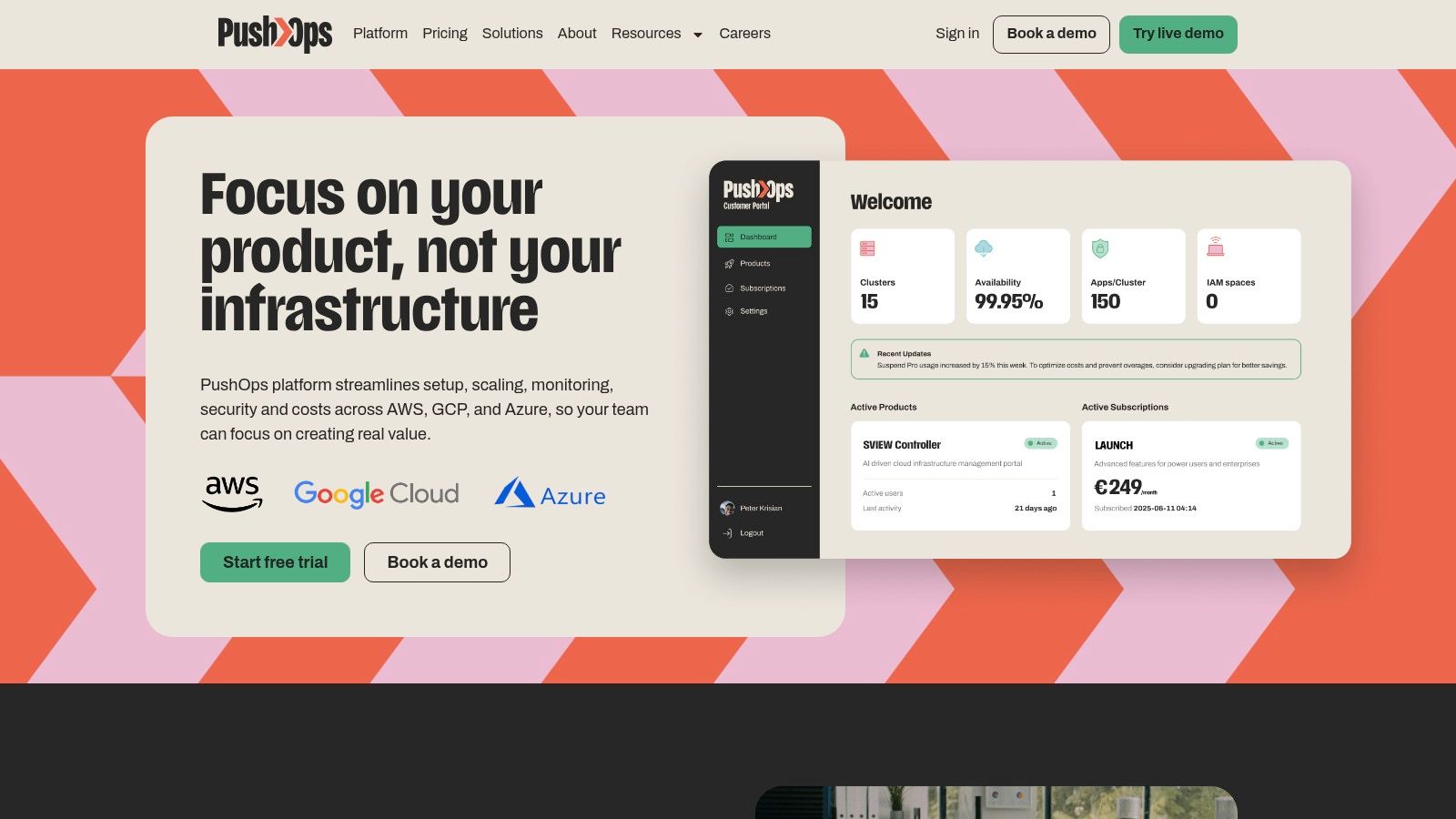
For teams operating across AWS, GCP, and Azure, that abstraction matters. Developers shouldn't have to memorise every cloud-specific behaviour to ship safely. They need reliable defaults, self-service controls, integrated observability, and policy enforcement that works the same way every time.
Security and compliance stop being side projects
One reason DIY release management drags on is that compliance gets bolted on late. Teams launch pipelines first, then add auditability, access controls, evidence collection, and review procedures when a customer or regulator asks hard questions.
That approach gets expensive. For European and UK businesses, achieving and maintaining DevOps compliance adds $30,000–$200,000 per year through tooling, audit fees, and engineering time, with annual penetration testing alone costing $15,000–$80,000 depending on scope.
A unified platform changes the operational pattern. Permissions, audit logs, release approvals, environment controls, and policy enforcement become defaults instead of afterthoughts.
Better release management feels simpler to developers
The best release systems don't ask developers to become infrastructure specialists. They reduce context switching.
That includes practical capabilities such as:
- Self-service environments so teams don't wait on platform specialists
- Built-in observability so release health is visible in one place
- Automated cost controls so non-production environments don't linger
- Safe release controls such as staged rollout support and flag-driven exposure
If your team is tightening release safety around toggled rollouts, PushOps also has a clear explainer on feature flags and safe releases. It's a useful complement to the operational side of release management.
There's also a broader lesson here for QA-heavy organisations. Teams working on analytics and tracking quality have been pushing for stronger CI/CD-linked regression checks for the same reason engineering teams want stronger release controls. Trackingplan's update on recent improvements for analytics QA teams is a good example of how release confidence improves when validation is built into delivery workflows instead of handled manually after the fact.
Release management delivers the most value when developers barely notice the machinery behind it. They commit code, follow a clear path, and production behaves predictably.
That's the choice in front of most engineering leaders. Keep funding an internal platform effort that absorbs talent and attention, or standardise on a platform that makes secure, observable, production-ready releases the default.
PushOps helps software teams ship without turning developers into part-time platform engineers. It provisions production-ready foundations on AWS, GCP, and Azure, then handles deployments, environments, observability, security controls, and cost optimisation in one workflow. If your team is spending too much time maintaining release infrastructure instead of building product, take a look at PushOps.

