
A familiar pattern plays out in fast-moving software teams. Product is ready to launch. Engineering has done the hard work. Then a security review lands late, someone asks how the public app is protected, and the answer turns into a scramble through reverse proxies, managed rules, bot controls, alerting, and exceptions for routes nobody documented properly.
That's where a web application firewall usually enters the conversation.
The mistake is thinking the decision ends there. Buying or enabling a WAF is the easy part. Running it well, across multiple environments, without blocking legitimate users or slowing releases, is where the true cost shows up. That's especially true for startups and scale-ups that already feel stretched by Kubernetes, CI/CD, monitoring, permissions, cloud spend, and compliance requests.
Your Team Is Shipping Features Not Fortifications
Most engineering leaders don't resist security because they think it's optional. They resist it because they know what usually follows. Another control. Another dashboard. Another specialist tool that needs policy tuning, incident handling, and ownership nobody has time to take on.
A WAF is now standard infrastructure, not a niche add-on. According to Mordor Intelligence's web application firewall market analysis, the market was valued at USD 11.01 billion in 2026 and is projected to reach USD 22.05 billion, with cloud-based WAFs holding over 64% of market share. That matters because it tells you where the industry has landed. Internet-facing apps and APIs are expected to have application-layer protection in front of them.
The practical problem is that most WAF conversations stop at procurement. They don't deal with what happens after go-live, when a new release changes request patterns, a login flow starts tripping managed rules, or an API endpoint needs a narrow exception that won't weaken everything else.
For teams that don't want to build a full internal security and platform function, outside perspectives can help frame the basics. Guides such as Networking2000 cyber security services are useful because they reflect the broader reality many growing businesses face. Security controls don't fail because nobody bought them. They fail because nobody operationalised them.
What CTOs usually underestimate
- Tool sprawl: A WAF rarely stays “just a WAF”. It pulls in logging, alerting, ticketing, deployment approvals, and exception workflows.
- Ownership ambiguity: Security wants stricter rules. Product wants fewer blockers. Platform ends up carrying the pager.
- Release friction: Every control added outside the delivery workflow becomes a source of delay.
A WAF should reduce risk at the edge. It shouldn't create a second release process that engineers have to tiptoe around.
The right question isn't whether you need a WAF. For public applications, you probably do. The right question is whether you want to operate it as another standalone security product, or as part of a delivery platform that keeps security aligned with how software ships.
Understanding WAF Fundamentals at Layer 7
A traditional firewall and a web application firewall solve different problems.
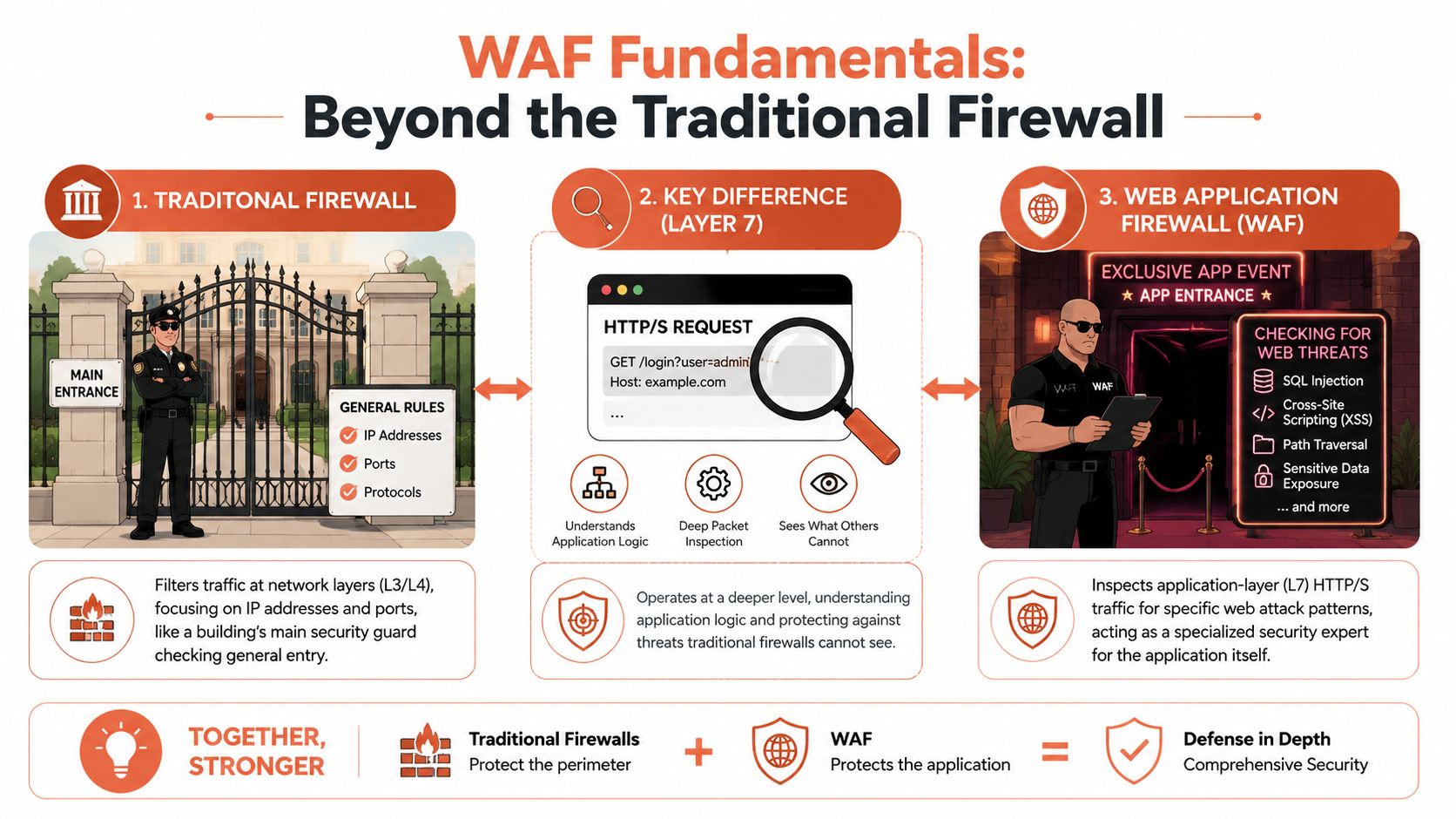
A traditional network firewall works at the network boundary. It cares about things like ports, protocols, and traffic flow at lower layers. A web application firewall operates at Layer 7, where HTTP and HTTPS requests live. That means it can inspect what the request is trying to do inside the application, not just where it came from.
The simplest way to explain it
Think of the network firewall as the guard at the front gate of an office complex. It checks whether traffic should be allowed into the premises at all.
The WAF is the security team at the door of a specific executive office. It checks the contents of the documents being carried in, understands the format, and blocks requests that look malicious even if they arrived through a perfectly legitimate entrance.
Microsoft's Azure WAF overview describes WAF as a real-time protection layer for web applications that monitors attacks through WAF logs and Azure Monitor. It differs significantly from a network firewall because it inspects HTTP/HTTPS traffic and is designed to stop application-layer attacks such as SQL injection and cross-site scripting (XSS).
Why Layer 7 matters in practice
Application attacks often hide inside normal-looking requests. The packet reaches the right host, over the right port, with valid TLS in place. A lower-layer firewall sees allowed traffic. The application sees a hostile payload.
That gap is exactly why WAFs became a standard control for public web apps and APIs.
A good WAF can help with:
- Input inspection: Looking inside query strings, headers, cookies, and request bodies.
- Attack pattern detection: Catching signatures and behaviours associated with common web attacks.
- Edge enforcement: Blocking or challenging malicious requests before they hit origin infrastructure.
If you want a vendor-oriented view of how managed offerings are positioned, WAF services pages like this can be useful for comparing how providers frame protection, response, and ongoing management.
Practical rule: If the traffic is HTTP or HTTPS and it reaches a public application, assume you need a control that understands the application layer, not just the network path.
That doesn't replace your network firewall. It fills the gap your network firewall was never built to solve.
Choosing Your WAF Deployment Model
Once you've accepted that a web application firewall belongs in front of public apps, the next decision is architectural. There are three common deployment models, and each carries a different operational burden.
The three models most teams consider
Cloud-native WAF
This usually means using the controls built into AWS, Azure, or GCP. The advantage is proximity to the rest of your infrastructure. Identity, logging, load balancing, and routing often integrate cleanly inside one cloud.
The trade-off is fragmentation. If you're multi-cloud, you now manage different policy models, logging formats, and edge services. Even if each individual setup is reasonable, the combined overhead grows quickly.
Third-party SaaS WAF
This model abstracts much of the infrastructure and often gives you a cleaner global edge layer. For many teams, that's attractive because deployment is faster and the management plane is more consistent.
The cost is dependency. You route traffic through a provider's model, align with their policy abstractions, and sometimes accept constraints around custom logic or platform integration. That's not always bad, but it is a strategic choice.
Self-managed WAF
This gives maximum control and maximum effort. You manage provisioning, updates, availability, tuning, integrations, and lifecycle. Some organisations still want that level of ownership. Most startups and scale-ups regret it once they factor in the engineering time.
WAF deployment model comparison
| Model | Best For | Pros | Cons (The Hidden DevOps Tax) |
|---|---|---|---|
| Cloud-native WAF | Teams standardised on one cloud | Native integration, provider-managed components, familiar tooling | Different implementations across clouds, duplicated policy work, more operational variation |
| Third-party SaaS WAF | Teams prioritising speed and global edge coverage | Fast setup, centralised management, less infrastructure handling | Potential lock-in, external dependency, integration compromises |
| Self-managed WAF | Organisations with specialised requirements and dedicated security operations | Deep control, custom deployment patterns | High maintenance burden, more failure modes, more staffing pressure |
What CTOs should optimise for
The wrong way to choose is by asking which WAF has the longest feature list.
The better question is: which model fits the way your teams deploy software today? If you already struggle with cloud account sprawl and hand-built delivery workflows, adding another isolated control will make that worse, not better. Given these challenges, a broader DevOps cloud infrastructure platform conversation becomes more important than a narrow WAF bake-off.
Smaller companies often discover this same pattern across security tooling generally. Articles on cybersecurity for small businesses are useful because they show how quickly point solutions pile up when there's no coherent operating model behind them.
The best deployment model is usually the one your team can operate consistently across environments without inventing custom process around every release.
That's why “managed” matters more than people think. Not because engineers can't run these tools, but because they shouldn't have to spend product time stitching them together.
How WAFs Block Malicious Traffic
A WAF doesn't protect applications by magic. It applies rules to web requests and responses, then decides whether to allow, log, challenge, or block them.
The two most important rule philosophies are negative security and positive security. Good WAF programmes usually use both, but not everywhere in the same way.
Negative security model
This is the familiar approach. Block known bad things.
The WAF looks for patterns associated with attacks such as SQL injection, XSS, path traversal, suspicious headers, malformed payloads, or other malicious input. This works well as a broad protective layer because it's relatively quick to enable and can catch a wide set of commodity attack traffic.
The weakness is precision. A wide ruleset can create noise, especially for modern applications with unusual payload structures or heavy API usage.
Positive security model
This approach starts from the opposite assumption. Only allow known good behaviour.
Imperva's explanation of WAF operation describes effective WAFs as Layer 7 reverse-proxy controls that inspect full HTTP/HTTPS payloads and can enforce positive-security models for critical endpoints like login pages. That's one of the most effective ways to reduce attack surface without changing application code.
For example, a login endpoint usually has a predictable shape. Expected method, expected content type, expected parameters, expected size. That makes it a strong candidate for stricter allow rules.
Where each model works best
- Broad public surface areas: Negative rules are often the practical baseline.
- Sensitive routes such as login, admin, or payment: Positive rules usually deliver better control.
- Fast-changing API endpoints: Start carefully. Aggressive positive models can block valid traffic if the schema changes often.
A WAF is strongest when you stop treating all routes the same. Public brochure pages, checkout flows, admin paths, and partner APIs should not share one generic policy posture.
What this means for real attacks
The reason WAFs are useful is that many common attacks arrive inside normal web traffic. The request can look legitimate at a network level and still contain hostile intent. Rule engines help catch those payloads before they hit the app.
What doesn't work is pretending a generic managed ruleset is enough forever. Broad rules are a starting point. High-value routes need tighter controls, and those controls need to evolve with the application.
That's where protection turns into operations.
The Hidden Operational Cost of WAF Management
The painful part of a WAF isn't turning it on. It's what happens after.
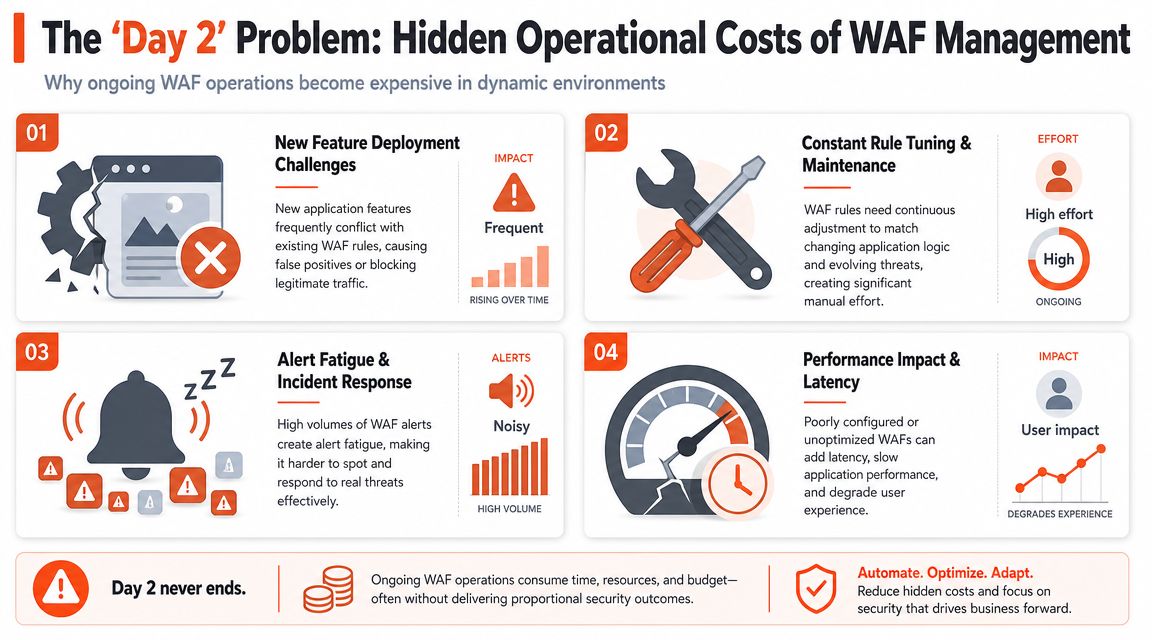
A team ships a new feature. Request bodies change. Headers change. Maybe a frontend library changes how it serialises form input. Suddenly legitimate customer traffic starts getting blocked. Support reports failed checkouts or broken sign-ins. Engineers dig through logs while someone suggests disabling the rule “temporarily”.
That cycle is common because WAFs live at the boundary between security policy and application behaviour. Any team that ships frequently will eventually hit it.
Day 2 is where the work begins
SentinelOne's WAF guide makes the key point that the primary challenge isn't installation. It's day-2 operations, where success depends on continuous rule tuning, false-positive reduction, and careful exception handling so production traffic doesn't break.
That sounds manageable in theory. In practice it means someone has to own:
- Rule tuning: Reviewing blocked traffic and deciding whether the rule or the request is wrong.
- Exception design: Narrowly allowing legitimate edge cases without weakening adjacent endpoints.
- Change coordination: Making sure app releases and WAF policy changes don't drift apart.
- Incident handling: Distinguishing real attacks from self-inflicted blocking.
The common failure modes
False positives become business incidents
A WAF doesn't have to go down to cause downtime. It only has to block legitimate requests on a critical route.
That's why many teams become timid. They leave the WAF in log-only mode too long, or they disable rules under pressure and never revisit them.
Manual UI changes create drift
When exceptions are made in a dashboard at speed, you lose review, context, and version history. Months later, nobody knows why a rule was disabled or whether it's still needed.
Alerting turns into noise
A noisy WAF is easy to ignore. Once engineers stop trusting the signal, the control still exists on paper but contributes much less in reality.
Security controls fail quietly when the operating model is weak. The dashboard stays green. The policy quality erodes in the background.
For teams already stretched across infrastructure work, the hidden tax becomes visible. You can reduce a lot of that burden with stronger process and automation, but if you're still doing most of it manually, you're paying in platform time that should be going into product. That's the broader issue behind reducing DevOps overhead. The cost isn't just tools. It's the permanent operational surface area those tools create.
Integrating WAFs into Your Automated DevOps Workflow
The best way to make a WAF sustainable is to stop treating it like a separate appliance managed by hand. It should behave like the rest of your delivery system. Versioned, reviewed, tested, and deployed through the same operational discipline as application changes.
That usually means moving toward policy as code.
What changes when policy lives in Git
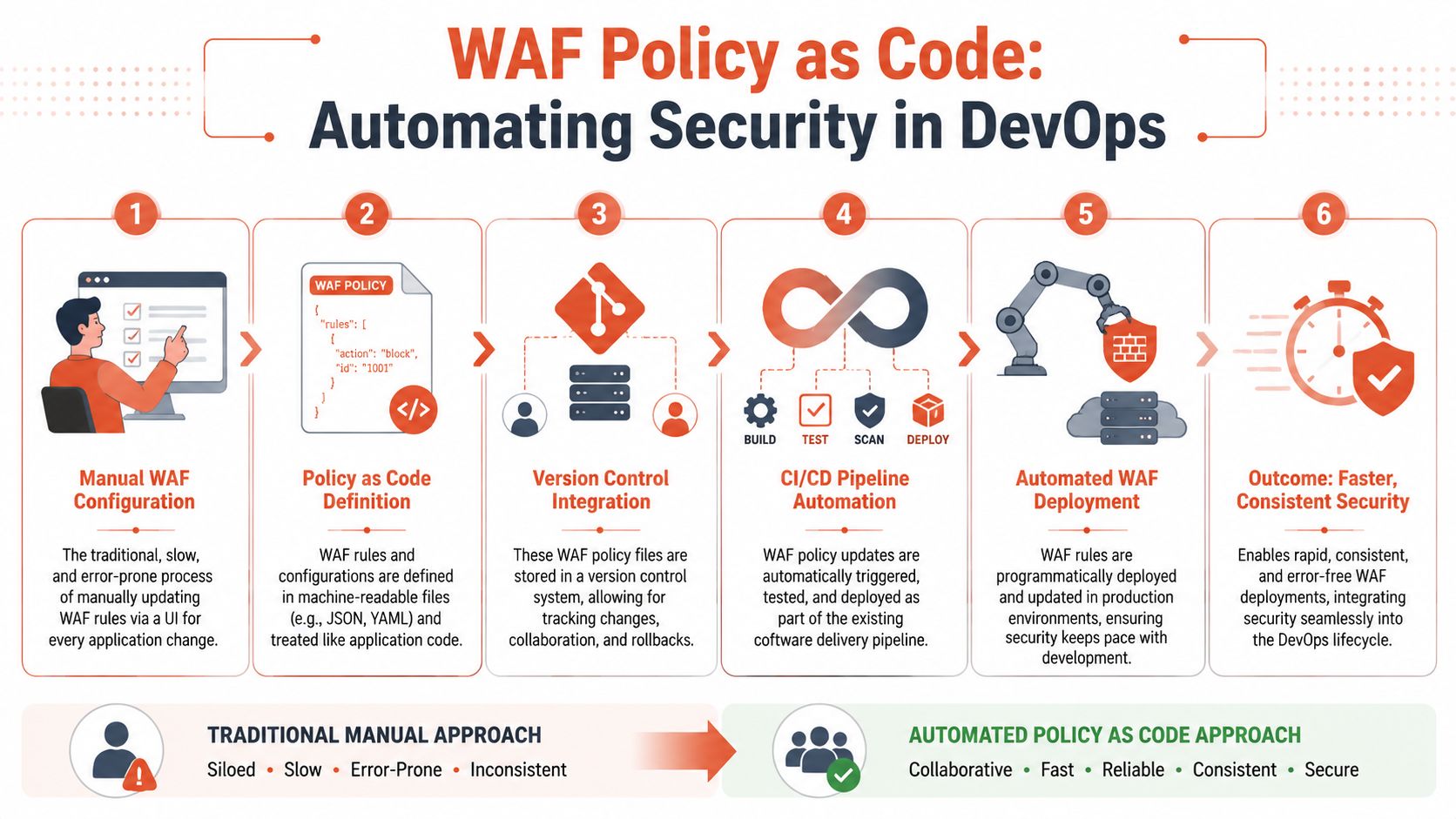
A manual WAF workflow relies on people clicking through a console, editing rules directly in production, and hoping the changes are documented somewhere useful.
A policy-as-code workflow is different:
- Rules are defined in machine-readable files
- Changes go through review
- Deployments happen through the CI/CD pipeline
- Rollbacks are possible without guesswork
That shift matters because it turns WAF management from tribal knowledge into an auditable engineering process.
Why observability matters as much as blocking
A WAF that only blocks traffic is leaving value on the table.
Splunk's WAF data model overview highlights traffic inspection logs, attack detection data, performance metrics, threat intelligence, and compliance reporting as part of the telemetry surface. In practice, that means WAF events can tell you much more than “request blocked”.
They can help teams answer operational questions such as:
- Did blocked traffic spike right after a deployment?
- Is a noisy endpoint under attack, or did a new frontend release change request shape?
- Are repeated exceptions pointing to an application design problem?
- Which routes need tighter positive validation because abuse is recurring?
Operational advice: If WAF logs don't land in the same observability and incident workflow as deployment events, teams will struggle to separate attacks from misconfiguration.
The workflow that actually scales
A workable model usually includes:
- Reviewed policy changes in Git rather than emergency console edits
- Environment-specific promotion so new rules can be validated before production
- Shared telemetry across platform, security, and application teams
- CI/CD integration so releases and edge policy stay aligned
When teams adopt zero-maintenance CI/CD pipelines, this kind of security integration becomes far more realistic. The point isn't adding more process. It's removing brittle manual work so the WAF becomes an automated guardrail instead of a release blocker.
Your WAF Evaluation and Implementation Checklist
A WAF evaluation should never end with “does it block SQL injection?” Most products can make that claim. The harder question is whether your team can operate the thing without creating a permanent drag on delivery.
Ask these questions before you choose
Can it fit your deployment model
If you deploy across AWS, GCP, and Azure, check whether policies, logging, and rollout workflows stay consistent enough to manage centrally. If they don't, you're signing up for duplicated platform work.
Can your team manage exceptions safely
Every WAF needs tuning. What matters is how that tuning happens. Look for an operating model that supports narrow exceptions, reviewable changes, and easy rollback.
Does it integrate with the systems you already trust
A WAF should feed the same observability, incident response, and audit flows your team already uses. If the security signal lives in its own silo, it will be slower to diagnose and easier to ignore.
Evaluate total cost, not just licence cost
Use this shortlist when comparing options:
- Engineering ownership: Who will maintain rules, triage alerts, and approve exceptions?
- Release fit: Can policy changes move with application changes?
- Multi-environment discipline: Is there a clean path from test to staging to production?
- Auditability: Can you explain why a rule changed and who changed it?
- Platform impact: Will this add another dashboard and another manual process?
What good looks like
A strong web application firewall programme has clear edge protection, route-aware policy, central visibility, and minimal manual drift.
A weak one has broad default rules, ad hoc exceptions, poor telemetry, and a growing list of “temporary” workarounds.
For most growing software companies, the strategic decision isn't which WAF logo to buy. It's whether security controls will be absorbed into a reliable platform model, or pile up as more DIY infrastructure your engineers have to nurse forever.
Frequently Asked Questions About WAFs
Do we still need a WAF if we already use secure coding, SAST, and DAST
Yes. Those controls improve the application and development process. A WAF protects traffic at the edge.
They solve different problems. Secure coding reduces defects. Scanners help find issues. A web application firewall adds a live enforcement layer in front of public endpoints. That's classic defence in depth.
What can't a WAF protect against
Oligo's in-depth WAF guide makes the limitation clear. WAFs cannot fix underlying application vulnerabilities and are not a replacement for network firewalls or broader security layers. They are also challenged by novel bot abuse, credential stuffing, and low-and-slow API attacks that mimic legitimate traffic.
That means a WAF won't save you from:
- Business logic flaws: If your workflow allows abuse, the WAF may not recognise it as malicious.
- Deep authentication problems: Credential attacks that look like valid login attempts are hard to distinguish without additional controls.
- Unknown attack paths: A WAF helps, but it won't replace patching, code review, or application security testing.
Is a WAF the same thing as an API gateway
No. They're complementary.
An API gateway focuses on routing, authentication support, versioning, rate management, and API lifecycle concerns. A WAF focuses on inspecting HTTP/HTTPS traffic for malicious patterns and enforcing security policy at the application edge.
Sometimes a single vendor offers both capabilities in one platform, but the functions are still different.
Should we run a WAF in blocking mode or logging mode
Start with enough visibility to understand what the rules are seeing, then move to enforcement deliberately. Critical routes often justify stricter controls earlier, especially if request patterns are well understood.
The worst outcome is indefinite hesitation. A WAF left half-configured for months creates operational noise without delivering full protection.
Does a WAF slow down releases
It can, if rule management is manual and detached from delivery.
It doesn't have to. The teams that get the most value from WAFs treat policy changes as part of the engineering workflow, not as special-case security admin work done in a separate console.
What should a CTO care about most
Not the brochure claims. Care about operational fit.
If your team can't version rules, review exceptions, correlate WAF events with deployments, and manage policy consistently across environments, the WAF will become another tool that absorbs engineering attention. Protection matters. So does the shape of the work required to keep that protection reliable.
If your team wants the protection and operational discipline described here without building more infrastructure around it, PushOps is worth a look. It gives software teams a production-ready cloud platform across AWS, GCP, and Azure, with deployments, environments, observability, security controls, and policy enforcement built into the workflow so engineers can spend less time maintaining tooling and more time shipping product.

