

Your team ships a feature on Friday. By Monday, the post-release discussion has nothing to do with the feature.
An auditor has flagged inconsistent access controls. GitHub has MFA enforced for some users, but not every admin path. A cloud console is protected, yet someone still has an old static credential on a laptop. The CI runner can deploy to production, but nobody can say with confidence how that access is protected end to end.
That's where multi factor authentication stops being a checkbox and starts becoming an infrastructure problem.
Most engineering leaders already know MFA matters. The frustration comes later. The moment you try to apply it consistently across people, cloud consoles, command line access, CI/CD, break-glass procedures, contractors, and multiple cloud providers, the work multiplies fast. What looked like an identity setting turns into platform engineering, security operations, and support overhead.
Your Team Is Shipping Features Not Managing Security Audits
A lot of teams hit the same wall at roughly the same stage of growth. The company is no longer small enough to rely on trust and tribal knowledge, but not yet big enough to have a dedicated platform team for every control. So engineering ends up carrying the gap.
One developer signs into AWS through SSO with a decent policy. Another still has an access path through a local tool that nobody has reviewed in months. The production deploy job runs under a service identity created during a rushed launch. A contractor was onboarded quickly, then never fully removed from every system. None of these look catastrophic in isolation. Together, they create the kind of messy access surface that auditors and attackers both notice.
Why this gets painful fast
The hard part isn't enabling MFA on one system. The hard part is making authentication controls consistent across all the places where power lives.
For a growing cloud team, that usually includes:
- Developer identities: GitHub, Google Workspace, Microsoft 365, Slack, cloud consoles, incident tooling.
- Operational access: Kubernetes dashboards, SSH alternatives, database admin tools, secrets managers.
- Automation paths: CI/CD runners, deploy bots, infrastructure pipelines, scheduled jobs.
- Emergency access: break-glass accounts, recovery workflows, temporary escalation for incidents.
Security problems rarely start with the control you forgot to buy. They start with the access path you forgot to standardise.
This is why MFA deserves attention from the CTO, not just the IT admin. If your platform is spread across AWS, GCP, and Azure, and your team is already juggling deployment automation, observability, and cloud cost control, building a reliable authentication layer yourself can absorb roadmap time for months.
What Multi Factor Authentication Actually Means
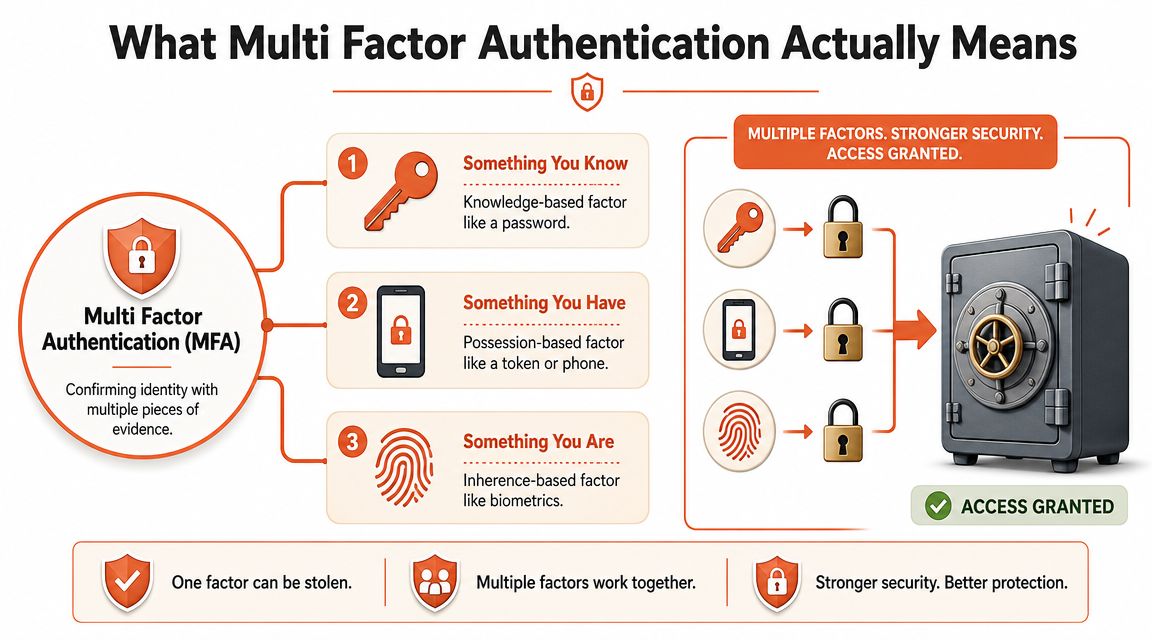
Multi factor authentication means verifying identity with at least two independent factors, not just a password.
The simplest way to think about it is a bank safe deposit box. Having the key alone isn't enough. Knowing the code alone isn't enough either. Access requires more than one kind of proof. That's the whole point. If one factor is stolen, the attacker still doesn't have everything needed.
The three factors that matter
Most practical MFA discussions come down to three categories:
| Factor type | What it means | Common example |
|---|---|---|
| Something you know | Knowledge only the user should know | Password, PIN |
| Something you have | A device or token in the user's possession | Authenticator app, security key, phone |
| Something you are | A physical characteristic | Fingerprint, face scan |
The reason passwords fail on their own is obvious to anyone who has run a modern engineering organisation. Passwords get reused. They get phished. They get copied into password managers, scripts, tickets, and internal docs. Even when your people behave well, credentials still leak through old integrations and forgotten accounts.
Why the distinction matters in practice
A second step doesn't automatically mean strong security. If the second step is weak, badly implemented, or easy to bypass operationally, you've added friction without much protection.
That's why implementation details matter more than the acronym. A clean setup guide such as EnvManager 2FA setup is useful because it shows the operational side teams often underestimate: enrolment, backup methods, and user recovery, not just the login prompt itself.
Practical rule: MFA works when the factors are independent and the recovery path isn't weaker than the login.
For engineering leaders, that's the crucial lens. Don't ask whether MFA exists. Ask what factors it uses, where it's enforced, and whether the fallback process negates the benefit.
Comparing MFA Methods The CTOs Cheat Sheet
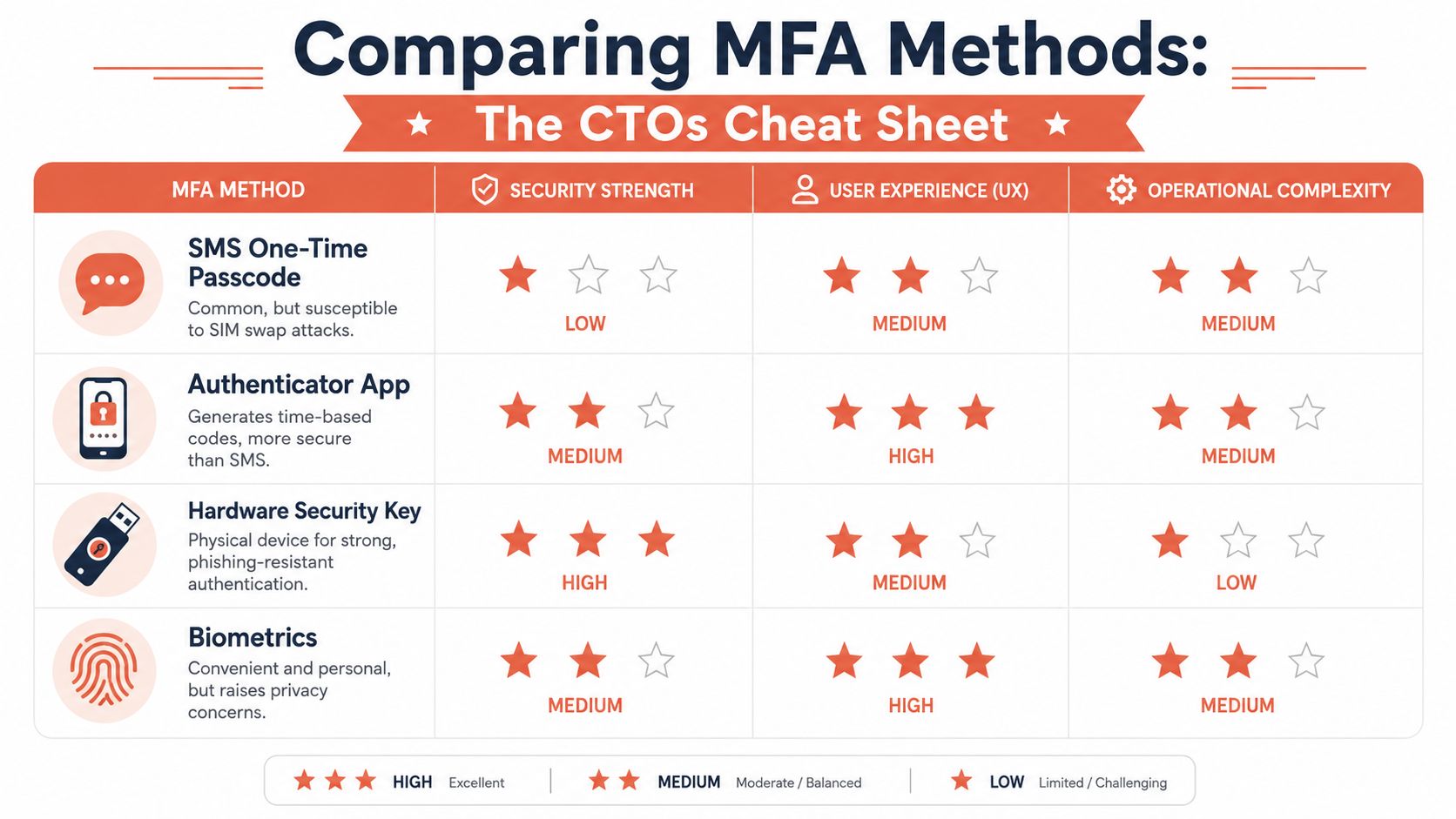
Not all MFA methods deliver the same security. Some are easy to roll out but weak against common attacks. Others are much stronger but require more planning, device support, and user education.
For a CTO, the decision is rarely about theory. It's a trade-off between security strength, developer friction, and operational burden.
What each method looks like in the real world
Here's the practical view:
| Method | Security view | UX view | Ops view |
|---|---|---|---|
| SMS codes | Familiar, but weaker | Easy for most users | Simple to start, messy under attack |
| Authenticator app codes | Stronger than SMS | Reasonable once enrolled | Manageable for most teams |
| Push notifications | Convenient, but can create prompt fatigue issues | Very good when users trust the flow | Depends on vendor ecosystem |
| FIDO2 or WebAuthn security keys / passkeys | Strongest option for phishing resistance | Excellent after rollout, but needs setup discipline | Best for high-value access, needs planning |
| Biometrics | Useful as part of device-based auth | Usually smooth | Tied to endpoint and platform choices |
SMS is common, not strong
SMS remains popular because it's easy to explain and easy to switch on. That doesn't make it a good default for sensitive systems.
National cybersecurity guidance for public institutions in regions like Lithuania now emphasises phishing-resistant MFA over SMS because OTPs sent by SMS are vulnerable to interception and SIM-swap attacks, and possession-based authenticators such as FIDO2 or WebAuthn security keys and device-bound passkeys are technically stronger for reducing account takeover risk, as reflected in the NIST MFA glossary guidance.
If you want a quick reminder of why phone-number-based flows shouldn't be treated as trustworthy by default, look at how easy it is to obtain temporary numbers through services like quackr SMS numbers. That doesn't prove every SMS workflow is broken, but it does show why security teams don't treat phone possession as a clean identity signal.
What usually works best
For most software teams, the pattern that holds up is straightforward:
- Use authenticator apps as a baseline for broad compatibility.
- Require phishing-resistant methods for admins, production access, and finance-related workflows.
- Use passkeys or hardware keys where the blast radius is high.
- Avoid SMS as the primary method for privileged users.
If an account can change infrastructure, rotate secrets, alter billing, or deploy code, it deserves stronger authentication than a text message.
The important point isn't to chase the fanciest method everywhere. It's to match the method to the risk, then make that policy enforceable across your stack.
The Hidden DevOps Tax of DIY MFA Implementation
The implementation of MFA is often considered an administrative task. In reality, the login screen is the easy part. The expensive part starts after that.
You can turn on MFA for a SaaS app in an afternoon. Then the deeper questions arrive. How do developers authenticate securely to deployment tooling from the command line? How do you control privileged access during incidents? What about automation that can't tap an authenticator app? What replaces the long-lived keys your pipelines still depend on?
Where the work actually shows up
The hidden tax usually appears in four places.
- CLI access: Developers need to run commands against cloud APIs, clusters, secrets stores, and internal tooling. MFA in a browser session doesn't automatically protect every local workflow.
- CI/CD identities: Pipelines often use service accounts, tokens, or federated identities. If these are bolted on over time, they become difficult to review and harder to rotate safely.
- Recovery and exceptions: Lost devices, locked-out admins, emergency access, and contractor offboarding all need process design, not just technology.
- Auditability: It's one thing to enforce MFA. It's another to prove who accessed what, under which identity, and whether policy was applied consistently.
Why bespoke solutions age badly
Engineering teams often patch these gaps with scripts, ad hoc wrappers, and one-off IAM rules. That can work for a while. Then the stack expands. You add another cloud account, another environment, another deploy path, another vendor login, another support escalation flow.
Soon you're maintaining a private identity platform without meaning to.
A good example is CI/CD. Teams build pipeline logic, secret handling, and credential workarounds internally because each exception feels small. Over time, maintenance becomes the product. A cleaner model is to remove custom pipeline burden altogether, which is why a lot of teams move towards zero-maintenance CI/CD pipelines instead of layering more security controls on top of brittle deployment plumbing.
DIY MFA usually fails at the edges. Not at the main login, but in the handoffs between humans, scripts, vendors, and cloud APIs.
This is the broader platform lesson. Every custom access path you keep alive becomes another place where multi factor authentication has to be interpreted, adapted, or bypassed. That's expensive in staff time and dangerous in incident response.
Beyond Logins MFA for Your Entire Deployment Pipeline
Thinking about MFA only at the user login layer is too narrow for a modern engineering organisation. The most powerful actor in your environment may not be a person. It may be a deployment pipeline with rights to change production.
That matters because the cloud is API-driven. Infrastructure, secrets, releases, and rollbacks all move through authenticated requests. If your human users have MFA but your automation still relies on broad standing credentials, your strongest control is protecting the least dangerous path.
The high-privilege actor most teams overlook
A CI runner can deploy new application code, alter infrastructure definitions, fetch secrets, and trigger rollbacks. In many companies, that identity has more practical power than any individual engineer.
The right question isn't “does the deploy system use MFA” in the literal human sense. It's whether the system is anchored to strong identity controls, short-lived trust, and clear authorisation boundaries rather than reusable credentials scattered across tools.
What strong authentication looks like in pipelines
For deployment systems, the secure pattern usually includes:
- Short-lived credentials: Access should expire quickly instead of lingering in stored secrets.
- Workload identity: Services should authenticate as workloads, not by passing around copied keys.
- Approval on sensitive actions: Production-impacting steps should require stronger human verification where appropriate.
- Traceable execution: Every action should map cleanly to a user, workload, or approved workflow.
The broader logic is well established. The EU's 2018 PSD2 Strong Customer Authentication rules made MFA foundational for most electronic payments, and that shift mattered in Lithuania where the ECB reported that card payments accounted for 59% of point-of-sale payments by value in 2022, compared with 22% for cash and 16% for credit transfers. In a market already dependent on digital transactions, MFA became part of daily operations rather than a specialist control. The same source context also notes Microsoft's finding that more than 99.9% of compromised accounts do not have MFA enabled, which underlines why strong authentication belongs in modern identity design, not as an optional extra in a few admin screens, as summarised in these MFA adoption statistics and PSD2 context.
That same mindset applies to software delivery. If the process can move money, data, or production state, it needs stronger identity guarantees.
A practical next step is to evaluate the whole release path as one system rather than separate tools. In this context, a modern automated deployment pipeline guide becomes useful, because the security model should be designed with the deployment model, not patched on afterwards.
Rolling Out MFA Without Derailing Your Team
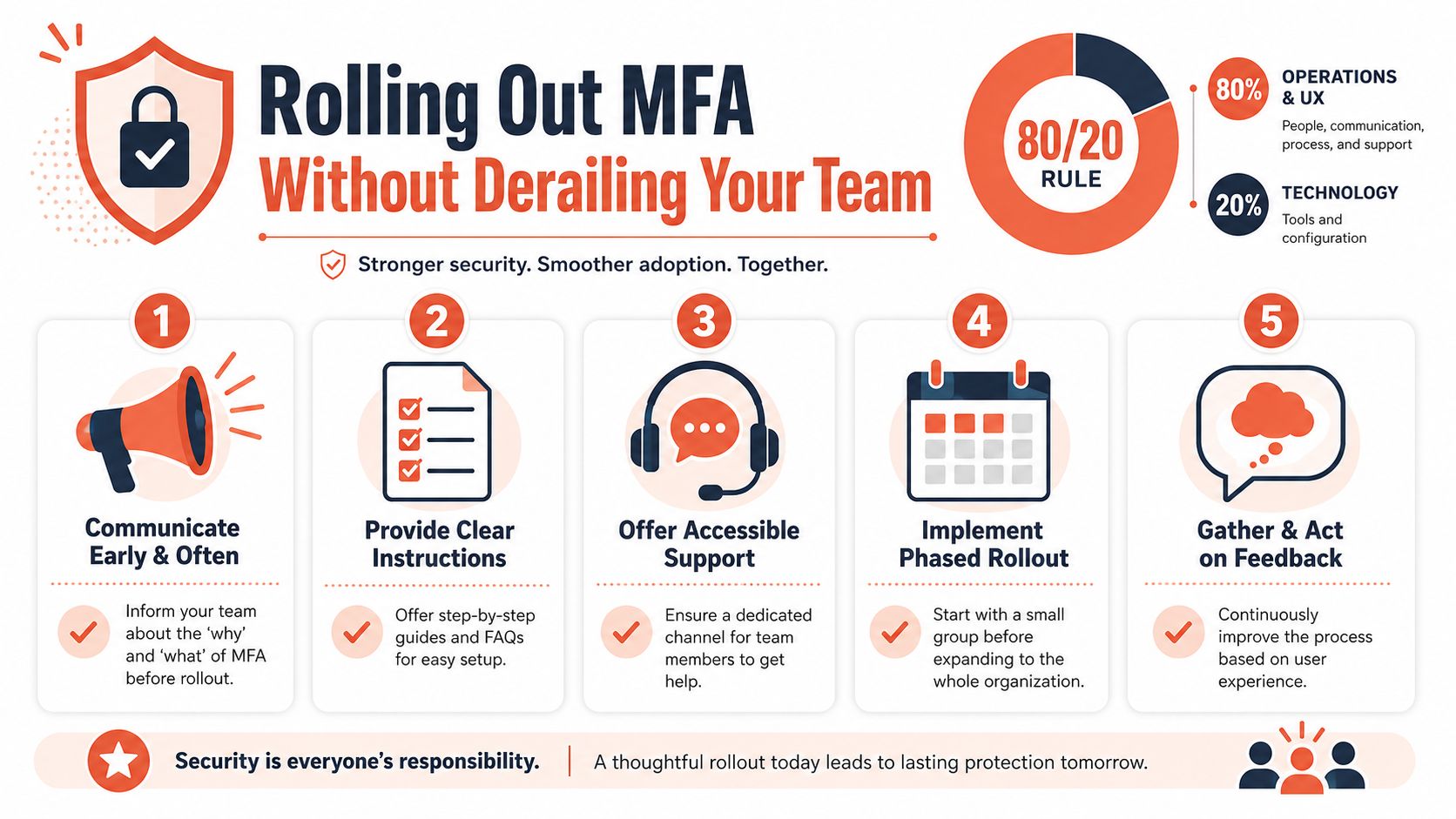
MFA rollouts fail for human reasons more often than technical ones. Teams resist controls that are confusing, slow, or easy to get locked out of. If your rollout creates daily friction for developers, they'll work around it or delay critical tasks until someone makes an exception.
That's why the rollout plan matters as much as the chosen method.
The operational model that avoids chaos
A workable rollout usually has a few characteristics:
Start with high-risk groups
Admins, finance users, cloud operators, and anyone with production access should go first. This reduces risk early and exposes policy gaps before a full rollout.Give people more than one supported path
If you mandate one method with no backup, lost devices turn into outages. Support at least one strong backup option and make the recovery process explicit.Document recovery before enforcement
Recovery is part of the control. If helpdesk staff can bypass identity checks casually, the rollout hasn't improved much.
Friction usually comes from poor edge-case handling
The most common trouble spots are predictable:
- Contractors and short-term staff: They need access quickly, but often sit outside normal device policies.
- Incident response: You can't design a security process that collapses when production is down.
- Shared operational habits: Teams still using copied credentials, shared admin accounts, or old scripts will hit resistance first.
Good MFA rollout design reduces support load because it removes ambiguity. People know how to enrol, how to recover, and what to do when access changes.
A CTO checklist worth enforcing
- Choose stronger methods for privileged paths.
- Phase policy enforcement instead of switching everything overnight.
- Test recovery with real scenarios, not just documentation.
- Remove legacy access routes once the new flow works.
- Review exceptions regularly so temporary access doesn't become permanent.
A managed platform tends to handle these workflows more cleanly because identity, access policy, audit logs, and deployment paths are designed together. That removes a lot of accidental complexity your engineers would otherwise own indefinitely.
The PushOps Approach From DIY Complexity to Unified Security
At some point, MFA stops being an isolated security feature and becomes a platform design choice. That's the key difference between piecing controls together yourself and adopting a unified operating model.
When the platform is fragmented, authentication policy fragments with it. One system supports passkeys. Another falls back to SMS. A third relies on inherited cloud permissions. CI/CD has its own secrets model. Audit logs are split. Recovery procedures differ by tool. Engineering spends time stitching together security instead of shipping product.
Why unified beats custom
A platform approach changes the economics. Instead of teaching every team how to secure AWS one way, GitHub another way, CI another way, and cloud access a third way, you standardise the control surface.
That matters in multi-cloud environments because the complexity isn't only technical. It's procedural. Onboarding, offboarding, approvals, production access, deployment trust, and auditability all need to line up.
If you're thinking about the broader design principle, architecture patterns for unified ops are a useful reference point. The value isn't a prettier dashboard. It's fewer disconnected control paths for people and systems.
What engineering leadership should optimise for
The goal isn't to give developers more security ceremony. It's to give them less infrastructure to maintain while raising the baseline.
That means prioritising:
- One access model across environments
- Stronger authentication for privileged workflows
- Consistent audit trails
- Less dependence on long-lived credentials
- Less bespoke CI/CD and identity plumbing
For teams trying to avoid building an internal platform from scratch, developer platform automation is often the more rational path than hiring more engineers to maintain the same sprawl with better documentation.
The best MFA implementation is usually the one your team doesn't have to reinvent. It's built into the way environments are provisioned, deployments are authorised, and access is governed across AWS, GCP, and Azure. That's what turns MFA from a recurring engineering burden into a stable part of delivery.
If your team is spending too much time stitching together cloud access, CI/CD security, auditability, and MFA policy by hand, PushOps is worth a look. It gives software teams a production-ready platform with security enforced by default, so engineers can spend less time maintaining infrastructure and more time shipping features.

