


A developer leaves. Their AWS access key was supposed to be rotated weeks ago. Someone remembers it might still be referenced in a CI job, a Terraform variable, or an old service that nobody wants to restart during business hours. At 3 AM, that stops being a security discussion and becomes an operations problem.
That's why encryption key management presents a greater challenge than often recognized. The hard part usually isn't encryption itself. It's controlling who can create keys, where they live, how they're used, when they rotate, how they're revoked, and how you prove all of that later under pressure.
Many engineering teams still treat this as a side concern. They bolt on secrets tools, write a few lifecycle scripts, and assume they've handled it. What they've built is fragile security scaffolding that demands permanent maintenance. Every new environment, cloud account, workload type, and compliance requirement makes that scaffolding harder to trust.
For regulated teams, this is even sharper. In Lithuania, for example, the legal foundation for cryptographic control is tied to the EU eIDAS framework and the national trust-service regime, and qualified electronic signatures based on secure signature-creation devices have had legal effect across the EU since 1 July 2016 according to Salesforce's overview of encryption key management and the Lithuanian trust context. That means key handling isn't just implementation detail. It can sit directly inside your compliance obligations.
The practical takeaway is simple. Key management isn't solved by hiring one more DevOps engineer and hoping they can hold the system together. It needs to be treated as a foundational platform capability, because the hidden cost of doing it badly always lands on engineering time, delivery speed, and risk.
Introduction
Your team launches a new service on Friday. By Monday, one environment is failing because a decryption key was rotated in one system but not another, audit logs are split across cloud consoles, and the engineers who should be shipping roadmap work are tracing access policies instead. That is what encryption key management looks like in practice. It is not a side setting in a security tool. It is ongoing operational work that reaches into delivery, uptime, and compliance.
For startup and scale-up teams, this burden arrives early. Product plans rarely include time for vault policy design, key rotation workflows, certificate renewal, break-glass access, or proving who used which key and when. But those jobs still exist, and they usually fall onto platform, security, and SRE teams already carrying too much.
Encryption protects data only when key control is disciplined. The problem is deciding where keys live, which services can use them, how access is approved, how rotation happens without breaking production, and how the company can prove control during an incident or audit.
Practical rule: If engineers are manually passing secrets between tools, environments, or people, the system is incomplete.
That operational load has a real risk profile. Lithuania's National Cyber Security Centre publishes annual incident reporting that shows how often security failures hit connected systems and critical infrastructure, not just isolated endpoints, in its 2023 national cyber incident review. In that kind of environment, poor key handling is not a paperwork problem. It is a production and governance problem.
Teams often start with a few scripts, cloud-native key stores, and local conventions. That can work for a while. Then the estate grows across AWS, GCP, Azure, Kubernetes, managed databases, queues, and third-party services, and the cost shows up everywhere: slower releases, fragile runbooks, audit gaps, and senior engineers spending their week on infrastructure nobody buys your product for.
This is classic undifferentiated heavy lifting. Key management still needs strong controls, but building and operating those controls yourself is usually the wrong use of engineering time. A managed platform that centralizes identity, secrets, policy, logging, and lifecycle work is often the better strategic choice, especially for teams that need to stay focused on shipping product.
What Is Encryption Key Management Really
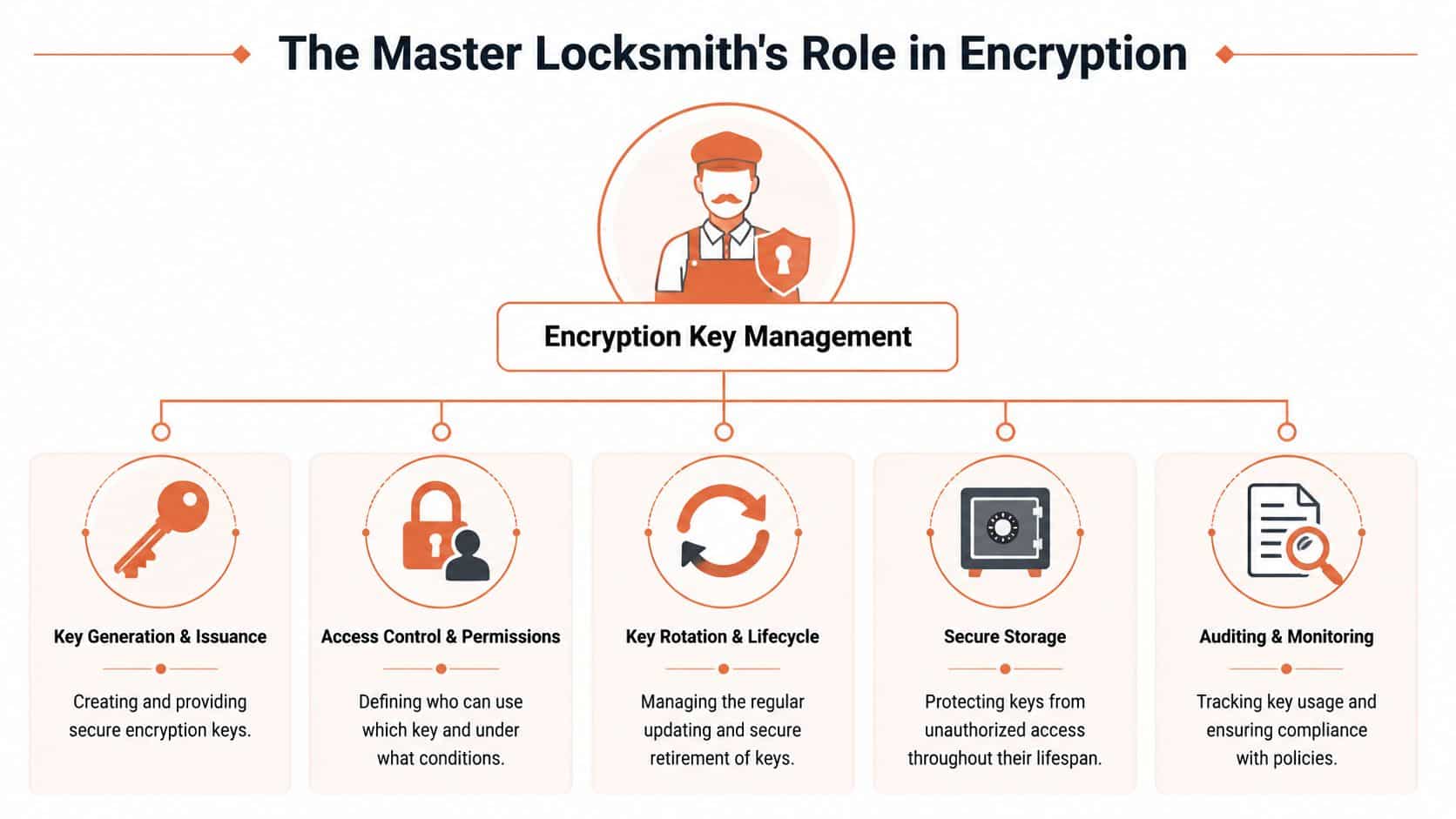
Encryption key management is the operating system for cryptographic keys across their full lifecycle, from creation to retirement. It covers who can generate keys, where they live, how services are allowed to use them, how they are rotated, and how the team proves control after an incident or during an audit.
That sounds narrow. In practice, it reaches into platform engineering, IAM, service design, deployment workflows, backup strategy, and compliance evidence.
The lifecycle is where the work lives
The usual shorthand is generate, store, rotate, revoke, destroy. That is accurate, but it hides the engineering burden. Every stage has failure modes, ownership questions, and operational cost.
- Generation means creating keys with sufficient entropy, the right protections, and a clear owner from day one.
- Storage means keeping keys in systems that are hardened, recoverable, access-controlled, and fully logged.
- Use means enforcing that only the intended workload or person can access a key, only for an approved purpose.
- Rotation means replacing keys without breaking running services, queued jobs, legacy integrations, or access to existing data.
- Revocation and destruction mean old access is removed for real, dependent systems are updated, and there is evidence the process completed.
Many internal setups often begin to fray. One team stores keys in a cloud KMS, another copies material into application configs for convenience, a third forgets that a background worker still depends on an old version. The cryptography may be sound. The operating model is not.
One key, one job
Good key management also depends on role separation inside the system. Guidance in the CMS Key Management Handbook, aligned with NIST SP 800-57 Rev. 5, states that a single cryptographic key should be used for one specific function. In practice, that means separate keys for encryption, integrity checks, key wrapping, and digital signatures.
That is not an academic design preference. It affects service boundaries, access policy, incident recovery, and blast radius. If one key is reused across functions, compromise is harder to contain and remediation gets messy fast.
The fastest way to make key management unsafe is to make it a shared concern with no clear owner for lifecycle, access, and audit evidence.
KMS, HSM, and BYOK are operating models
CTOs usually encounter three broad approaches:
| Model | What it means in practice | Main trade-off |
|---|---|---|
| Cloud KMS | You use the cloud provider's managed key service | Fast to adopt, but policy design and usage discipline still sit with your team |
| HSM | Keys are backed by tamper-resistant hardware controls | Higher assurance, higher integration and operating cost |
| BYOK | You generate your own keys and import or control them | More control, more governance, more room for process failure |
The mistake is treating this as a product comparison. The harder question is which model your team can run consistently across environments, on-call rotations, staff turnover, and audit pressure.
That is why encryption key management ends up being more than a security control. It becomes a recurring tax on engineering throughput. Teams that stitch together cloud services, scripts, manual approvals, and local conventions often build an internal security platform by accident. A unified DevOps cloud infrastructure platform is often the better choice because it centralizes lifecycle control, policy enforcement, and auditability without pulling senior engineers away from product work.
Choosing Your Key Management Architecture
Architecture choice shows up later as an operating cost.
A team can get pretty far with basic encryption controls and still end up in trouble six months later, when rotation jobs fail, access reviews pile up, an auditor asks for evidence across environments, or a production incident needs a key restored under pressure. The right question is not which option sounds strongest on a slide. It is which model your team can run cleanly at 2 a.m., during staff turnover, and under compliance scrutiny without turning platform engineering into a key custody team.
Cloud KMS is the practical starting point
For many teams, AWS KMS, Google Cloud KMS, and Azure Key Vault are the first sensible choice. They integrate well with native services, remove a lot of setup work, and give application teams a faster path to encrypted storage, secrets handling, and service-to-service protection.
The trade-off arrives with scale and sprawl. Each provider brings its own IAM model, policy syntax, audit logs, quotas, and service integrations. A design that is manageable in one cloud account becomes harder to reason about across business units, environments, and exceptions. That is where hidden cost starts to show up. Engineers spend time reconciling policy differences, writing glue code, and documenting edge cases that no customer will ever pay for.
For teams trying to avoid that drift, a DevOps cloud infrastructure platform can centralize lifecycle control and policy enforcement instead of leaving every squad to assemble its own pattern.
HSM raises assurance and operating burden
A Hardware Security Module gives stronger isolation for key material and tighter control over cryptographic operations. That matters in regulated environments, for high-value signing keys, and anywhere the business needs hardware-backed assurances rather than software controls alone.
The operational cost is not theoretical. HSM deployments usually mean more design work around provisioning, availability, backup, access separation, incident handling, and vendor integration. They also introduce procurement and capacity planning decisions that cloud-native teams often underestimate. The U.S. National Security Agency's guidance on hardware-backed key storage reflects why teams choose hardware protection for higher assurance use cases, but it also points to the stricter handling expectations that come with that choice.
HSMs make sense when the assurance requirement is real. They are a poor fit when a team is using them to compensate for weak process discipline elsewhere.
BYOK gives control to the customer and process burden to your team
Bring Your Own Key is attractive when customers want explicit control, when contracts require separation of duties, or when a security team wants tighter ownership over root key generation and import. On paper, that can look like the best of both worlds.
In practice, BYOK pushes more failure modes into your operating model.
Your team now owns key generation standards, import workflows, rotation coordination, revocation planning, recovery procedures, and the support path when a customer changes or withdraws a key. Product teams also inherit awkward edge cases. What happens to queued jobs, encrypted backups, or cross-region replication when a customer-managed key is disabled at the wrong time? Those are not abstract design questions. They become real incidents.
A practical comparison
| Criterion | Cloud KMS (e.g., AWS KMS) | Dedicated HSM | BYOK (Bring Your Own Key) |
|---|---|---|---|
| Setup complexity | Lower | Higher | Medium to high |
| Operational overhead | Moderate, rises across clouds and teams | High, with more lifecycle and availability work | High, because customer control creates more process and support paths |
| Compliance suitability | Good for many internal workloads | Strong for high-assurance and regulated use cases | Strong where contractual or customer-controlled encryption matters |
| Cost profile | Predictable early, then grows with policy sprawl | Higher direct spend plus integration and specialist effort | Often underestimated because the cost lands in engineering, support, and governance |
The mistake is treating these as interchangeable security features. They are operating models with different staffing, tooling, and audit consequences. If your business does not compete on custom key infrastructure, building and maintaining that machinery yourself is usually the wrong place to spend senior engineering time.
Key Management in a Multi-Cloud Reality
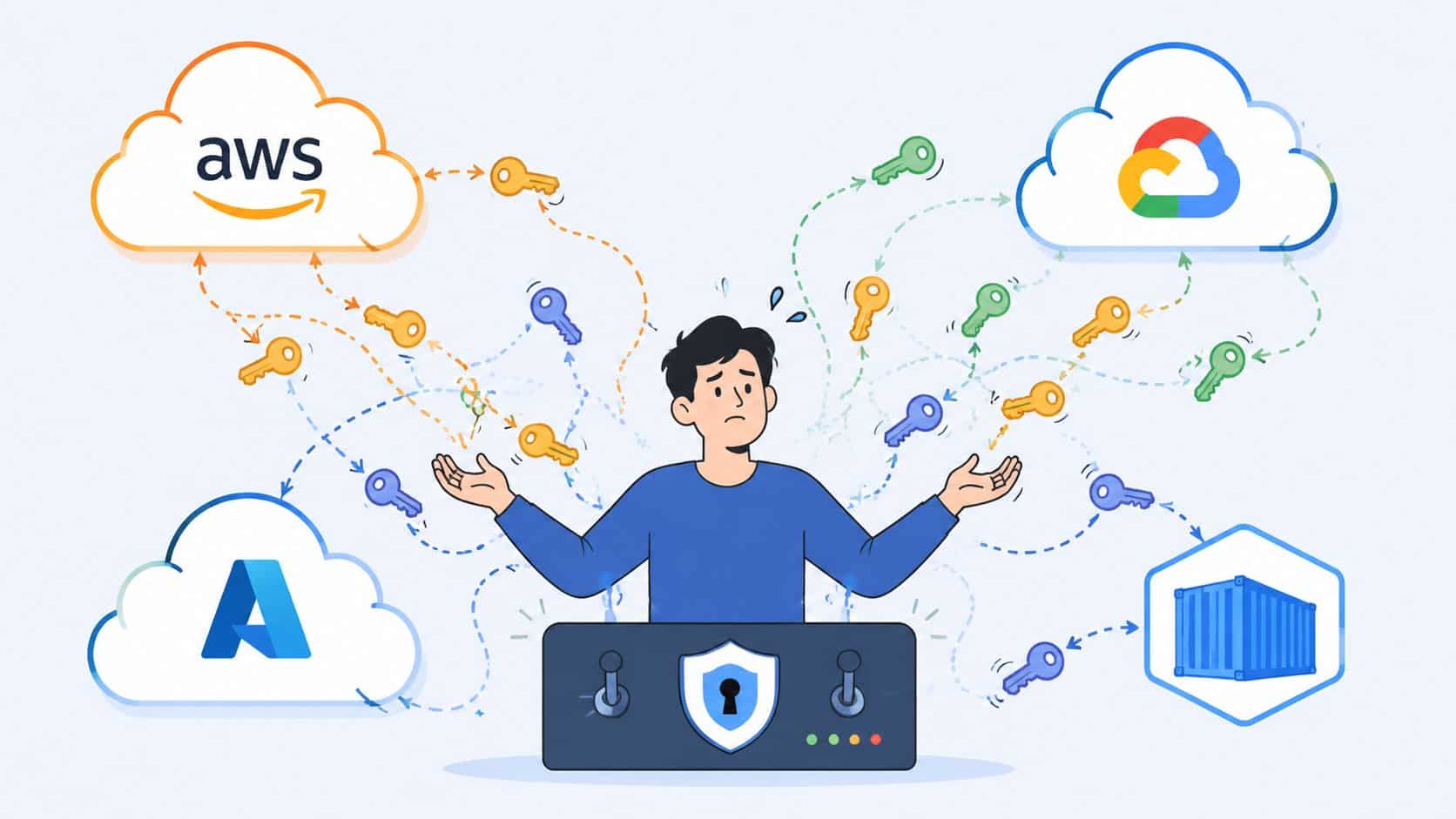
Monday starts with a failed deployment in AWS. By lunch, the analytics team is asking why a GCP job cannot decrypt yesterday's data. Before the day ends, security wants proof that the same rotation and access rules apply in Azure. That is what multi-cloud key management usually looks like in practice. Not a clean architecture diagram, but a stack of small differences that turn into operational drag.
Inconsistency is what breaks teams
The hard part is rarely generating keys. The hard part is keeping policy behavior consistent when each cloud has its own IAM model, logging format, service limits, and default assumptions.
A rotation rule exists in AWS, but the equivalent control in GCP was set up by a different team six months later. Azure emits the access event you need for audit, but it lands in a different system with different field names. One managed database supports customer-managed keys cleanly. Another requires a workaround. None of these problems look severe on their own. Together, they create an estate where nobody can answer a basic question with confidence: who can use which key, for what workload, and under which policy?
NIST SP 800-57 recommends defining cryptoperiods and rotating keys based on usage, sensitivity, and exposure, not leaving them in place indefinitely. In multi-cloud environments, a critical failure is not missing a date on a calendar. It is allowing every provider and team to interpret rotation differently, which creates weak spots that attackers and auditors both find quickly.
Ephemeral workloads make the control problem harder
Multi-cloud estates rarely consist of long-lived servers anymore. They run containers, batch jobs, functions, and managed services that appear briefly, request access, and disappear. Key management has to keep up with that pace.
That changes the engineering work:
- Access has to be issued per workload and per run, not granted broadly to a shared service account that accumulates permissions over time.
- Keys and secrets need runtime delivery, so they do not end up in container images, Terraform variables, or copied config files.
- Logs need a common shape across providers, or incident review turns into a manual reconstruction exercise.
This is one reason platform teams standardize aggressively. If you need developers to memorize provider-specific exceptions, they will either get them wrong or work around them.
More scripts do not solve the operating model
Teams often respond with Terraform modules, wrapper scripts, policy templates, and internal docs. I have seen that approach work for a while. It also creates a quiet tax on senior engineers, because every cloud feature, every acquisition, and every compliance request adds another exception path to maintain.
A better answer is a unified control plane that applies one policy model across clouds and workload types. That is the primary value of multi-cloud management. It reduces the number of places where policy can drift, and it gives security and engineering a shared source of truth.
The strategic question is simple. Do you want your team building custom glue for key policies, identity mapping, audit normalization, and incident handling across providers, or do you want them shipping product? For most companies, DIY key management across clouds is undifferentiated heavy lifting. A managed platform is usually the cheaper choice once you count engineering time, audit prep, on-call load, and the cost of mistakes.
Teams that need help standardizing those controls usually also need stronger automation discipline across delivery and infrastructure. A good starting point is to learn DevOps automation with GitDocAI.
Integrating Key Management into Deployment Pipelines
Security controls that interrupt delivery don't survive contact with a busy engineering team. They get bypassed, worked around, or deferred until after the release. Key management has to fit inside the deployment path developers already use.
What the clunky version looks like
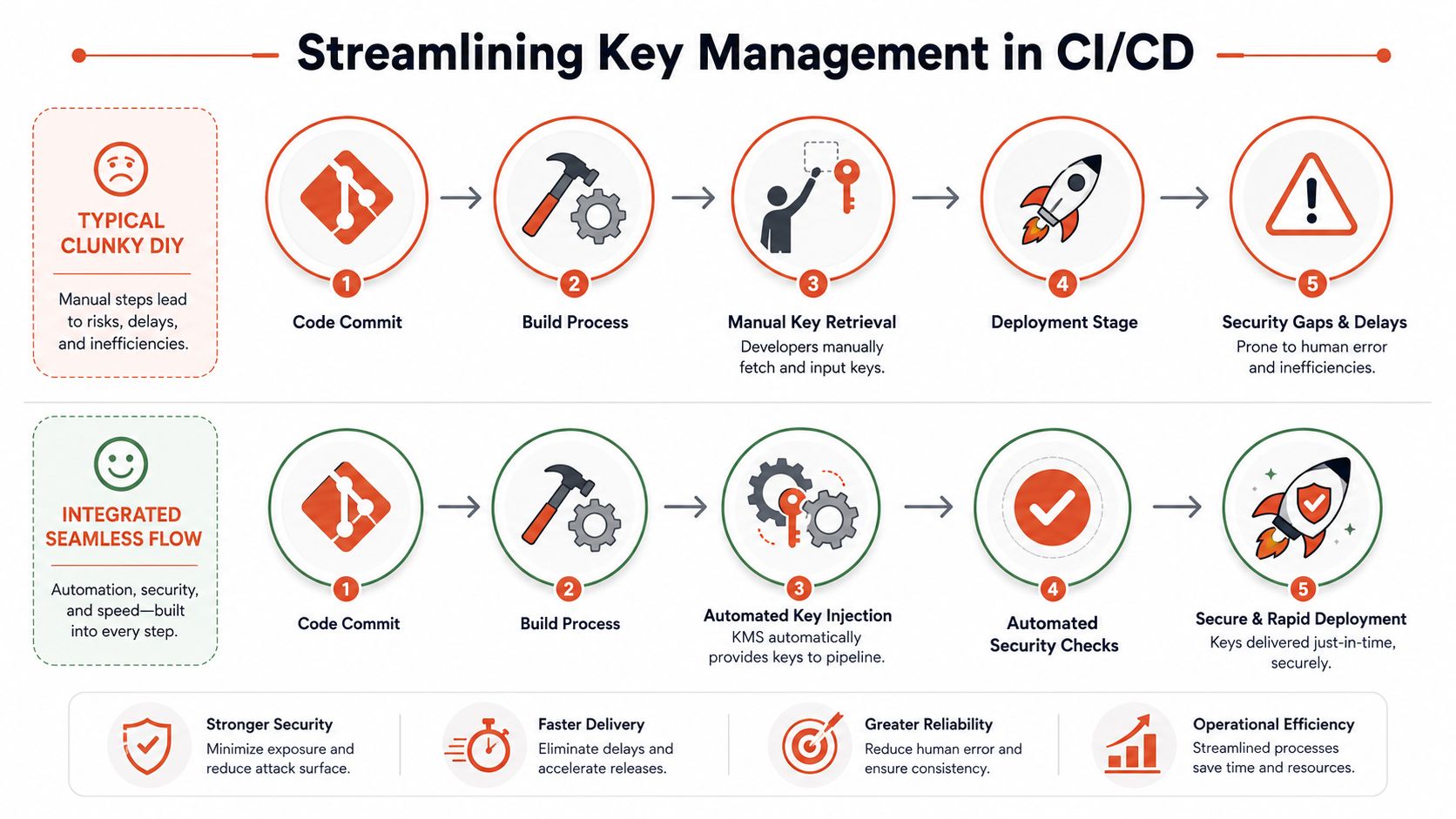
You've probably seen this pattern. Source code lives in GitHub or GitLab. CI runs in one system. Secrets live in HashiCorp Vault, cloud KMS, or a mix of both. Access is mediated through service accounts, shell scripts, and pipeline variables that grew over time.
The build works, until one part changes. Then someone adds a temporary workaround. Temporary becomes standard. A deployment depends on a secret fetch step that only two people understand, and nobody wants to touch it before Friday's release.
Key management thus becomes a delivery tax:
- Manual retrieval creeps in when automation doesn't cover edge cases.
- Permissions grow wider because narrow permissions break pipelines too often.
- Audit trails fragment across CI logs, cloud logs, and secret stores.
Teams trying to improve this often benefit from stepping back and reviewing how automation should work end to end. This primer on learn DevOps automation with GitDocAI is useful because it frames automation as operational design, not just scripting.
Runtime injection is the safer pattern
A stronger design gives workloads time-bound access at deploy or runtime. Developers don't fetch or paste keys. The platform authorises the workload identity, injects what's needed, and records the event centrally.
That matters even more for short-lived infrastructure. A frequently under-answered question is how to manage ephemeral and short-lived encryption keys in cloud-native systems, because mainstream guidance often focuses on the standard lifecycle and leaves a real operational gap for containers and serverless functions, as described in Splunk's key management overview.
The practical pattern looks like this:
- The pipeline authenticates as a workload, not a human
- The environment grants minimum necessary access
- Keys or derived secrets appear just in time
- Use is logged automatically
- Access expires without manual cleanup
If you want this to be reliable, the deployment system has to understand security context directly. Bolting security on after the pipeline is built usually produces friction. An automated deployment pipeline is most effective when key access, policy enforcement, and release flow are part of one design.
The secure pipeline isn't the one with the most controls. It's the one developers can use every day without handling secrets themselves.
That's the difference between policy on paper and policy that withstands production pressure.
Auditing Compliance and Avoiding Governance Nightmares
The painful moment usually arrives during diligence, not design. A large customer sends a security questionnaire. An auditor asks for evidence of key rotation and access control. Legal wants to know who could decrypt regulated data last quarter. If your answer depends on pulling records from three clouds, a CI system, and a secrets tool, key management has already become an operations problem.
Governance fails in the joins
Audit failures rarely come from having no logs at all. They come from fragmented evidence. AWS CloudTrail records one action, Azure logs another, GCP KMS logs a third, and your deployment system may track none of the approval context that explains why access happened in the first place. An auditor now needs correlation, interpretation, and tribal knowledge. That is expensive on a calm day and dangerous during an incident.
For teams operating in Europe, the compliance pressure is real. The SSL Store's summary of enterprise key management practices points to GDPR and NIS2 as drivers for stronger security-by-design expectations, including tighter control over access, rotation, and accountability in encryption programs, as noted in The SSL Store's best-practices discussion. The operational gap is not the policy language. It is execution across multiple providers. Cloud provider guides usually explain their native controls well, but they leave you to build the unified audit trail and role separation model that spans AWS, GCP, and Azure.
That gap creates governance debt.
A managed platform earns its keep here because it turns scattered events into one control plane. Instead of proving compliance by stitching together screenshots and exports, teams can show a consistent record of who requested access, which policy allowed it, what key material was used, and whether the action matched an approved workload or administrative role. That is the difference between a control that exists and a control you can defend.
A practical migration checklist
If the current setup is messy, fix the evidence path before chasing perfect architecture.
- Start with inventory. Identify where keys live, which services still depend on them, who can administer them, and which entries are leftovers from old projects.
- Define role separation early. Separate key administration, service usage, and policy approval so the same person is not creating, granting, and consuming access without oversight.
- Standardise audit collection. Pick one place where administrative actions and runtime usage events are retained, searchable, and tied back to identities your team understands.
- Prioritise high-risk rotation paths. Focus first on production data stores, customer-facing services, signing keys, and certificate workflows.
- Test recovery. Key revocation, accidental deletion, and lost access should have a documented runbook and a practice drill behind it.
- Migrate new services before legacy edge cases. Prove the operating model on systems that can adopt it cleanly, then work back toward older applications.
What auditors actually need
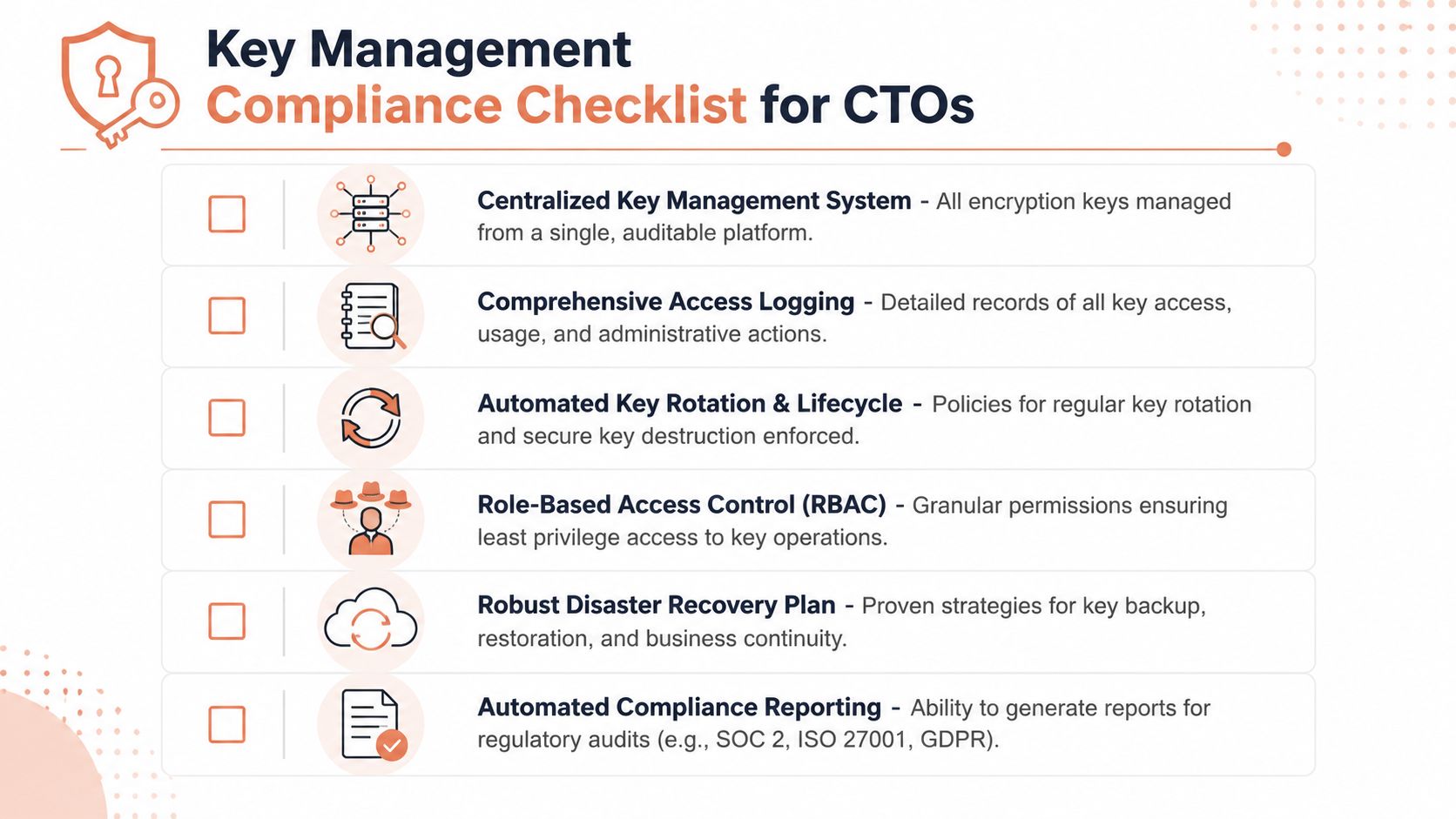
Auditors are looking for repeatability. They want to see that access is controlled by policy, key lifecycle actions are enforced, and evidence survives staff turnover.
A defensible setup usually shows:
| Area | What good looks like |
|---|---|
| Access | Role-based permissions with clear separation |
| Lifecycle | Rotation, revocation, and destruction policies that are enforced |
| Evidence | Central logs for administrative and usage events |
| Recovery | Documented backup and restoration processes |
This matters beyond infrastructure hygiene. If encrypted systems also process personal data, governance failures can quickly become data compliance problems, which is why Trackingplan on PII data security is a useful companion read.
The core trade-off is simple. You can spend engineering time building evidence collection, policy mapping, exception handling, and audit reporting across every environment, or you can use a platform that treats those controls as part of the product. For many organizations, DIY key governance is undifferentiated heavy lifting with a long maintenance tail.
Conclusion Stop Building Infrastructure Start Shipping Product
Encryption key management is essential. Building and operating it yourself, across clouds, pipelines, environments, and compliance demands, usually isn't the best use of your engineering team.
That's the uncomfortable truth for many CTOs. The DIY route feels like control at first. Over time it becomes maintenance, drift, and governance debt. Your best engineers end up babysitting secrets workflows, access policy, audit plumbing, and recovery procedures instead of building product.
If you're also looking at the broader data-protection picture, this guide to Trackingplan on PII data security is a useful companion because it connects infrastructure choices with real compliance exposure around personal data.
The strategic move is to buy more of this capability than you build. Teams win when secure, auditable, production-ready infrastructure is the default, not a side project that keeps expanding.
PushOps gives software teams a managed way to provision secure cloud foundations, automate deployments, enforce access controls, and keep auditability built in across AWS, GCP, and Azure. If you want your engineers spending less time maintaining infrastructure and more time shipping product, take a look at PushOps.

