
A familiar startup pattern looks efficient right up until the first serious incident. The product team moves fast, Terraform grows into a maze, Kubernetes gets “good enough” observability, and somebody stitches together CI/CD, alerting, cost dashboards, and security checks from half a dozen tools. Then a customer-facing service degrades, support starts escalating, and leadership discovers that nobody can answer the simplest question with confidence: are we meeting our service commitments?
That's where SLA management stops being a service desk term and becomes a platform question.
For CTOs, VP Engineering, and senior developers across Europe, Singapore, the UK, and the US, the problem usually isn't a lack of effort. It's that the team is spending too much of its best engineering time building and maintaining infrastructure plumbing when what the business needs is a reliable, production-ready platform across AWS, GCP, and Azure. If you're trying to ship product while also owning Kubernetes, CI/CD, monitoring, security controls, and cloud cost discipline, SLA management becomes one more fragile system to assemble yourself.
Why Your DIY DevOps Is Failing Your SLAs
A bad SLA week rarely starts with one catastrophic mistake. It starts with small operational gaps. An alert fires but routes to the wrong channel. A dashboard shows average latency, while a subset of customers gets a much worse experience. A ticket sits in the wrong state, and the SLA clock keeps running. By the time the team sees the pattern, the breach has already happened.
The common assumption is that the team needs to work harder or hire another DevOps engineer. In practice, the problem is often structural. DIY DevOps stacks are good at letting smart engineers prove they can assemble a platform. They're much worse at giving a growing business consistent operational discipline.
Free tooling is rarely free
The open-source route looks cheap on paper. The invoice for Prometheus, Grafana, Terraform, ArgoCD, custom scripts, and home-grown policy logic might be low. The labour bill isn't.
Teams relying on a “free” DIY DevOps approach incur approximately $300,000 annually in hidden expenses from engineers spending excessive time on infrastructure maintenance, security patching, and pipeline upkeep rather than shipping features, according to this breakdown of the hidden cost of DIY DevOps.
That cost shows up in places finance doesn't always see clearly:
- Platform babysitting: Senior engineers spend time fixing pipelines, rotating credentials, updating Helm charts, and patching clusters.
- Fragmented ownership: Nobody owns the whole SLA path from deployment to monitoring to incident response.
- Slow product delivery: Feature work waits while infrastructure debt gets serviced.
A lot of teams try to solve this by adding more internal abstraction. That often creates an internal developer platform without the resourcing, product thinking, or operational maturity required to run one well. If you want a useful overview of what proper platform automation should look like, this explainer on developer platform automation is a practical starting point.
Practical rule: If your senior engineers spend more time maintaining delivery machinery than improving customer-facing systems, your SLA problem is already a platform problem.
SLA management exposes weak foundations
SLA management sounds administrative. It isn't. It forces precision across systems your team may currently run as loosely coupled parts.
A DIY stack tends to break down in the exact places SLA discipline matters most:
| Where SLAs get tested | What DIY often looks like | Why it fails |
|---|---|---|
| Incident timing | Manual ticket states and ad hoc timestamps | Response and resolution data becomes unreliable |
| Availability tracking | Multiple dashboards with inconsistent definitions | Teams argue about the number instead of fixing the issue |
| Escalation | Custom alert rules and tribal knowledge | Critical issues don't escalate cleanly |
| Reporting | Spreadsheet exports and manual review | Breaches are discovered too late |
This is why mature teams stop treating reliability as a side effect of good intentions. They build or adopt systems that make the right behaviour the default.
From Promises to Metrics SLAs SLOs and SLIs
Most confusion about SLA management comes from mixing up promises, targets, and measurements. The easiest way to separate them is with a service everyone understands.
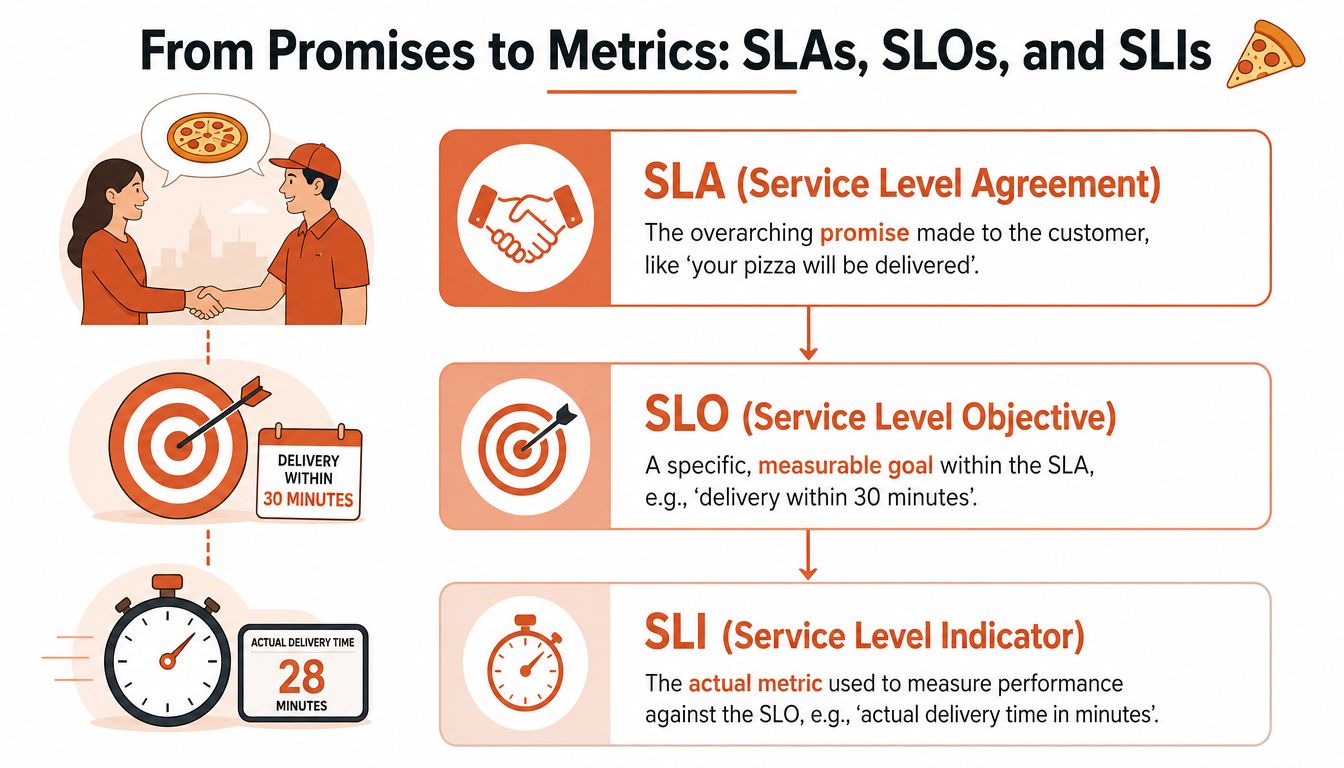
If a pizza shop tells you your order will arrive within a stated window, that's the customer promise. Internally, the shop aims to dispatch faster than that so it has room for traffic or kitchen delays. Then it measures actual delivery time for each order. That's the hierarchy.
The three layers that matter
SLA is the formal commitment made to the customer. It defines what the service provider owes, usually in terms of uptime, response, or resolution.
SLO is the internal target the team uses to stay safely ahead of that customer promise.
SLI is the actual measurement. Latency, availability, successful request rate, incident response time, and ticket resolution time all sit here.
That distinction matters because many organisations think they have SLA management when they really have a contract document and a few dashboards. They don't have a disciplined chain from promise to operational metric.
Across industries, the average SLA compliance rate is 88%, which means a 12% average SLA breach rate persists globally, according to industry SLA compliance statistics. For a startup or scale-up selling reliability to customers, that gap is not a background metric. It's a sign that many teams still haven't operationalised service promises properly.
The hard part isn't naming the metric
Choosing an SLI sounds simple until you're working in a distributed environment across AWS, GCP, or Azure. Which latency matters? API gateway latency? End-user request latency? Database query time? Are you measuring averages, percentiles, or something else?
The practical mistake is using metrics that are easy to collect instead of metrics that reflect user experience. Averages make operations look tidier than they are. Tail behaviour usually shows the actual picture.
A sound workflow is:
- Start with the user promise: what exactly are you committing to?
- Set an internal objective with buffer: leave room for normal operational variance.
- Choose an indicator that exposes bad experiences: not just the happy-path average.
- Review whether the data is trustworthy: if it comes from three tools and two scripts, expect disputes.
For teams building this manually, data wrangling becomes its own tax. Someone has to reconcile logs, monitoring data, ticket timestamps, deployment histories, and support states before leadership gets a reliable view.
Good SLA management isn't about collecting more numbers. It's about making sure the numbers actually describe customer experience.
If you want a practical primer on how to define, calculate, and monitor SLOs, that guide is useful because it stays close to implementation rather than theory.
The Four Stages of the SLA Lifecycle
Teams often treat SLA management as a reporting exercise. In reality, it's a lifecycle. The quality of your SLA operation depends on how well you handle four linked stages: design, monitoring, enforcement, and review.
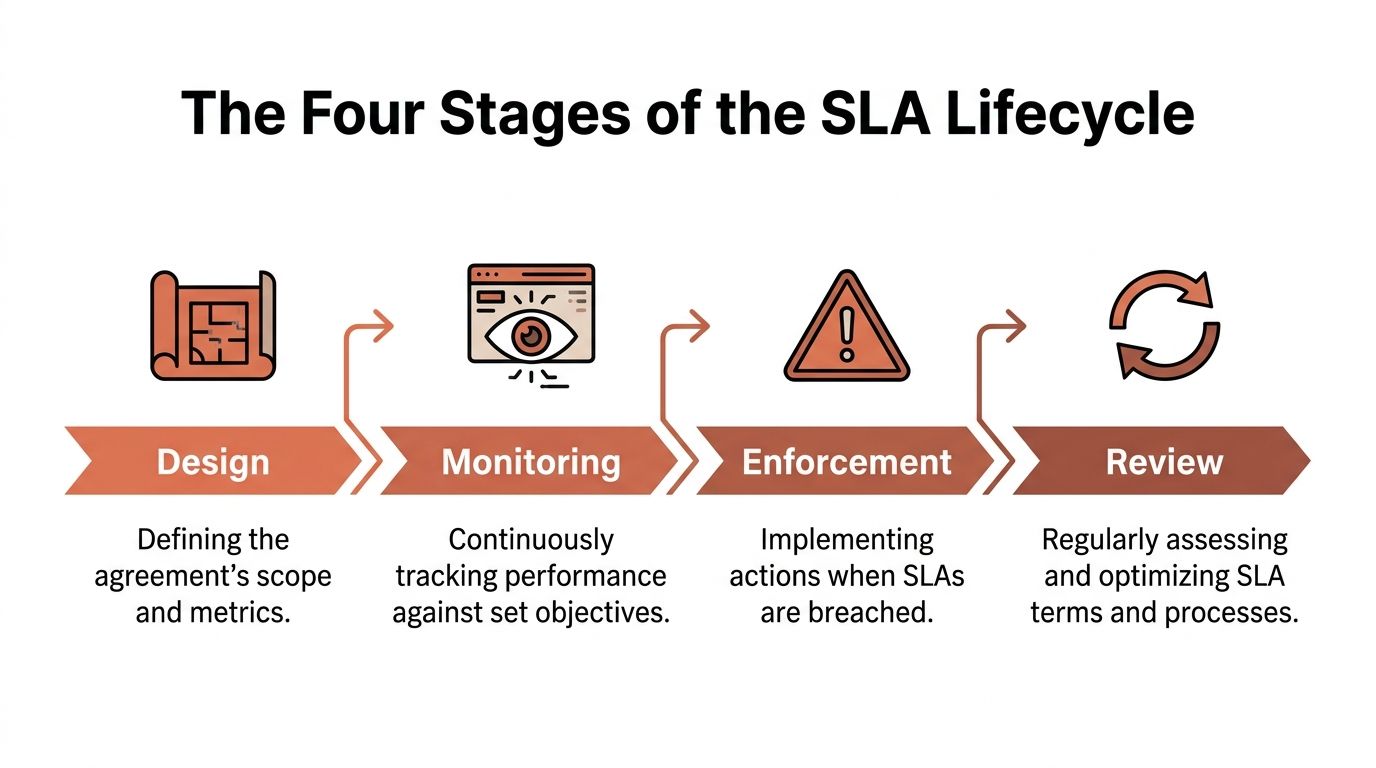
Design starts with realism
A product launch creates pressure to promise fast response and aggressive restoration times. Commercially, that's understandable. Operationally, it can be reckless.
For cloud infrastructure teams, aligning resolution targets with MTTR benchmarks is critical. Elite teams achieve MTTRs under 30 minutes, while typical teams average 2–4 hours, which makes aggressive breach thresholds risky if your own historical data doesn't support them, as outlined in this MTTR and SLA target discussion.
That means design work should include questions like:
- What incident classes do we handle well today?
- Which services need stricter commitments than others?
- Do we have evidence for the promised resolution window, or just optimism?
An SLA that sales can close but operations can't sustain is a liability dressed up as confidence.
Monitoring is where DIY stacks become noisy
Once the agreement exists, the team needs continuous visibility. Homemade platforms often start leaking time.
One service reports through Prometheus. Another uses a cloud-native dashboard. Support tracks customer-facing incidents in one system, while engineering tracks root cause in another. Suddenly, the same incident has different timelines depending on which console you open.
A workable monitoring layer needs consistency more than sophistication. It should answer the same core questions every time:
| Lifecycle stage | Operational question |
|---|---|
| Design | What exactly are we committing to? |
| Monitoring | Are we drifting toward breach right now? |
| Enforcement | Who acts when thresholds are threatened? |
| Review | What should change before the next quarter? |
Enforcement needs less heroism and more structure
The worst enforcement model is “the on-call engineer will figure it out”. That isn't a process. That's a dependency on individual effort under pressure.
Strong enforcement includes clear alert thresholds, escalation paths, ticket ownership, and handling rules for states such as customer waiting or third-party dependency. If those rules live in scripts that only one engineer understands, they won't stay aligned with the business.
Review is where most teams lose discipline
Quarterly SLA review shouldn't mean exporting CSV files and debating whose spreadsheet is correct. It should mean looking at breach patterns, response bottlenecks, ticket state misuse, service tier mismatches, and whether recent architecture changes improved reliability or just shifted noise around.
Operational advice: Review the system that produced the metric, not just the metric itself. A clean compliance number can still come from a messy process.
That's the full lifecycle. Most DIY approaches don't fail because the team ignores one stage completely. They fail because each stage is handled in a different tool, by a different group, with a different definition of reality.
Implementing Practical SLA Best Practices
Basic SLA management gets you a contract and a dashboard. Mature SLA management changes how engineering and support teams make decisions under pressure.
The difference shows up in the details. Not the obvious ones. The awkward ones teams usually postpone because they're difficult to implement cleanly.
Stop rewarding metric theatre
One of the fastest ways to damage reliability culture is to let teams hit the target on paper while users still feel pain. This happens when organisations define SLIs in ways that make reporting look better than reality.
Existing content rarely addresses how teams manipulate SLI definitions to meet targets without improving reliability. Reporting only averages hides tail performance failures, causing up to 40% of SLA breaches to be undetected until customer impact occurs, according to this discussion of SLA metric blind spots.
That's why good practice usually looks like this:
- Prefer indicators that expose tail pain: If a small but important slice of requests is bad, your customers still experience a bad service.
- Audit stop-the-clock logic: If tickets pause too easily, compliance rises while operational quality stays flat.
- Tie reliability metrics to customer outcomes: A green dashboard is worthless if support queues and escalations tell a different story.
Use clock rules that reflect reality
A mature SLA setup distinguishes provider delay from customer delay. If a ticket is waiting on customer input, the provider shouldn't keep burning SLA time for inactivity it doesn't control.
The mechanics matter. Automatic clock-pausing during customer-pending states helps measure provider responsiveness rather than customer delays. Timezone-aware business-hour scoping and pre-breach warnings also make a big difference in real service operations, especially for distributed teams and customers across regions, as described in this guide to service desk best practices.
A few practices consistently work:
- Pause the SLA clock automatically when the ticket enters a genuine customer-waiting state.
- Scope timers to real support hours if the contract isn't round-the-clock.
- Trigger warnings before breach, not at breach.
- Review exception rules regularly, because these are the first places people game the system.
Bring error budgets into the conversation
Error budgets create a healthier discussion than raw uptime arguments. They give engineering leaders a way to weigh change velocity against reliability without pretending there's no trade-off.
If a team is burning through its allowed reliability margin, it shouldn't keep shipping at the same pace and hope observability will save it. It should slow risky changes, improve recovery paths, or reduce operational complexity. That's one reason this explainer on how to reduce deployment failures is worth reading. Deployment reliability and SLA performance are tightly linked.
Teams with strong SLA discipline don't argue about whether reliability matters. They argue about where to spend the next unit of risk.
The best practices above are not complicated conceptually. They're complicated operationally. DIY environments make them brittle because every rule depends on manual consistency across tools, tickets, dashboards, and people.
Automating SLA Management with a DevOps Platform
Once you've lived through enough incident reviews, a pattern becomes obvious. Most SLA pain isn't caused by one missing feature. It comes from the joins between systems.
Deployments happen in one tool. Infrastructure state lives somewhere else. Monitoring spans cloud-native services, log pipelines, and third-party dashboards. Support tracks customer impact in another place. Security controls and cost visibility sit off to the side. Every handoff adds delay, ambiguity, and maintenance work.
What automation changes
A modern DevOps platform changes SLA management by collapsing those joins.
Instead of building the plumbing yourself, the platform standardises the path from infrastructure provisioning to deployment, observability, incident handling, policy enforcement, and cost control. That means teams spend less time translating data between systems and more time acting on it.
For startups and scale-ups, that matters immediately. European tech startups automating their DevOps infrastructure achieve a 40–60% reduction in setup time, where a new production environment that previously required 3 days of manual work now provisions in 30 minutes, according to this analysis of automated DevOps infrastructure in European startups.
That speed gain isn't just about convenience. It changes the economics of reliability work.
The platform removes common failure points
When SLA management sits on top of an integrated platform, several chronic problems become easier to control:
- Provisioning drift drops: Production foundations are created consistently across AWS, GCP, and Azure.
- Monitoring starts from a known baseline: Teams don't spend weeks wiring up dashboards before they can trust the data.
- Security becomes default behaviour: Role-based access, auditability, and policy enforcement don't need separate bolt-ons.
- Cost awareness stays close to operations: Reliability choices can be evaluated alongside cloud spend instead of after the fact.
A lot of engineering leaders know this in theory. They still hesitate because they assume platform adoption means losing flexibility. In practice, the opposite is often true. Teams regain flexibility because they stop wasting energy on maintenance.
If you want a broad operational view of mastering the DevOps process, that lifecycle perspective helps explain why stitched-together stacks become so expensive to run. The work is cumulative. Every layer you add needs ownership.
Buy back senior engineering focus
The hidden cost in DIY SLA management isn't only tool sprawl. It's the repeated diversion of your strongest engineers into routine platform upkeep.
In-house hiring often looks like the obvious answer. It usually isn't. In Western Europe, a mid-to-senior DevOps engineer carries a total annual cost between $120,000 and $200,000, excluding recruiting fees that average $20,000 to $40,000 per hire, according to this in-house versus outsourced DevOps cost comparison for 2026. On top of that, industry estimates indicate that a meaningful share of DevOps capacity gets consumed by maintaining pipelines, infrastructure-as-code templates, and monitoring configuration rather than improving them.
A managed platform replaces that maintenance burden with a system designed to keep evolving without becoming another internal product team you need to staff indefinitely. For a practical look at that model, see this overview of a DevOps cloud infrastructure platform.
The point isn't that internal platform engineering is always wrong. It's that many companies start building one far too early, then discover they've created a side business in operating delivery infrastructure.
Moving Beyond Firefighting to Strategic Reliability
The teams that handle SLA management well don't treat it as paperwork, and they don't solve it with another layer of scripts. They treat it as an operational capability that depends on platform quality.
That shift matters because engineering focus is finite. Industry estimates indicate that 15–25% of DevOps engineering capacity is permanently consumed by maintaining CI/CD pipelines, IaC templates, and monitoring configurations rather than improving them, according to this overview of DevOps implementation cost expectations. That's time your organisation can't spend on product differentiation, customer experience, or faster iteration.
What strategic reliability looks like
A more mature posture is usually visible in a few decisions:
- Leaders stop measuring platform success by tool ownership and start measuring it by reduced toil and better delivery confidence.
- Teams standardise production foundations so SLA reporting, escalation, and governance don't have to be reinvented service by service.
- Reliability work stays close to product goals instead of becoming a separate craft project for a small infrastructure group.
There's a useful mindset change here. Adopting a managed platform isn't about outsourcing responsibility. The engineering leadership team still owns service quality, customer commitments, and operational risk. What changes is that the company stops spending scarce product talent on rebuilding common platform capabilities.
Leadership test: Is operating your DevOps stack part of your competitive advantage, or is it the tax you're paying before real work can begin?
For most startups and scale-ups, the answer is uncomfortable but clear. Customers don't buy your product because you hand-built CI/CD maintenance workflows, custom SLA timers, and monitoring glue. They buy because your team ships valuable software reliably.
If your current stack keeps pulling engineers away from that work, the strategic move isn't to accept the distraction. It's to remove it.
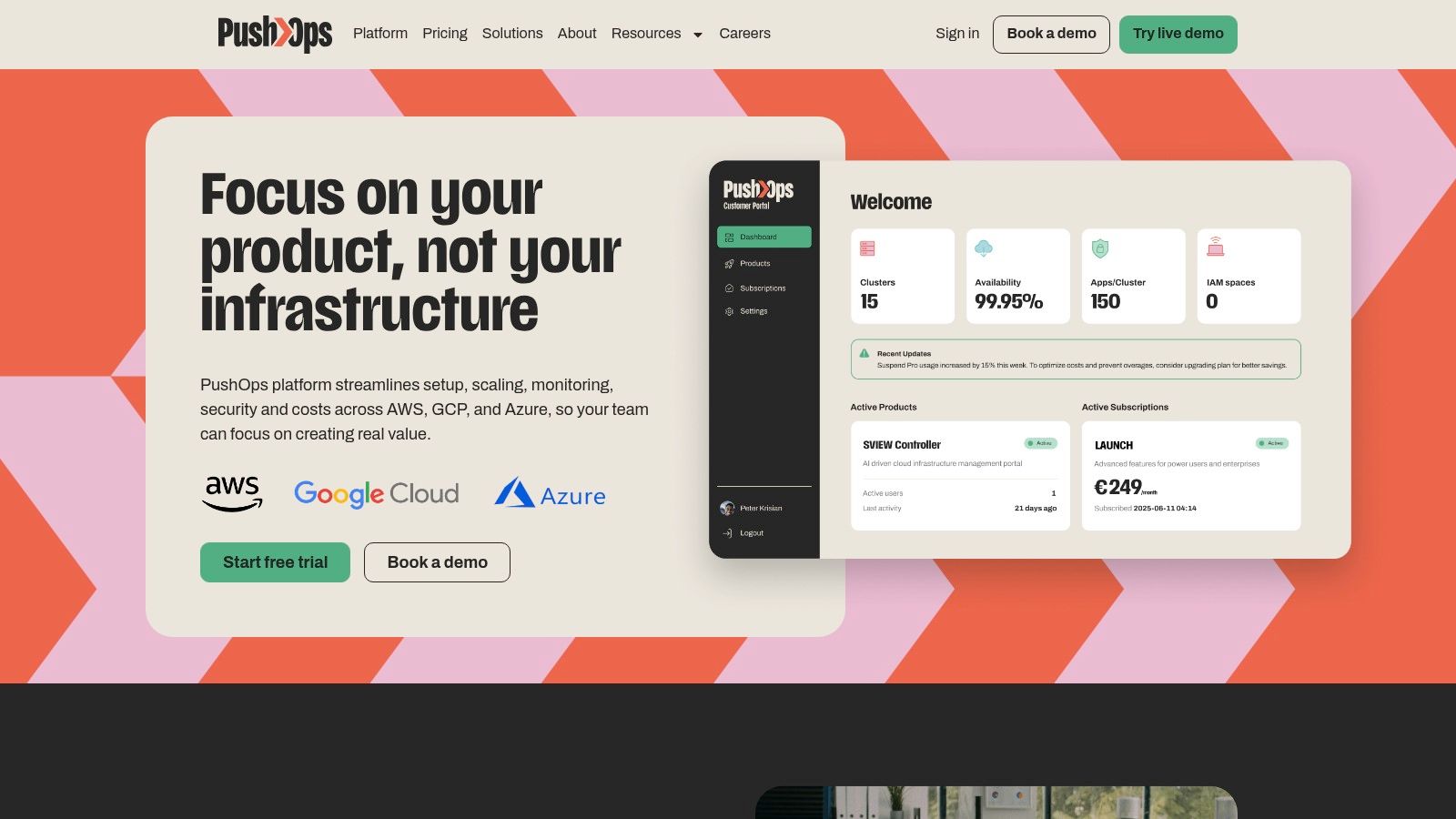
If your team wants production-ready infrastructure, integrated observability, safer deployments, built-in security controls, and clearer operational ownership without building an internal platform from scratch, take a look at PushOps. It's designed for software teams that want to spend less time on DevOps maintenance and more time shipping product across AWS, GCP, and Azure.

