


A release is ready. Product has done the hard work. QA has signed off. Sales is waiting for the feature because a live prospect asked for it. Then the rollout stalls on something small and painfully familiar: a database needs provisioning, a secret needs wiring into CI, an ingress rule needs changing, or a preview environment needs to exist for one more week.
The developer who built the feature can't finish the job without asking another team for help. So they open a ticket, paste context into Slack, wait for a response, and switch tasks. By the time the change lands, the engineer has lost momentum and leadership has accepted delay as normal.
That's usually the moment people say they need a self service portal. They're often right about the outcome and wrong about the project. What they want is not another internal website. What they want is a safe way for engineers to provision, deploy, inspect, and recover systems without becoming part-time platform operators.
The hard part is that a portal sounds small. It isn't. In most companies, a portal is the visible tip of a much larger platform. If you build it yourself, you're not just creating a UI. You're taking on an internal product with ongoing security, compliance, workflow design, cloud integration, maintenance, and support obligations. That's where many teams walk into a strategic trap.
Your Best Engineers Are Blocked and It's Costing You
A lot of engineering friction looks trivial when you inspect one ticket at a time. A new branch environment. A pipeline variable. A change to deployment permissions. None of these requests is dramatic on its own. Together, they turn your best engineers into queue managers.
I've seen this pattern in startups and scale-ups repeatedly. The first few infrastructure requests feel manageable because one DevOps engineer or staff backend engineer can still absorb them. Then the company adds more services, more environments, and more teams. Suddenly every release depends on a handful of people who understand the deployment path end to end.
The bottleneck is organisational, not personal
This isn't usually a staffing problem. It's a systems problem.
When developers need specialist help for routine operational work, the business creates a central dependency for everyday delivery. That dependency shows up as slower releases, more context switching, and more meetings to coordinate changes that should have been routine.
A healthy self service portal changes that dynamic. It gives engineers guardrailed access to the actions they need most often, such as:
- Environment creation: spin up the standard runtime for a service without filing a request
- Deployment controls: promote, pause, or roll back through approved paths
- Runtime visibility: check logs, health signals, and recent changes in one place
- Operational tasks: restart workloads, rotate routine config, or request approved access
That sounds straightforward. It isn't trivial to implement safely.
Teams don't ask for a portal because they love portals. They ask for one because waiting on infrastructure work has started to slow product delivery.
If this already feels familiar, it's worth looking at practical ways of reducing DevOps overhead before deciding that another hiring round or another internal tool is the only answer.
Where the frustration compounds
The damage shows up in places leaders often underestimate:
| Friction point | What engineers experience | What leadership pays for |
|---|---|---|
| Release dependency | Waiting for infra changes | Slower feature delivery |
| Tool sprawl | Jumping across CI, cloud, logs, IAM | Lower focus and more mistakes |
| Manual approvals | Re-explaining standard requests | Platform team saturation |
| Unclear ownership | “Who can do this safely?” | Delays and governance gaps |
The lesson is simple. If engineers can't complete the common path to production on their own, your delivery system is already working against you.
What Is a Developer Self Service Portal Really
A developer self service portal is often described as a dashboard. That definition is too shallow to be useful.
The better definition is this: it's the operator-facing front end of an internal developer platform. The portal is where developers request actions. The platform underneath decides what those actions mean, what guardrails apply, which cloud resources are touched, how identity is enforced, and what happens when something fails.
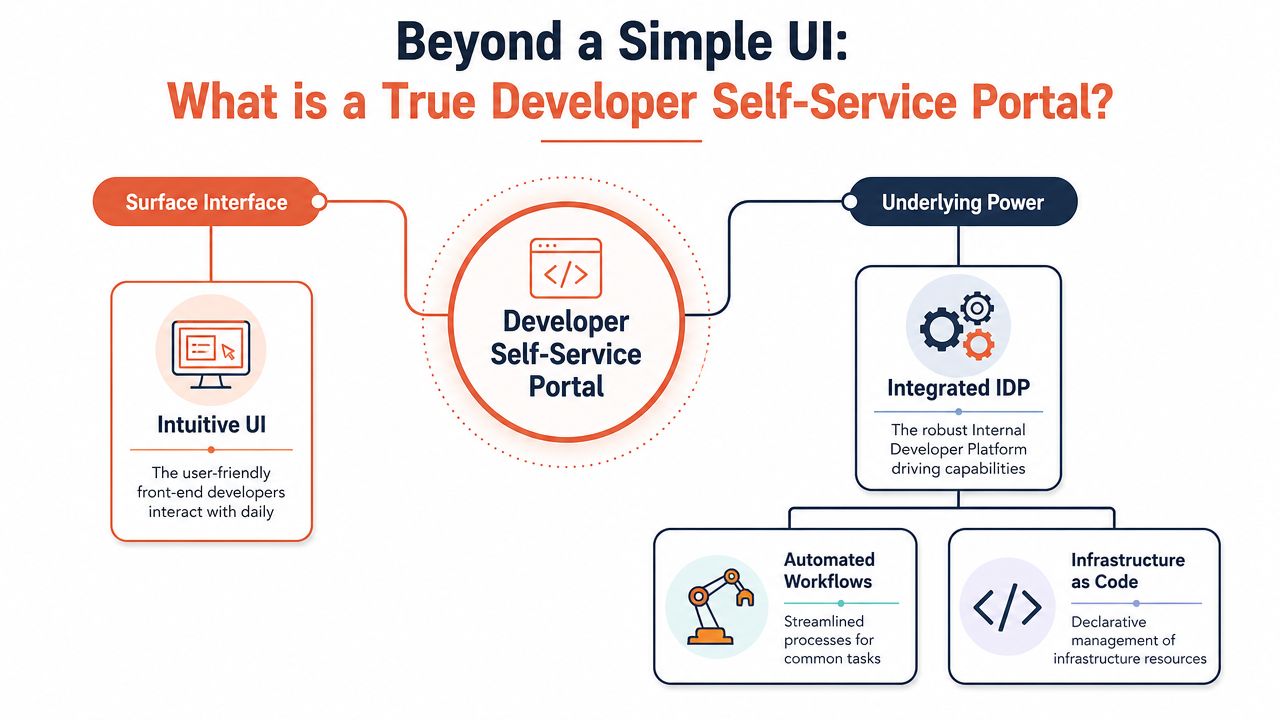
The portal is the visible layer
If an engineer clicks “create preview environment”, the UI is the least interesting part of the system. Underneath, something has to provision infrastructure, apply network policies, inject secrets, connect observability, expose DNS or routing, configure TTL rules, and register ownership. If any of that is missing, the button is theatre.
That's why teams get misled by the word portal. They scope a front end project and discover they've signed up for platform engineering.
Here's the practical distinction:
- A helpdesk portal routes requests to humans.
- A developer self service portal completes approved actions through automation.
- A mature portal also handles failure states, permissions, and auditability.
The hidden requirements underneath
The same underlying machinery is often required, whether teams realise it or not:
- Identity and access controls: who can act on which service, environment, and cloud account
- Workflow automation: repeatable paths for provisioning, deployment, rollback, and inspection
- Infrastructure abstraction: templates that hide Kubernetes, cloud primitives, and CI complexity
- Operational context: logs, metrics, events, and recent deploy history in one workflow
Practical rule: If a portal action still requires someone to “go sort things out in the cloud console”, the portal hasn't removed complexity. It has only moved it.
There's also a broader market reality behind self service design. In Lithuania, digital delivery expectations are already well established through the national e-government and digital identity model, including the shared state service layer known as VIISP. That matters because it reinforces a single-login, multi-service expectation around digital interactions rather than fragmented manual journeys, as noted in this overview of customer portal statistics and Lithuania's digital public-service foundations.
For engineering leaders, the takeaway is the same in private-sector environments. Users and developers both prefer one authenticated front door, not a patchwork of internal tools.
The Hidden Factory The True Cost of a DIY Portal
The first mistake teams make is budgeting for the build. The actual cost is the factory you create afterwards.
A DIY self service portal needs design, front end work, backend orchestration, cloud integrations, role models, templates, and deployment logic. That's just the opening move. Once it exists, someone owns uptime, bug fixes, security updates, workflow changes, cloud API drift, documentation, onboarding, and support.
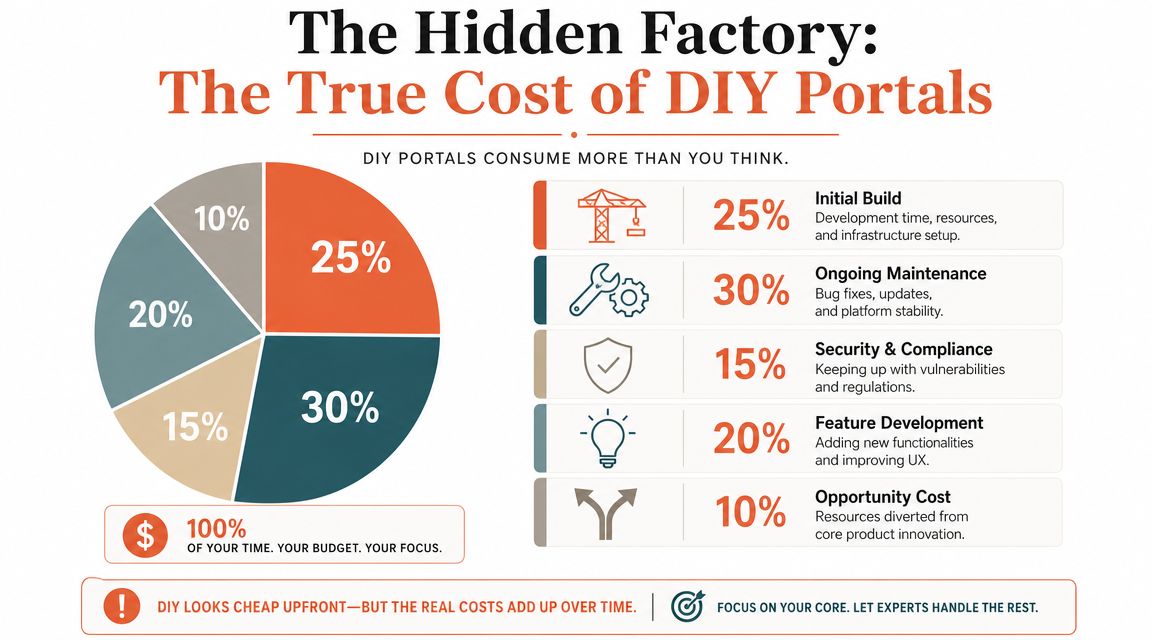
The build is only the beginning
Most internal platforms start with a sensible idea. Standardise environments. Reduce repetitive requests. Give developers guardrails. All good. Then reality arrives.
The team wants service templates. Then they need environment lifecycles. Then branch deployments. Then secrets. Then observability links. Then cost controls. Then auditability. Then multi-cloud support because one customer deal or one compliance requirement changes the roadmap.
That's when the portal stops being “a productivity layer” and becomes a product in its own right.
What DIY quietly adds to your operating model
The costs aren't only financial. They alter how your engineering organisation spends attention.
- You create a permanent maintenance stream. Every integration ages. CI changes. Kubernetes versions move. cloud providers add, rename, or deprecate capabilities. Your platform team inherits that churn.
- You absorb security work that doesn't ship customer value. Access boundaries, secret handling, audit logging, and policy enforcement all need continuous care.
- You force roadmap choices. Each new workflow means deciding what the portal should support and what still requires manual intervention.
- You add support obligations. Developers become users of your internal product. They file bugs, request features, and need docs and onboarding.
A lot of teams underestimate this because they compare DIY with licence cost. That's the wrong comparison. The right comparison is total cost of ownership versus strategic focus.
If your product engineers are spending meaningful time making internal delivery plumbing tolerable, you are funding infrastructure with product velocity.
The opportunity cost is the part that hurts most
Senior engineers are expensive. Beyond their cost, they're scarce. Every month they spend smoothing over CI failure modes, writing portal glue code, and managing bespoke cloud workflows is a month they don't spend on the product your customers buy.
That's why many teams should evaluate a DIY internal developer portal alternative before they commit to building one themselves. The point isn't that internal platforms are bad. The point is that they're easy to underestimate and hard to unwind.
A quick decision frame helps:
| Question | DIY answer tends to be | Managed answer tends to be |
|---|---|---|
| Who maintains workflows? | Your team | Vendor platform team |
| Who patches integrations? | Your team | Vendor platform team |
| Who handles platform support? | Your team | Shared with vendor |
| Who carries toolchain complexity? | Your organisation | Mostly abstracted |
There's also a user adoption angle leaders often miss. In Lithuania, 91% of individuals aged 16 to 74 used the internet in the last 12 months, and 68% used e-government services, according to this overview of IT self service portal adoption context. That kind of digital reach is a reminder that access is often not the core problem. Workflow quality is.
If users are digitally reachable, poor self service usually comes from friction, permissions, and broken process design, not from a lack of screens.
Core Features and UX Patterns That Matter
A good self service portal doesn't try to expose every possible infrastructure option. It narrows the path. The job is to make the common, safe actions fast and obvious.
That means the best portals feel opinionated. They don't ask developers to assemble cloud resources from scratch. They offer paved roads: create a service from a template, deploy through the approved pipeline, inspect logs with context, and recover from failure without opening five different tools.
Workflows worth implementing first
If you're evaluating or designing a portal, these are the workflows that usually matter most:
- Service scaffolding: create a new service from a standard template with repo conventions, CI hooks, secrets paths, and runtime defaults already wired.
- Preview environments: let developers provision temporary environments on demand for review, QA, and product sign-off.
- Unified runtime visibility: show logs, health signals, deployment history, and ownership metadata in one view.
- Safe rollback paths: make reversal a first-class workflow, not an improvised incident response.
- Access requests with context: tie permissions to service ownership and environment scope so the request system understands intent.
UX patterns that reduce support load
The interface matters less than the interaction model.
A weak portal exposes infrastructure nouns. It says “namespace”, “load balancer”, “pipeline variable group”, “IAM role binding”. A strong portal speaks in developer tasks. “Create review app”. “Promote to staging”. “View errors from latest deploy”. “Grant read-only access to this service”.
That distinction changes adoption because developers don't want to become cloud archaeologists.
For form-heavy workflows, small UX choices matter more than teams expect. Good forms reduce hesitation, clarify side effects, and make approvals easier to process. This guide to best practices for static site forms is useful beyond marketing forms because the same principles apply to internal platform requests: ask for less, explain consequences, and confirm the next step clearly.
A self service portal should remove decisions developers shouldn't have to make. It should not give them a prettier way to make the same risky decisions.
What usually doesn't work
Three anti-patterns show up again and again:
- Portal as launchpad. A page full of links to Jenkins, Grafana, cloud consoles, and runbooks isn't self service. It's a bookmarks bar.
- Portal as thin wrapper. If every meaningful action drops users into manual cloud work, the portal hasn't solved anything.
- Portal as everything machine. Teams that try to model every workflow up front usually create a slow, over-designed system nobody enjoys using.
Useful self service is narrow at first. It handles a handful of high-frequency actions extremely well. Then it grows from demonstrated need, not from platform ambition.
Key Architecture and Security Principles
The fastest way to create a dangerous self service portal is to optimise for convenience before governance. A portal that lets engineers act quickly without strong controls won't stay open for long.
The underlying platform needs to be restrictive in the right places and flexible in the right places. That's an architectural problem before it's a UI problem.
Identity, scope, and policy boundaries
The first essential element is role-based access control. Not broad team-level access. Not “engineering can use staging”. Proper scoped permissions tied to service ownership, environment boundaries, and approved operational actions.
You also need auditability. Every change should be attributable. Who triggered the deployment. Who granted access. Who changed policy. Who rolled back a release. If you can't answer those questions quickly, the portal will create governance pain during incidents and reviews.
A practical baseline looks like this:
| Principle | What it protects | Failure mode if missing |
|---|---|---|
| RBAC | Service and environment boundaries | Over-permissioned engineers |
| Audit logs | Change accountability | Painful incident forensics |
| Secrets management | Sensitive runtime data | Credential sprawl |
| Policy as code | Consistent guardrails | Manual exceptions everywhere |
Secure automation is still security work
Automation does not remove responsibility. It moves responsibility into templates, policies, and platform defaults.
That means your portal workflows need to enforce secure paths by default. Approved base images. secret injection through managed systems. deployment controls that don't rely on memory. policy checks before changes are applied. Many internal builds weaken over time in these areas because policy logic gets scattered across scripts, CI configs, admission layers, and tribal knowledge.
For teams thinking through those controls, the MeshBase security documentation is a useful reference point for how to reason about access, network boundaries, and platform-level protection in distributed systems.
Security in a self service model depends on what the platform refuses to do automatically, not only on what it enables.
Multi-cloud isn't just procurement flexibility
If you operate across AWS, GCP, and Azure, or expect to, the portal can't be hardwired to one provider's vocabulary. Otherwise every workflow embeds lock-in into your operating model.
Abstraction doesn't mean pretending every cloud is identical. It means presenting stable developer-facing workflows while the platform handles provider-specific implementation underneath. “Create environment” should not become three different procedures depending on which cloud a team uses.
There's also an access reality to keep in mind. Lithuania's State Data Agency reports that 84.8% of households had internet access in 2024, while 98.2% of households with children were connected, according to this summary of self service portal context and household connectivity. In other words, broad connectivity is often present. The engineering problem is less about raw access and more about authentication friction, workflow design, and recoverable failure paths.
That leads to one final principle: design for exceptions. Authentication fails. SSO breaks. People lose access. A secure portal must define what happens next.
How a Managed Platform Delivers Self Service Instantly
Teams generally don't want to build platform capability. They want the outcome of having platform capability.
That distinction matters because the shortest path to self service is often not a portal project at all. It's adopting a managed platform that already provides the infrastructure patterns, deployment workflows, observability, security controls, and cost management needed underneath the portal experience.
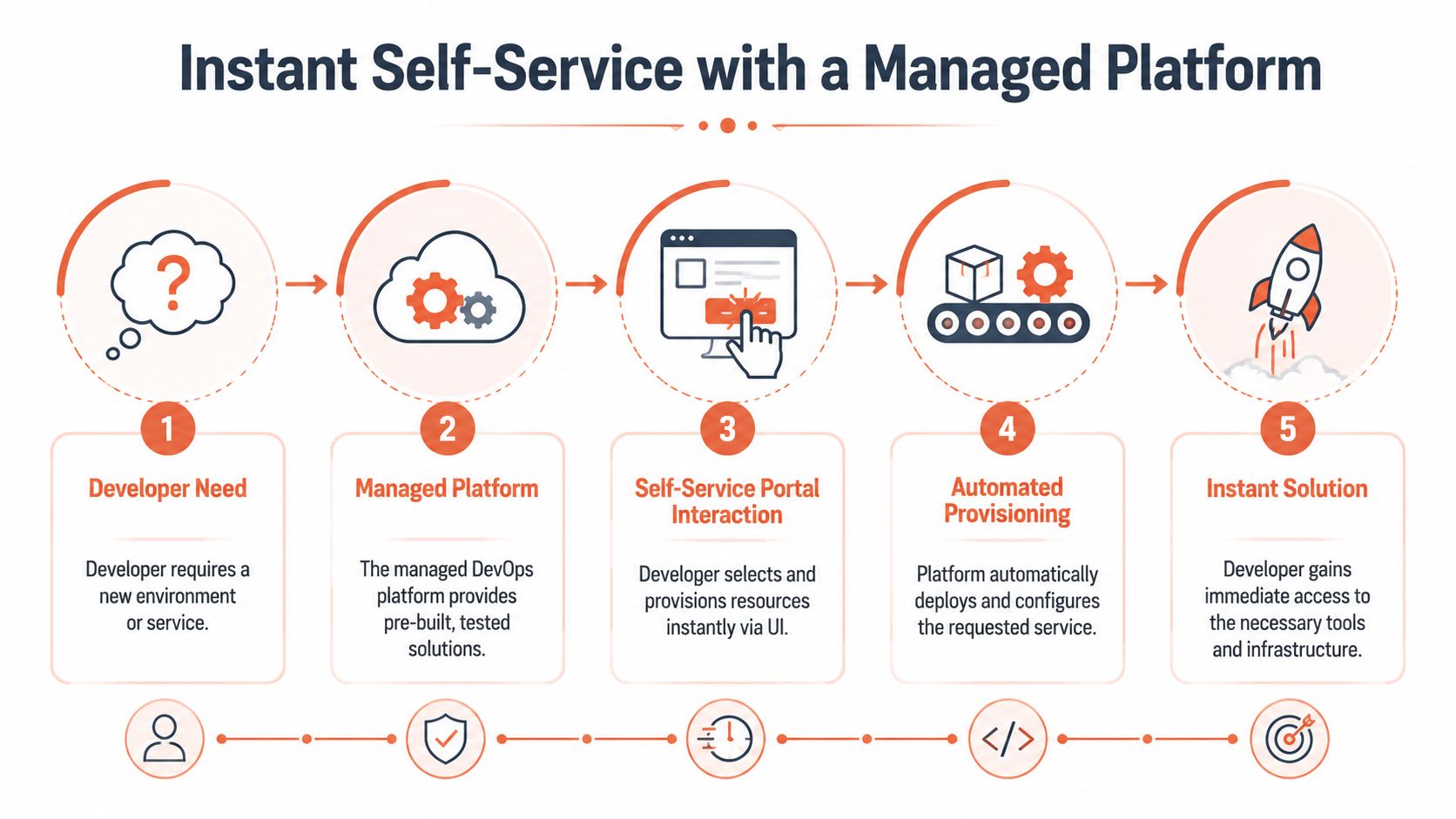
Buy the outcome, not the plumbing
This is the strategic shift many CTOs make too late. They spend months assembling Kubernetes patterns, CI/CD templates, observability wiring, cloud security controls, and cost policies so that one day developers can click a few buttons safely.
A managed DevOps platform collapses that timeline because the iceberg already exists. The workflows are tested. The integrations are maintained. The security controls are part of the product surface, not an afterthought in your backlog.
One option in this category is PushOps, which provides production-ready foundations across AWS, GCP, and Azure, along with automated builds, deployments, environments, observability, access controls, audit logs, and cost-management features. The relevant point isn't the brand. It's the operating model: developers get a self service experience without the company first having to invent and maintain the entire platform beneath it.
What changes when the platform is managed
The benefits are operational before they are cosmetic.
- Provisioning becomes standardised. New services and environments follow known templates instead of bespoke scripts.
- Pipelines stop being a side project. Teams use deployment workflows without owning pipeline maintenance as a full-time burden.
- Security is built into the path. Access rules, auditability, and policy enforcement are part of normal operation.
- Cloud complexity is pushed down. Developers act through stable workflows while the platform handles provider-specific mechanics.
This is why managed self service usually lands faster than internal builds. You're not sequencing a platform initiative before delivery gains appear. You're adopting the delivery system directly.
For teams exploring that approach, this explainer on developer platform automation captures the broader shift from hand-built workflows to managed operational paths.
The less obvious advantage
There's one more reason managed platforms win more often than people expect. They force discipline.
Internal platforms often accumulate exceptions because every internal stakeholder can escalate a special case. Managed platforms create healthy constraints. Teams adapt to standard workflows instead of continuously reshaping the platform around local preferences.
That's usually good for delivery. Standardisation reduces debate, lowers variance, and makes supportable paths obvious.
The same logic applies to public-facing and citizen-facing service design. EU Digital Decade policy sets a target that 100% of key public services should be available online by 2030, and the European Commission's Lithuania assessments emphasise digital public services, user-centric design, and pre-filled interactions, as summarised in this article on self service statistics and the Digital Decade target. The lesson for engineering leaders is familiar: self service works when it becomes a standard operating model, not an optional side channel.
Your Next Steps An Evaluation Checklist
If you're deciding whether to build or buy, don't start with feature lists. Start with operational questions.
Questions leadership should answer first
- What are we really trying to remove? Ticket queues, deployment friction, cloud complexity, platform toil, or all of them?
- Who will own the platform after launch? Not just build it. Maintain it, secure it, support it, and evolve it.
- How many workflows need to be fully self service? Be specific. New service creation, preview environments, rollbacks, access requests, logs, secrets, policy checks.
- What happens when automation fails? Every portal needs exception paths and human escalation.
KPIs worth tracking
Use a short list that exposes delivery quality:
- Lead time for changes
- Deployment frequency
- Failed deployment recovery time
- Percentage of routine platform requests completed without manual intervention
- Time required for a developer to provision a standard environment
One more check matters and often gets ignored. How well does the system handle people who can't complete the normal path? Much of the public material on portals focuses on routine tasks and ignores fallback design. This summary of self service portal guidance and exception handling gaps gets at the practical issue: the best portal doesn't pretend failure states don't exist. It makes them visible and recoverable.
If your answers depend on adding more bespoke tooling, more scripts, and more specialists just to make routine work possible, you probably don't need a portal project. You need a better platform decision.
If your team is spending too much time maintaining delivery plumbing instead of shipping product, PushOps is worth a look. It gives engineering teams a managed path to self service across infrastructure, deployments, observability, security, and cloud cost controls, so the platform outcome is available without building the whole platform in-house.

