


A batch job fails at 3 AM. The alert wakes a senior developer, not because the task itself is unusual, but because nobody trusts the machinery around it. Did the job miss its window? Did a retry loop hammer a dependency? Did the scheduler node die without a trace? By breakfast, the team has spent hours on infrastructure triage instead of shipping anything useful.
That pattern is common in startups and scale-ups that built “just enough” automation a year ago and are now running a business on top of it. What started as a cron entry, a few scripts, and some glue code turns into an operational dependency nobody wants to own but everybody fears touching.
The cost is bigger than one bad night. A 2025 CNCF report found that engineering teams spend up to 30% of their time maintaining custom CI/CD pipelines and scheduling scripts, and that this ops tax costs a typical 50-person engineering organisation over £1.2M annually in lost productivity. That's not a scheduling problem in isolation. That's product velocity leaking out through home-grown platform work.
Job scheduling sits in the middle of that leak. It decides what runs, when it runs, in what order, with which resources, and what happens when reality gets messy. If that layer is brittle, the rest of your delivery system is brittle too.
Your 3 AM Alert Is a Symptom Not the Problem
It is common to diagnose the wrong thing. Organizations see a failed backup, a stuck ETL pipeline, or a deployment job that never started, and they treat it as a one-off incident. The underlying problem is usually that the scheduler grew from a convenience tool into critical infrastructure without being designed as one.
A scheduler looks simple until it isn't. Running a task every night sounds trivial. Running hundreds of jobs with dependencies, retries, permissions, auditability, observability, and cost controls across cloud services is a different class of problem.
Where DIY starts to break
Early on, teams get away with:
- Single-host cron jobs: Fine for isolated tasks with low blast radius.
- Ad-hoc scripts: Useful when one engineer understands every edge case.
- Manual retries: Acceptable when failures are rare and non-critical.
Then the business grows. Jobs begin to trigger other jobs. Data moves between services. Maintenance windows matter. Cloud spend matters. Incident response matters. Suddenly the “simple scheduler” is part of the production control plane.
Practical rule: If your scheduler failure can delay a customer-facing workflow, it's no longer a background script. It's part of your platform.
The strategic question
This is why job scheduling is really a build-versus-buy decision. CTOs often frame it as a tooling detail, but the real issue is allocation of engineering attention. Do you want your senior people refining retry semantics and missed-run recovery logic, or building product features customers will pay for?
The hidden trap is that internal scheduling systems rarely stay narrow. They pull in deployment orchestration, environment automation, on-call noise reduction, cloud cost management, and compliance requirements. Once you accept that, the strategic answer becomes clearer. The team doesn't need another fragile internal subsystem. It needs a production-ready platform capability.
Understanding Job Scheduling in Modern DevOps
Job scheduling is the control layer for automated work. It tells infrastructure and applications what to execute, when to execute it, and what must happen first. In modern DevOps, that reaches far beyond nightly scripts. It includes builds, deployments, backups, data pipelines, environment lifecycle tasks, compliance jobs, and recovery workflows.

A useful way to think about it is as the central nervous system of automation. Your CI pipeline, cloud resources, and monitoring stack are the limbs and organs. The scheduler coordinates them so work happens in the correct sequence, under the right conditions, without engineers babysitting every step.
Three trigger patterns that matter
Most job scheduling falls into three broad modes.
- Time-based scheduling: This is the alarm clock model. Run a backup at night, rotate logs weekly, or shut down development environments outside working hours.
- Event-based scheduling: This is closer to a motion-sensor light. A code push triggers a build. A new object in storage triggers processing. A failed health check triggers a remediation job.
- Batch processing: This handles heavier grouped work, such as report generation, reconciliation, or large data transformations that are better processed as controlled units.
The mistake is treating all three as the same thing. They aren't. A nightly report and an event-driven deployment pipeline have different failure modes, different latency expectations, and different operational consequences.
Why the scheduler becomes business-critical
Once jobs span teams and systems, scheduling mistakes stop being local. An O'Reilly operations analysis found that 22% of critical outages in distributed systems are traced to misconfigured schedulers, race conditions in batch jobs, or cascading failures from retry storms. That number should get any CTO's attention, because it puts scheduling in the category of outage prevention, not back-office convenience.
Good scheduling also depends on clear ownership and documentation. If nobody can tell which jobs exist, what they depend on, and what “success” means, incident response slows down fast. Teams that need cleaner runbooks and machine-readable system context should look at this automated software documentation guide, especially when workflows are spread across services.
A scheduler only looks boring until it becomes the reason your deployment, backup, and recovery workflow all fail in the same hour.
What modern teams should expect
A modern scheduling layer should give you:
- Dependency awareness: Job B shouldn't run if Job A failed or produced invalid output.
- Operational visibility: Teams need status, history, failure context, and ownership.
- Resource awareness: Jobs should respect capacity, not fight for it blindly.
- Integration with delivery workflows: Scheduling should fit the broader automation model, not sit beside it as an isolated utility.
That's also why teams moving beyond hand-maintained pipelines often adopt approaches closer to zero-maintenance CI/CD pipelines. The operational burden drops when scheduling is treated as a managed platform concern rather than another stack of scripts to keep alive.
The Four Levels of Job Scheduling Maturity
Most organisations don't choose a scheduling architecture up front. They drift into one. A team starts with scripts, adds cron, layers on a queue, then introduces a workflow tool when the rough edges become intolerable. By the time leadership notices, the scheduling estate is already fragmented.
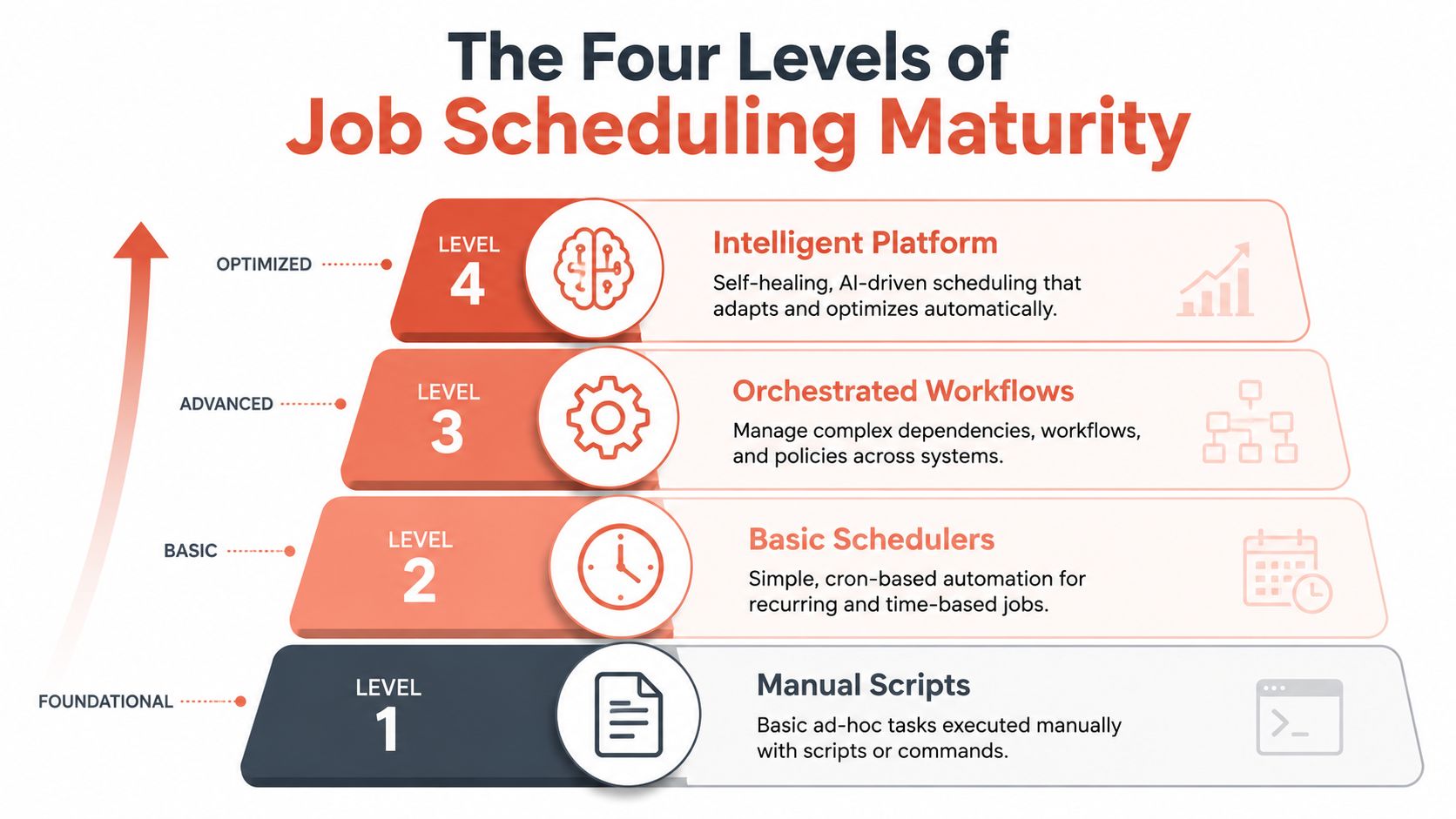
A maturity model helps because it shows what each stage is good for, and where it starts costing more than it saves.
Level 1 with basic cron
This is the familiar starting point. Jobs run on a schedule from a single machine or a small set of hosts. The team usually manages them through shell scripts, OS-level schedulers, and tribal knowledge.
It works when jobs are isolated, low-risk, and easy to rerun. It breaks when:
- The host fails: Now you need failover and missed-run logic.
- Dependencies appear: Job order becomes hard to manage cleanly.
- Ownership gets fuzzy: Nobody remembers why a script exists until it breaks.
At this level, engineers often confuse simplicity of setup with simplicity of operation. They're not the same.
Level 2 with batch systems
Batch systems are better suited to grouped work with clearer processing windows. Data imports, reconciliations, report generation, and heavy offline workloads fit here.
The strength of this level is control over larger chunks of work. The weakness is rigidity. Batch systems often solve throughput while leaving cross-system orchestration, visibility, and recovery patterns only partially addressed.
Teams usually outgrow basic scheduling before they admit it. They don't outgrow it when they have more jobs. They outgrow it when failures start crossing system boundaries.
Level 3 with workflow orchestrators
Tools like Airflow or Prefect usually enter the picture. They model dependencies explicitly, often as DAGs, and give engineers a better way to express multi-step workflows.
That's a meaningful upgrade. You gain structure, retries, dependency control, and richer operational logic. But you also inherit a platform to run. Someone has to maintain the orchestrator, upgrade it, secure it, observe it, and keep the worker fleet healthy.
For many scale-ups, this is the awkward middle. The system is more powerful than cron, but the organisation still underestimates how much platform engineering it takes to keep the orchestrator itself reliable.
Level 4 with distributed multi-cloud platforms
At the highest maturity level, job scheduling is no longer a side tool. It's an integrated platform service with consistent policies, observability, security controls, and resource management across environments.
This matters even more once you operate across cloud providers. An O'Reilly survey on enterprise DevOps reported that, in a multi-cloud environment, managing job scheduling dependencies across AWS, GCP, and Azure introduces a 40% increase in configuration complexity compared to single-cloud setups, leading to higher rates of deployment failure. That's the point where DIY often stops being admirable and starts being expensive.
A practical maturity check
| Level | Typical tools | What works | What breaks |
|---|---|---|---|
| Level 1 | Cron, shell scripts, Windows Task Scheduler | Simple recurring jobs | Fragile recovery, weak visibility |
| Level 2 | Batch processing systems | Large offline processing windows | Limited orchestration across systems |
| Level 3 | Airflow, Prefect, custom workflow engines | Explicit dependencies, richer workflows | Ongoing platform maintenance |
| Level 4 | Distributed platform-managed scheduling | Cross-cloud consistency, observability, policy control | Usually difficult to build well in-house |
The strategic move for leadership isn't always to climb each rung manually. In many cases, the better decision is to skip the DIY journey and adopt the capability at the platform level before internal complexity hardens into permanent overhead.
How Scheduling Algorithms Impact Your Bottom Line
Leadership teams often hear “scheduler” and think interface, dashboard, or developer ergonomics. The more important issue is the policy underneath. The scheduling algorithm determines who gets resources, who waits, how long they wait, and what happens under contention. That directly affects deployment speed, recovery time, cloud efficiency, and operational fairness.

FIFO is simple and often wrong
First-In, First-Out sounds fair. The earliest job enters the queue first, so it runs first. That's easy to reason about, and many internal systems default to it.
The problem appears when jobs have very different value and duration. A long-running, low-importance task can block a short deployment job that matters to customers. FIFO gives predictability of order, but not predictability of business impact.
Priority scheduling fixes one problem and creates another
Priority-based scheduling improves on FIFO by letting urgent jobs run first. Critical deploys, incident-related automation, and recovery tasks can move ahead of routine background work.
That aligns operations with business urgency, but it introduces a classic failure mode. Low-priority jobs can starve. They remain queued indefinitely because something more urgent always arrives first. In practice, that means reports never complete, maintenance tasks lag, and background housekeeping degrades the system.
Aging makes priority systems usable
Aging solves starvation by increasing a job's priority the longer it waits. That way, critical work still gets fast access to resources, but lower-priority jobs eventually run instead of rotting in the queue forever.
This is not an academic refinement. According to the technical architecture discussion on advanced job scheduling, organisations implementing aging mechanisms reduce mean time to recovery by 35-45% for critical deployments compared to strict FIFO approaches, while maintaining fairness across concurrent build and deployment jobs.
Operational advice: If your queue contains both customer-impacting deploys and background maintenance, “fair” ordering isn't enough. You need business-aware ordering with guardrails.
Retry logic is part of the algorithm too
Many teams treat retries as a separate concern. They aren't. A scheduler with naive retry behaviour can turn one transient dependency failure into a much larger incident. If every failed job retries immediately, you get thundering herds, resource contention, and pressure on the very service that's already struggling.
That's why backoff policy matters. Exponential backoff gives systems time to recover. It lowers the chance that your recovery automation becomes the next problem.
Cost, throughput, and priority are linked
A scheduler doesn't just decide sequence. It influences infrastructure shape. If your policy allows bursts of non-critical jobs to consume scarce capacity, customer-facing work waits. If your policy over-reserves for peak conditions, you overpay for idle resources.
Scheduling meets finance at this intersection. Leadership teams trying to manage spend should treat scheduling policy as part of capacity planning, not a hidden engineering detail. The same logic behind queue fairness and resource contention also affects wasted cloud consumption, which is why cloud leaders often tie scheduling policy to broader cloud cost optimisation efforts rather than managing it in a silo.
The Hidden Costs of Building Your Own Scheduler
Internal schedulers usually start life as a small engineering win. Someone automates a painful task, the team saves time, and confidence grows. The trap is that success encourages expansion. Before long, the system is responsible for production jobs, deploy orchestration, environment lifecycle control, and recovery flows. At that point, you're not maintaining a script. You're maintaining a platform.
Reliability is where the real work begins
A production-ready scheduler needs more than a queue and a trigger.
Ask these questions:
- What happens if the scheduler node dies mid-run?
- How do missed jobs get reconciled after an outage?
- Can two workers accidentally run the same job?
- How are retries coordinated across transient and permanent failures?
Most DIY systems handle the happy path well enough. They struggle with the failure path because that's where distributed systems stop being intuitive. Recovery semantics, lock management, idempotency, and replay safety all need explicit design.
Observability is usually bolted on too late
When scheduling logic is internal, observability often arrives after the first painful incident. Teams realise they can't answer basic questions quickly enough:
- Did the job fail, or never start?
- Which dependency blocked it?
- What changed since the last successful run?
- Who owns this workflow now?
Without central logs, structured events, run history, and dependency-aware alerts, incident response becomes archaeology. Engineers dig through scripts, queue state, and cloud logs trying to reconstruct what happened.
If your team needs three tools and two Slack threads to explain one failed job, the scheduling layer isn't mature enough.
Security and governance don't come for free
Schedulers hold privileged access. They can deploy code, touch production data, invoke cloud APIs, and trigger workflows across environments. A home-grown system needs proper controls around that power.
That means role-based permissions, credential handling, audit trails, separation between definition and execution rights, and policy enforcement. It also means proving who changed what and when, which matters for compliance as much as for debugging.
DIY versus a managed platform
| Consideration | DIY Approach (Your Team's Responsibility) | Managed Platform (PushOps' Responsibility) |
|---|---|---|
| High availability | Design failover, state recovery, and duplicate-run protection | Built into the platform service |
| Missed-run recovery | Implement replay rules and outage reconciliation | Managed as part of scheduler reliability |
| Observability | Build dashboards, logs, alerts, and tracing context | Unified monitoring and job visibility |
| Security controls | Add RBAC, secret handling, audit logging, and policy checks | Enforced by default at platform level |
| Cross-cloud orchestration | Maintain integrations and provider-specific behaviours | Standardised across AWS, GCP, and Azure |
| Ongoing maintenance | Upgrade, patch, scale, and support the scheduler stack | Offloaded to the platform provider |
TCO is mostly operational, not initial
Leaders often ask what it costs to build a scheduler. The more useful question is what it costs to own one for years. Initial development is only the entry fee. The larger bill arrives through maintenance, incidents, upgrades, support load, and the opportunity cost of senior engineers doing undifferentiated platform work.
That's the core strategic mistake. Building your own scheduler can feel cheaper because the first version appears quickly. Owning the next ten versions is where the economics turn against you.
A Platform Approach to Job Scheduling in Practice
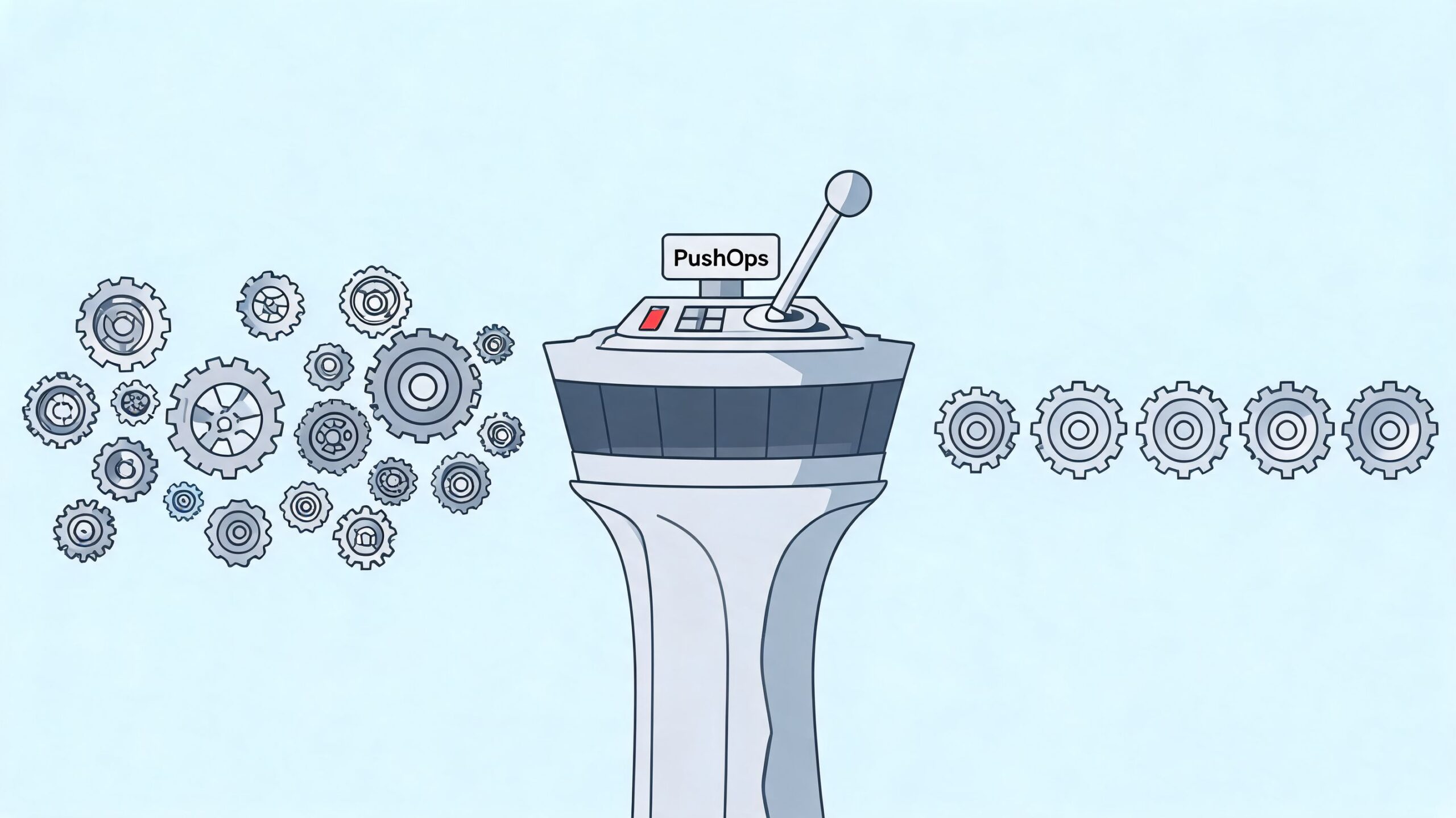
The value of a platform approach becomes obvious when you look at ordinary tasks that become awkward in a DIY stack. Not theoretical edge cases. Everyday operational work that should be boring.
The multi-cloud backup
A team runs production databases in different clouds because of customer requirements, legacy decisions, or acquisition history. They need backups to run on a consistent schedule with central visibility and clear failure handling.
In a DIY model, that often means separate job definitions, provider-specific credentials, different logging paths, and custom reconciliation logic. In a platform model, the team defines the policy once and lets the platform execute it consistently across environments.
The practical gain isn't just convenience. It's fewer moving parts during an incident.
The cost-saving shutdown
Non-production environments rarely need to run around the clock. Development, QA, preview apps, and internal sandboxes often stay online because nobody wants to manage stop and start logic by hand.
Capacity-aware scheduling provides significant value. By using finite capacity scheduling, which ensures scheduled jobs never exceed available resources, platforms can eliminate hidden overprovisioning costs that typically inflate cloud bills by 20-30% in unoptimised environments, as described in the Microsoft guidance on job scheduling. The key idea is simple. Schedule environment uptime intentionally instead of paying for accidental availability.
Teams looking at broader platform-led automation usually connect this directly to developer platform automation because environment scheduling, deployment workflows, and cost controls are tightly related operational concerns.
The event-driven pipeline
Now consider a cross-cloud workflow. A file lands in object storage. That event should trigger processing elsewhere, apply checks, and publish outputs without a developer coordinating the hand-off.
Internal systems often become a mess of webhooks, brittle scripts, queue consumers, and undocumented dependencies. A platform approach makes the event trigger, execution environment, logging, and recovery path part of one operational model.
Good job scheduling doesn't just automate tasks. It removes the need for engineers to think about the plumbing every time a workflow changes.
What changes for leadership
For CTOs and VPs of Engineering, the biggest benefit is consistency. The team stops reinventing execution control for each workload. Scheduling becomes a standard capability alongside deployment, observability, security, and environment management.
That's what lowers operational drag. Engineers spend less time wiring systems together and more time shipping product changes with confidence.
Stop Scheduling Jobs and Start Shipping Features
Job scheduling looks tactical until you account for the time, risk, and platform sprawl around it. Then it becomes a strategic choice. You can keep absorbing the hidden cost of internal tooling, or you can treat scheduling as part of a managed delivery platform and move that burden out of your core engineering roadmap.
The DIY route usually fails in slow motion. First it's a cron job. Then a workflow engine. Then a support burden, a reliability problem, and a staffing discussion about hiring more DevOps engineers to maintain work that doesn't differentiate the product.
The better path is to stop treating scheduling as an isolated utility. It belongs with the rest of the production platform. When scheduling, deployment, observability, security, and cloud cost controls work as one system, teams get fewer surprises and more shipping time.
If your engineers are still spending their best hours nursing scripts, recovering failed jobs, and stitching together cloud workflows, you don't need more scheduler code. You need less infrastructure to own.
If you want to reduce platform overhead and give your team a production-ready way to manage deployments, environments, observability, security, and multi-cloud automation without building it all in-house, take a look at PushOps. It's built for teams that want to spend more time shipping features and less time maintaining DevOps plumbing.

