
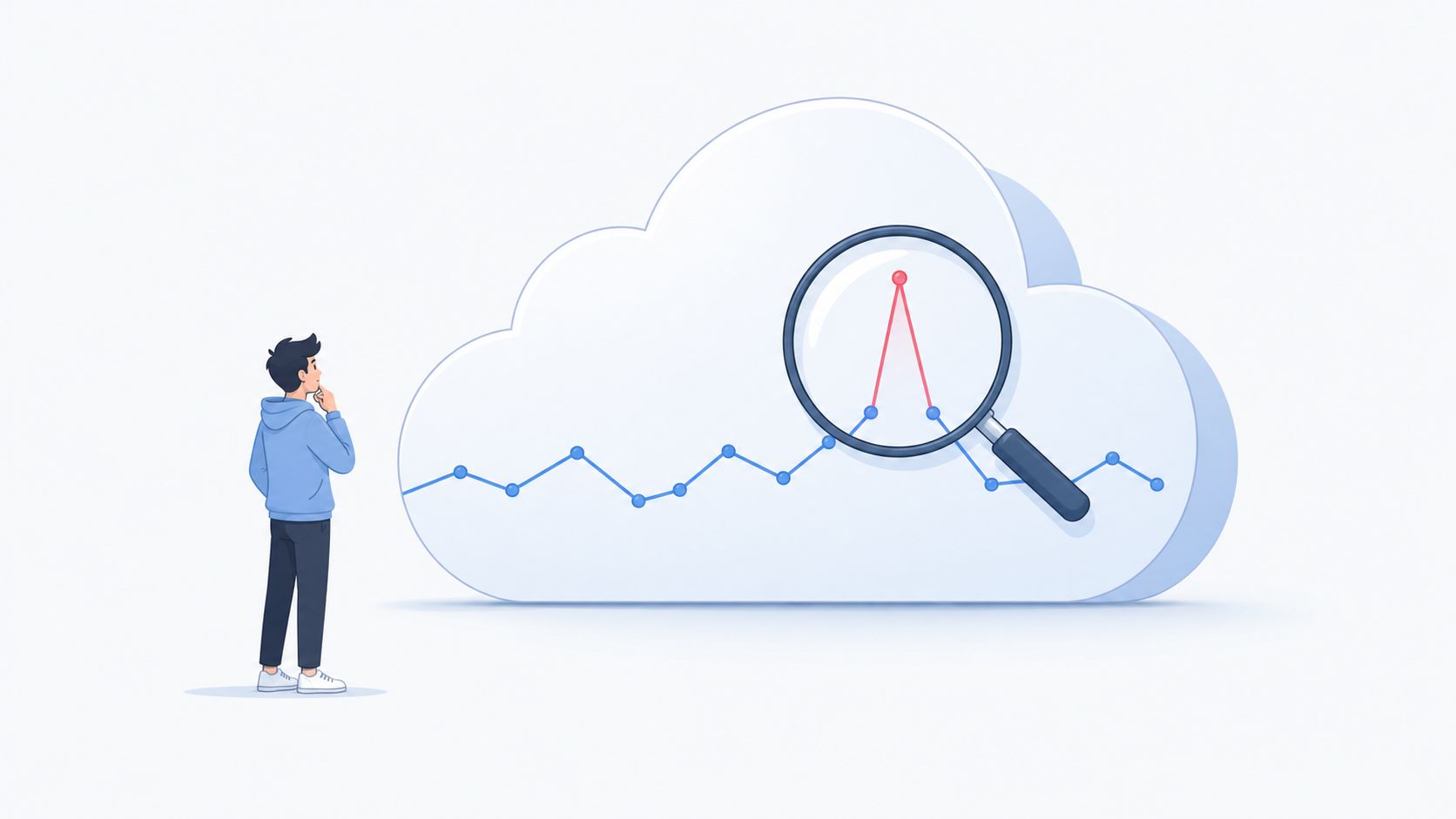
Monday morning starts with the same bad ritual. A CTO opens the cloud dashboard, sees a weekend spend jump, and spends the first hour figuring out whether it was a release, a region change, or a runaway workload. By the time anyone has a clean answer, the bill has already moved.
That's why cost anomaly detection belongs with engineering controls, not finance spreadsheets. Cloud spend is elastic, post-paid, and spread across services, accounts, regions, and teams, so a monthly review only tells you what went wrong after it has already happened. If you want a practical mental model for how modern cloud governance works, it helps to think the same way you would about cloud authorization graph patterns in security, you need connected context, not isolated alerts, to understand what changed and why. cloud authorization graph patterns
Why Cloud Bills Still Surprise Engineering Teams
The first surprise is usually not the bill itself, it's the timing. A team ships on Friday, traffic changes over the weekend, and Monday's numbers reflect usage that no one was watching in real time. Cloud providers bill after the fact, so the cost problem is already in motion before finance or engineering sees it.
That lag is what turns a small issue into a messy one. A new deployment, a test environment left running, or a region expansion can look harmless for hours, then become material before the next budget meeting. Monthly review cycles are too coarse for that kind of drift, which is why continuous monitoring is the control, not a spreadsheet reconciliation exercise.
Practical rule: If an alert arrives after the team has already accepted the spend as “normal,” the control is too slow to be useful.
Cost surprises are an engineering workflow problem
Teams often misdiagnose the issue. They treat cloud overspend as a budgeting mistake, then ask finance to tighten review cadence. That rarely works, because the underlying behaviour lives in deployment, scaling, and platform operations.
A better lens is to treat cost signals the way security teams treat permissions and entitlements. You need to understand relationships, ownership, and blast radius, not just totals. For teams that already use infrastructure graphs to reason about exposure, the same habit applies to billing, only here the graph is about spend paths, service boundaries, and who changed what.
In practice, that means the people who own the platform need alerts early enough to act, with enough context to avoid a scavenger hunt. Without that, every spike becomes a manual investigation, and manual investigations are exactly what slow teams down when they should be shipping product. For teams comparing how different control planes surface operational signals, the mechanics matter more than the dashboard colour.
How Cost Anomaly Detection Actually Works
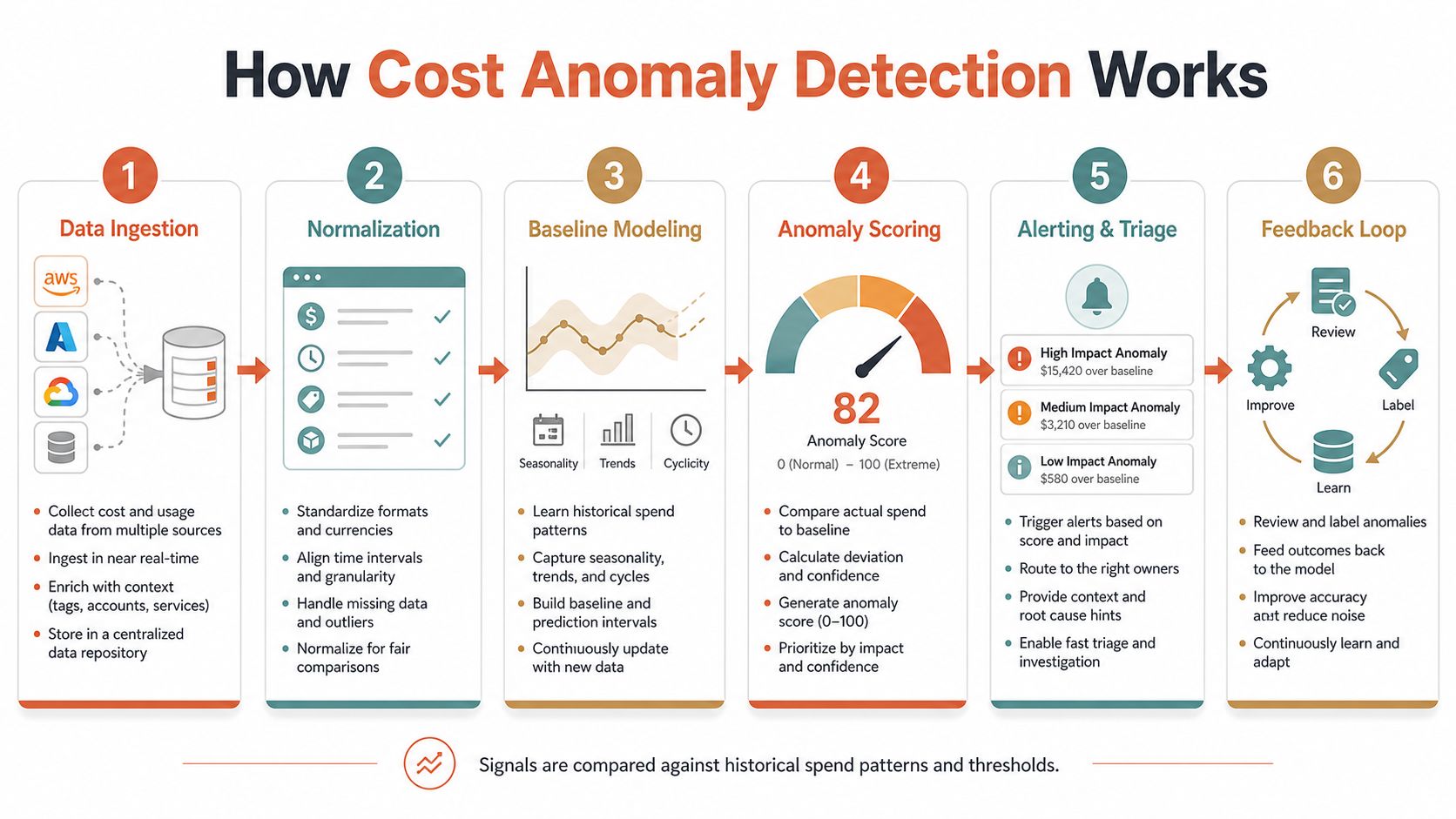
The cleanest model is a three-step sequence, estimation, prediction, and detection. The FinOps Foundation describes that workflow directly, along with the statistical methods used to separate normal variation from abnormal cost behaviour, including standard deviations, regression analysis, time-series analysis, and hypothesis testing. FinOps Foundation guidance on managing cloud cost anomalies
Estimation builds the baseline
Take an AWS EC2 spend stream. Estimation means the system looks at historical billing data and learns what “normal” looks like for that service over time. It's not guessing a number, it's modelling a pattern, so seasonal behaviour and ordinary growth don't automatically trip an alarm.
That baseline is only useful if the data is aligned to real operational rhythms. Cloud billing is commonly evaluated at hour, day, week, and month intervals, so a useful model has to work across multiple granularities rather than a single budget checkpoint. That's why a monthly budget report can never do the job of a live control.
Prediction compares the next interval
Once the baseline exists, the system forecasts the next interval. If the model expects EC2 to stay inside a certain confidence band and the actual spend breaks out, the system has a candidate anomaly.
That's the point where statistical thresholds matter. A system using only a flat threshold misses context, while a system that combines historical baselines with interval forecasting can distinguish routine variance from a step change. For practical operators, the question isn't whether the maths is elegant, it's whether the alert shows up soon enough to stop waste.
Detection decides when to act
Detection is the final gate. If actual values fall outside the confidence interval, the system flags them as anomalies and routes an alert. That alert should contain enough context for the on-call engineer to know whether the issue is a service spike, a region change, or a billing irregularity.
For teams comparing tooling choices, it helps to also sanity-check the broader monitoring stack. A useful reference for that kind of budget discipline is this guide on how teams compare monitoring platform fees before they commit to more tooling. compare monitoring platform fees
The model is only as good as the operational response behind it. A precise alert that nobody triages quickly still becomes wasted spend.
Native Cloud Anomaly Detection Features Compared
Native tools are useful because they lower the barrier to entry. AWS Cost Anomaly Detection uses machine learning for continuous monitoring of AWS cost and usage, and AWS documents that anomalies can be reviewed by start date and delivered through an Amazon SNS topic to downstream systems.
Oracle and Microsoft also ship native controls. Oracle says its service continuously monitors daily cloud cost and alerts on abnormal usage trends, while Microsoft exposes anomaly detection in Azure Cost Management smart views, lets users create Anomaly alert rules in the portal, and shows findings as an insight in Cost Analysis, including a “No anomalies detected” status when the evaluated dates are clean. Oracle and Microsoft cost anomaly detection documentation
| Native Cloud Anomaly Detection Comparison | AWS Cost Anomaly Detection | Azure Cost Management | Oracle Cloud |
|---|---|---|---|
| Feature | Machine-learning monitoring of cost and usage, with SNS delivery | Anomaly detection in smart views and alert rules in the portal | Continuous daily cost monitoring and abnormal usage alerts |
| Operational style | Continuous monitoring within AWS Cost Management | Native insight inside Cost Analysis | Daily monitoring with built-in alerts |
| Alert integration | Amazon SNS topic to downstream notification systems | Portal-based alert rules and insights | Built-in service alerts |
| Best fit | AWS-centric teams | Azure-centric teams | Oracle-centric teams |
What native tools do well
Native tools work well as a starting point when most of the estate lives in one cloud. They let teams get coverage without standing up a model, a data pipeline, or a custom alert bus. That matters for smaller platform groups that need something usable fast, and it matters for larger teams that would rather spend time on incident response than stitching together their own detection layer.
They also keep the operating model simple. Alerts, routing, and review stay close to the billing system that produced the signal, which makes first-pass triage easier for engineers who already live in that cloud console.
Where they break down
The gap shows up in multi-cloud. If workloads span AWS, GCP, and Azure, each cloud becomes its own alerting island, its own view, and its own routing path. That fragmentation adds real operational cost, because the person on call still has to reconcile separate consoles, separate dimensions, and separate naming conventions before they can explain why spend moved.
That extra glue work is where many teams overbuild. They spend engineering time creating internal normalisation, alert deduplication, and cross-cloud dashboards, then still end up with inconsistent signals across platforms. A managed platform can reduce that ongoing burden, especially when teams are already comparing pricing models and trying to translate forecasts into action, and a practical starting point is an Azure cost calculator guide for planning the spend side of the equation. Azure cost calculator guide
Separating Real Anomalies from Expected Spend Changes
False alarms are what make people ignore cost alerts. A release, a load test, a seasonal traffic surge, or a regional expansion can create a legitimate step-up in spend, but naive alerting treats all of it the same. AWS's own UI makes the underlying point clear, it asks users to compare anomalies across service, account, usage type, and region, which means root cause depends on slicing the data correctly, not just switching alerts on. AWS Cost Anomaly Detection user guide
Scope beats noise
The easiest way to reduce noise is to define scope carefully. If a team knows a release will move spend in one service, they should expect that shift and keep the alert focused on the areas that matter. Alerts that mix dev, test, and production together tend to mislead the people who have to respond.
Context matters just as much as thresholds. If a cost step change lines up with a deployment event, a launch window, or a regional rollout, that's usually not the same thing as a runaway resource. The engineer triaging the alert should see the likely explanation immediately, not after half an hour of clicking through billing views.
Tuning is about trust
If the sensitivity is too high, on-call teams drown in noise. If it's too low, true issues slip through and show up later as bill shock. The useful middle ground is a configuration that respects ownership boundaries, known workload patterns, and the fact that not every spend increase is a problem.
Practical rule: Treat every anomaly as a hypothesis until you've tied it to a deployment, a workload change, or a regional move.
For teams that want a broader cost lens, the right response is not just alerting, it's comparing the anomaly against the rest of the stack. That means the cost signal, the deploy signal, and the product signal should all be easy to inspect in one place, which is hard to do when each cloud provider exposes a different view.
The Hidden Cost of Building Your Own Detection Pipeline
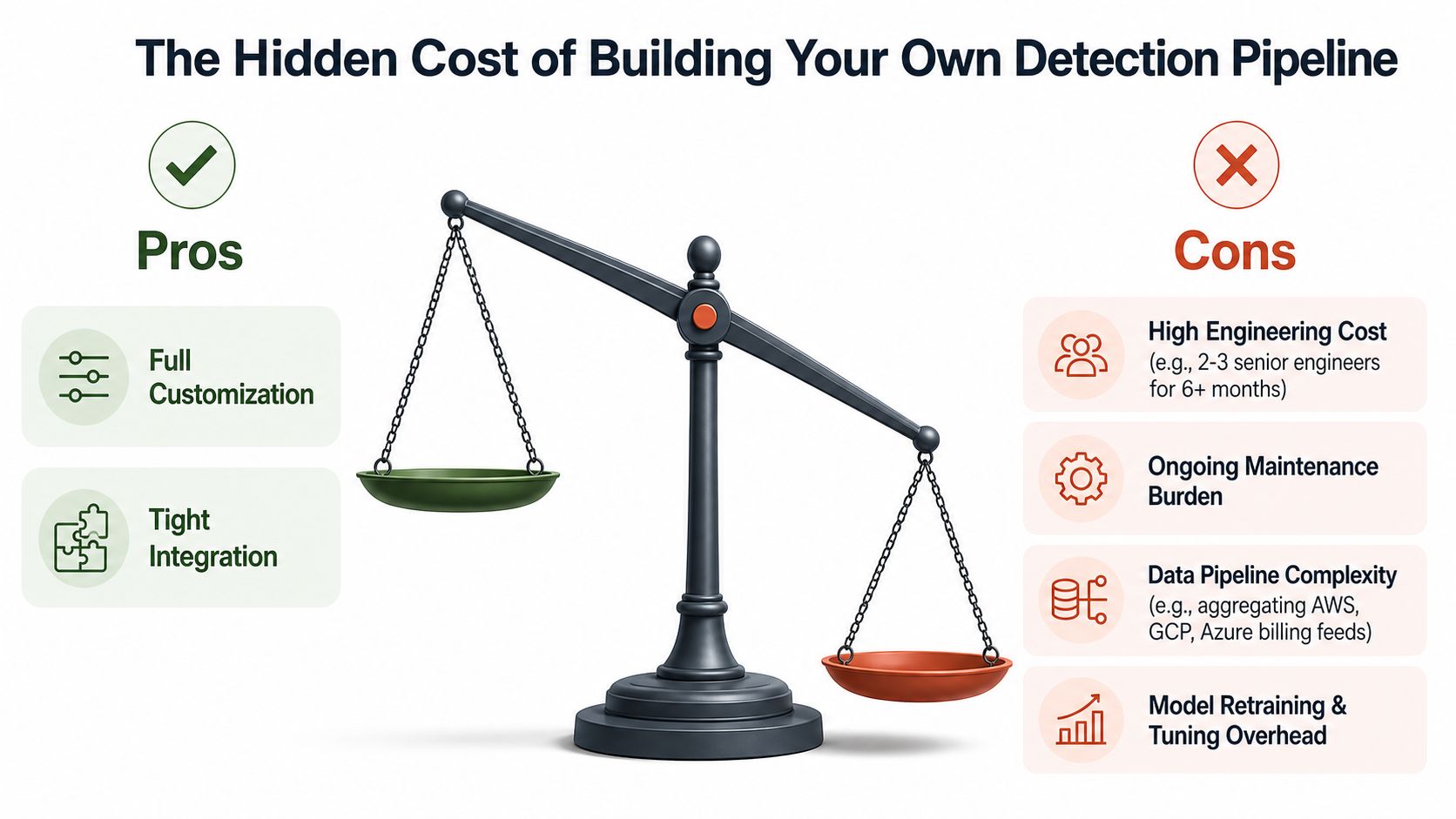
DIY anomaly detection looks small on a whiteboard and expensive in production. A team has to ingest billing data from multiple cloud APIs, normalise it, model it, route it, deduplicate it, and keep adjusting it as cloud providers change their interfaces. That is not just a script, it is a platform.
The hidden bill is people time. One engineer can prototype a baseline, but a production-grade pipeline needs steady ownership across data handling, statistical tuning, notification logic, and operational maintenance. Those are hours that disappear from roadmap work, and they do not disappear once. They come back every time a billing schema changes or a new cloud account is added.
The build cost never stays still
A custom pipeline also creates hidden coupling. If cost data is messy, alert quality suffers. If alert routing is brittle, people stop trusting it. If models are not retrained, the baseline drifts away from reality.
That is why many teams end up with a fragile middle state. They have something that technically detects anomalies, but it does not fit cleanly with incident management or developer workflows. The result is more tooling to maintain, not less.
For product teams that want the platform work handled instead of inherited, a managed DevOps platform can absorb more of that plumbing. PushOps is one example, it provisions production-ready foundations, automates builds and deployments, and includes autoscaling, right-sizing, and environment scheduling in the same operating surface. Its developer platform automation approach is built to reduce the operational work that usually sits around detection pipelines.
Buy when operations outweigh differentiation
That is the same build-versus-buy logic teams already use for CI/CD, monitoring, and security controls. If cost anomaly detection is not a core product differentiator, the safer move is to buy the control and spend internal capacity on shipping. The goal is not to own more infrastructure, it is to reduce the amount of infrastructure your team has to babysit.
Designing an Alerting Workflow That Engineers Actually Use
Detection is only useful if someone can act on it quickly. AWS Cost Anomaly Detection can deliver alerts through Amazon SNS, which is helpful, but notification alone is not a workflow. The rest of the chain has to be designed so the on-call engineer gets the right context and the right next step without hunting through cloud consoles. AWS alert delivery and monitoring workflow
Build alerts around action, not just signal
An alert should name the affected service, the likely area of spend, and the probable owner. If it only says “anomaly detected,” the engineer still has to reconstruct the incident from scratch. That is wasted time during the exact window when the spend is still growing.
Good routing also prevents notification storms. Group related anomalies together, send them to the right channel, and make escalation rules reflect severity rather than volume. Slack, PagerDuty, email, and SNS all have different roles, but none of them fix a weak incident design by themselves.
Keep the feedback loop short
Triage should end with a clear outcome, acknowledged, dismissed, or resolved. That outcome needs to feed back into the system so future alerts become sharper, not noisier. Teams that skip this step end up relearning the same false positives every week.
A unified multi-cloud platform helps here because the workflow stays the same even when the cloud changes. Instead of one process for AWS, another for Azure, and another for GCP, the engineer sees one consistent queue and one consistent response path. That saves context switching, which is often where cost incidents stall.
For teams trying to align remediation with broader platform work, it helps to pair this with a structured view of developer platform automation so the response process doesn't live in a separate silo. developer platform automation
Choosing the Right Approach for Your Team
A team that only needs a quick baseline can start with native cloud tools, especially if the footprint is small and mostly tied to one provider. Once billing spans AWS, GCP, and Azure, the hidden work shifts from detection itself to keeping three systems aligned, which is where DIY setups start to consume real engineering time. That maintenance burden is easy to underestimate until someone is on-call and the spend is still climbing.
For startups and scale-ups, the key question is who will own the pipeline after it is built. A managed platform usually makes more sense when engineers should be shipping product instead of normalising billing feeds, tuning thresholds, and wiring alert paths across separate clouds. I have seen teams spend weeks recreating basic FinOps workflows, then discover they still need someone to keep the whole thing healthy every month.
The same trade-off shows up in broader cloud cost optimization work. If the team is also trying to use credits or startup programmes to reduce burn, pair that with controls that keep the savings visible and enforceable. The resource on how to reduce cloud costs with credits is useful background, but credits only help when anomaly detection and budget guardrails are already in place.
A simple decision rule
Native cloud tooling fits teams that want quick coverage inside one provider and can live with the limits of that provider's billing model. DIY pipelines fit teams with unusual requirements, custom routing, or internal platform capacity to maintain the stack. A managed DevOps platform fits most growth-stage teams that need cost controls, autoscaling, security, and release automation without hiring another platform function.
PushOps sits in that last category. It brings production foundations across AWS, GCP, and Azure together with cost controls, observability, and release automation, so cost anomaly detection can live inside a broader operating model instead of becoming another isolated tool. If your team is spending too much time on infrastructure plumbing, that usually points to a stack that needs less stitching and more consolidation. developer platform automation cloud cost optimization
If cloud spend surprises are still draining engineering hours, PushOps can help move cost controls into the same platform that handles deployments, environments, and security. Visit PushOps to see how a managed multi-cloud foundation can cut operational overhead and give your team a cleaner path from detection to action.

