
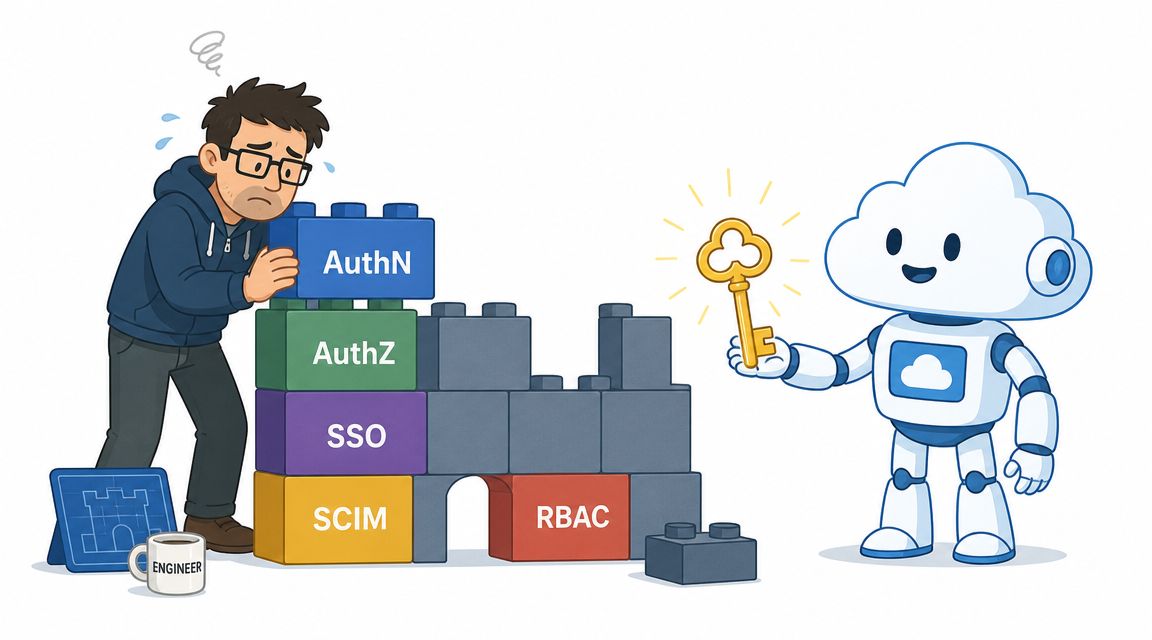

A lot of teams arrive at identity work by accident.
It starts with a sensible request. A new hire needs access to analytics. A contractor needs temporary access to a staging environment. A deployment job needs permission to push to production. Then the backlog shifts. Senior engineers are resetting access, writing role mappings, cleaning up old accounts, and chasing “access denied” failures through CI logs instead of shipping product.
That drift is expensive because identity management systems sit in the awkward middle. They're mission critical, but they rarely create direct product value. Customers buy your product because it solves their problem, not because your team built an elegant SAML setup, a tidy provisioning workflow, or a custom admin console for role approvals.
For startup and scale-up engineering leaders, this is usually part of a bigger pattern. Identity doesn't become a self-contained project. It becomes one more layer in the platform engineering yak shave. You're already maintaining Kubernetes, CI/CD, monitoring, cloud permissions, secret handling, and cost controls. Adding homegrown identity on top often means your team is building internal plumbing instead of product.
Your Team Is Drowning in Access Control Not Code
The common failure mode isn't dramatic. It's administrative.
A marketer joins and needs access to dashboards, ad platforms, product analytics, and a shared workspace. A developer changes teams and needs new cloud permissions. Someone leaves, and now you need confidence that every account, token, and service permission tied to that person is gone. None of this feels like platform engineering when it lands in your queue, but that's exactly what it becomes.
Soon the work spreads across systems that were never designed to stay in sync. HR or payroll holds the employment truth. Google Workspace or Microsoft 365 controls one layer of identity. GitHub, GitLab, AWS, GCP, Azure, Kubernetes, Datadog, and internal tools each have their own access models. The team starts gluing them together with scripts and good intentions.
The hidden platform team you didn't mean to build
This is the trap. Identity work looks small until it isn't.
You don't just need login. You need onboarding, offboarding, role changes, approvals, audit trails, emergency access, and sane defaults for every new tool. If your delivery pipeline touches cloud resources, then identity is now a deployment concern too. If your company works with partners or vendors, it's also an external access problem.
The moment engineers are writing one-off access scripts, they've started building an identity platform whether they planned to or not.
That's why this category has become so substantial. In the U.S., the Identity Management Software industry is projected to reach $4.9 billion in 2025/2026, with $4.9 billion in 2026 also cited as a projection and a 4.9% annualised growth rate over the prior period, according to IBISWorld's identity management software industry analysis. That matters because it confirms something engineering leaders learn the hard way. Identity management systems are a mature software category, not a side project for your DevOps team.
Security work still needs to stay usable
Good identity design is also an operational design problem. Locking everything down without thinking about user friction just creates bypasses. Teams start sharing credentials, over-requesting permissions, or asking for permanent admin access because the proper path is too slow.
If you're trying to tighten access around offices, endpoints, and network boundaries as well, resources on secure digital doorways for enterprises can help frame identity as part of a broader access control posture, not a standalone login feature.
What Are Identity Management Systems Really
An identity management system is the control layer that answers three questions for every request.
Who is this? What should they be allowed to access? What are they allowed to do once they get there?
That sounds simple until you list the actors. It's not only employees signing into dashboards. It's contractors, support staff, APIs, build runners, deployment bots, background jobs, partner users, mobile apps, and cloud workloads.

More than login screens
Organizations often initially think about identity in terms of authentication. Passwords, SSO, MFA. That's only the front door.
The system includes lifecycle management, role assignment, entitlement reviews, deprovisioning, service-to-service trust, and evidence for audits. If someone changes departments, leaves the company, or rotates onto an on-call role, the identity layer should reflect that change cleanly across the estate. If it doesn't, you accumulate stale permissions and manual clean-up work.
A helpful mental model is a digital bouncer connected to a building manager, payroll desk, facilities team, CCTV archive, and emergency override process. The bouncer checks identity. The rest of the system decides what happens before and after access.
Why DIY breaks down so fast
The market data points to the same conclusion. The global IAM market generated about USD 14.7 billion in 2022 and is forecast to reach USD 53.1 billion by 2032, implying a 13.7% CAGR. At the same time, 38% of companies still perform manual IAM checks, according to these IAM market statistics. That gap tells you where teams get stuck. They buy or build parts of the stack, but the operational model never becomes coherent.
What usually fails isn't the first login flow. It's the day-two work:
- Joiners and leavers: Access isn't granted or revoked consistently across tools.
- Role changes: Permissions drift because nobody owns the mapping logic end to end.
- Exception handling: Emergency access becomes permanent because temporary paths are clumsy.
- Audit requests: Logs exist, but they don't answer practical questions about who approved what and when.
If you need a clean primer on permission design, this explainer on how RBAC works is useful because it focuses on how roles map to access decisions in practice rather than treating RBAC as a checkbox.
Practical rule: If your access model depends on engineers remembering a sequence of manual updates, you don't have an identity system. You have a recurring incident.
The Core Components You Would Have to Build
Teams often say they're only building “a lightweight layer” for identity. In practice, they're committing to a chain of tightly coupled components. Each one introduces its own maintenance burden, edge cases, and support load.
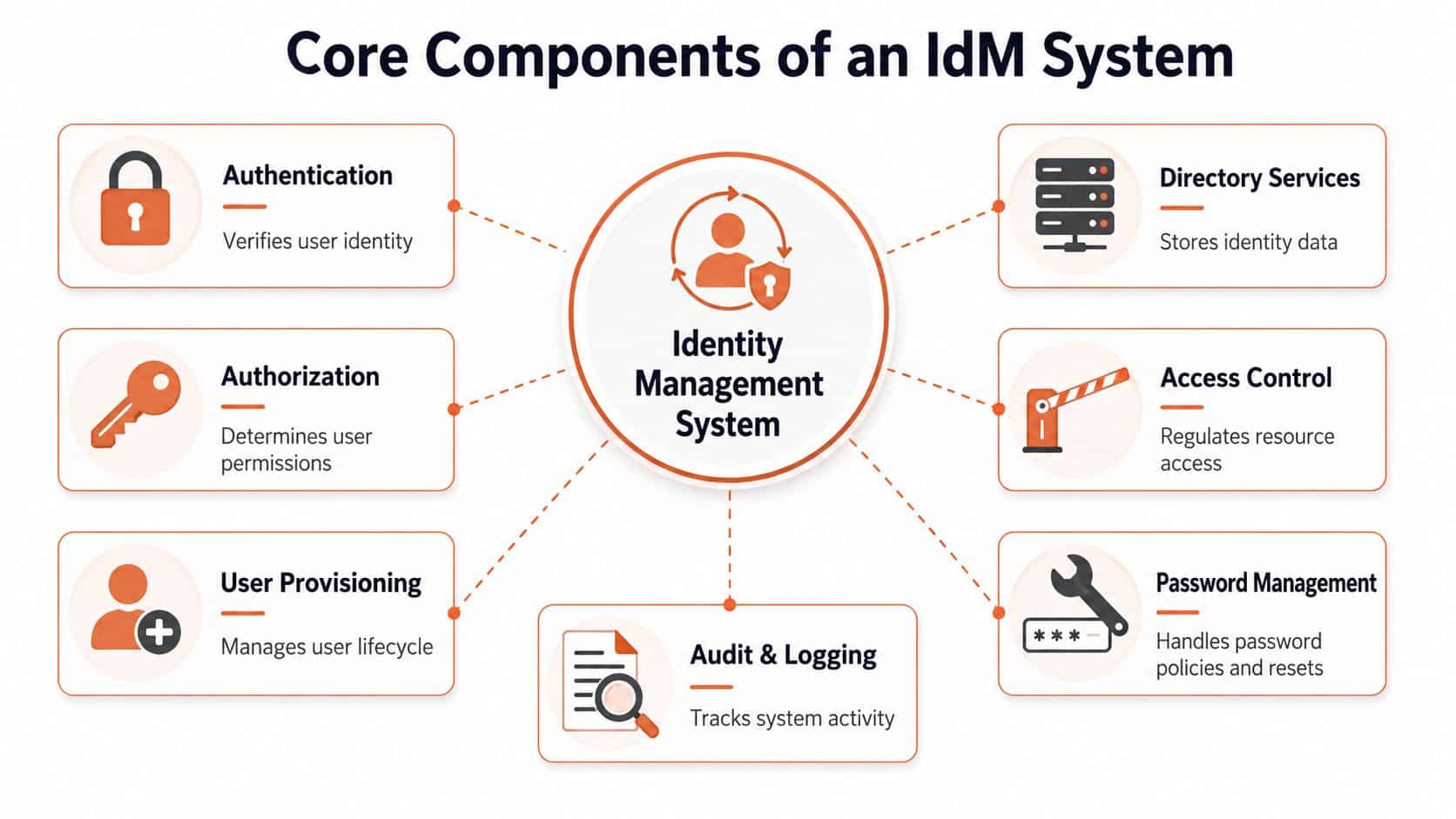
Authentication and authorisation
Authentication proves identity. Authorisation decides permissions. Teams often bundle them together because both sit in the sign-in path, but they fail in different ways.
Authentication work includes SSO, MFA, session behaviour, passwordless options, device trust signals, and support for standards such as SAML or OIDC. Authorisation is where sprawl begins. Roles look simple early on, then business exceptions pile up. Finance needs one extra permission. Support needs temporary production visibility. Contractors need access to one project but not another.
That's how “three roles should cover it” turns into a matrix nobody wants to touch.
Provisioning and deprovisioning
The moment identity connects to hiring, team changes, or contractor access, you need lifecycle automation. SCIM and workflow tooling become pertinent, accompanied by approval logic and sync jobs that are far less reliable than vendors imply.
A strong architecture treats provisioning and deprovisioning as first-class workflows, not as side effects of directory edits. The public-sector ICAM model separates the lifecycle into creation, identity proofing, provisioning, maintenance, aggregation, and deactivation, and also recommends federated assertions from partner organisations when that's the efficient route, as described in the Federal ICAM architecture guidance. That separation matters operationally. It reduces orphaned accounts and makes cross-organisation access workable without endlessly recreating identities at every boundary.
Directory and authoritative data design
Many internal efforts become fragile in this context.
If multiple systems can edit the same user attributes, you end up with circular updates and endless reconciliation. HR changes a department. IT overwrites a title. An app sync pushes stale data back upstream. Now nobody knows which system should win.
The stronger model is unidirectional flow of authoritative data. Authoritative sources push identity attributes downstream, and circular modification is not allowed. The Open Group's architecture guidance treats this as a core principle because it preserves traceability and accountability in large environments, as outlined in The Open Group identity architecture material.
| Component | Why teams want it | What DIY usually underestimates |
|---|---|---|
| Authentication | Fewer passwords, stronger login controls | Protocol edge cases, provider compatibility, support burden |
| Authorisation | Cleaner permission model | Role creep, exception handling, cross-system consistency |
| Provisioning | Faster onboarding and offboarding | Workflow breakage, brittle integrations, bad source data |
| Federation | Partner and third-party access | Trust mapping, claim design, debugging across boundaries |
| Audit and logging | Compliance and incident review | Log quality, retention, searchability, ownership |
The machine identity gap
Most internal identity roadmaps still centre on employees. That's outdated.
Modern estates include service accounts, API tokens, Kubernetes workloads, CI jobs, serverless functions, and ephemeral environments created by code. Governance for those identities is usually thinner than it should be. Teams know how to review employee access quarterly. They often have no equivalent process for a deployment token with broad cloud permissions.
Curity's coverage is useful here because it calls out a common blind spot: identity management discussions often miss how to govern service accounts, API tokens, and automated workloads alongside human users, even though token-based authentication and automated provisioning are now central to real environments, as discussed in Curity's overview of identity management systems.
A DIY identity stack doesn't fail because the login page is hard. It fails because the long tail of integrations, role changes, machine identities, and exception handling never stops growing.
Deployment Models and Their Hidden Operational Costs
Once a team accepts that building from scratch is a bad use of time, the next mistake is assuming the deployment model will save them.
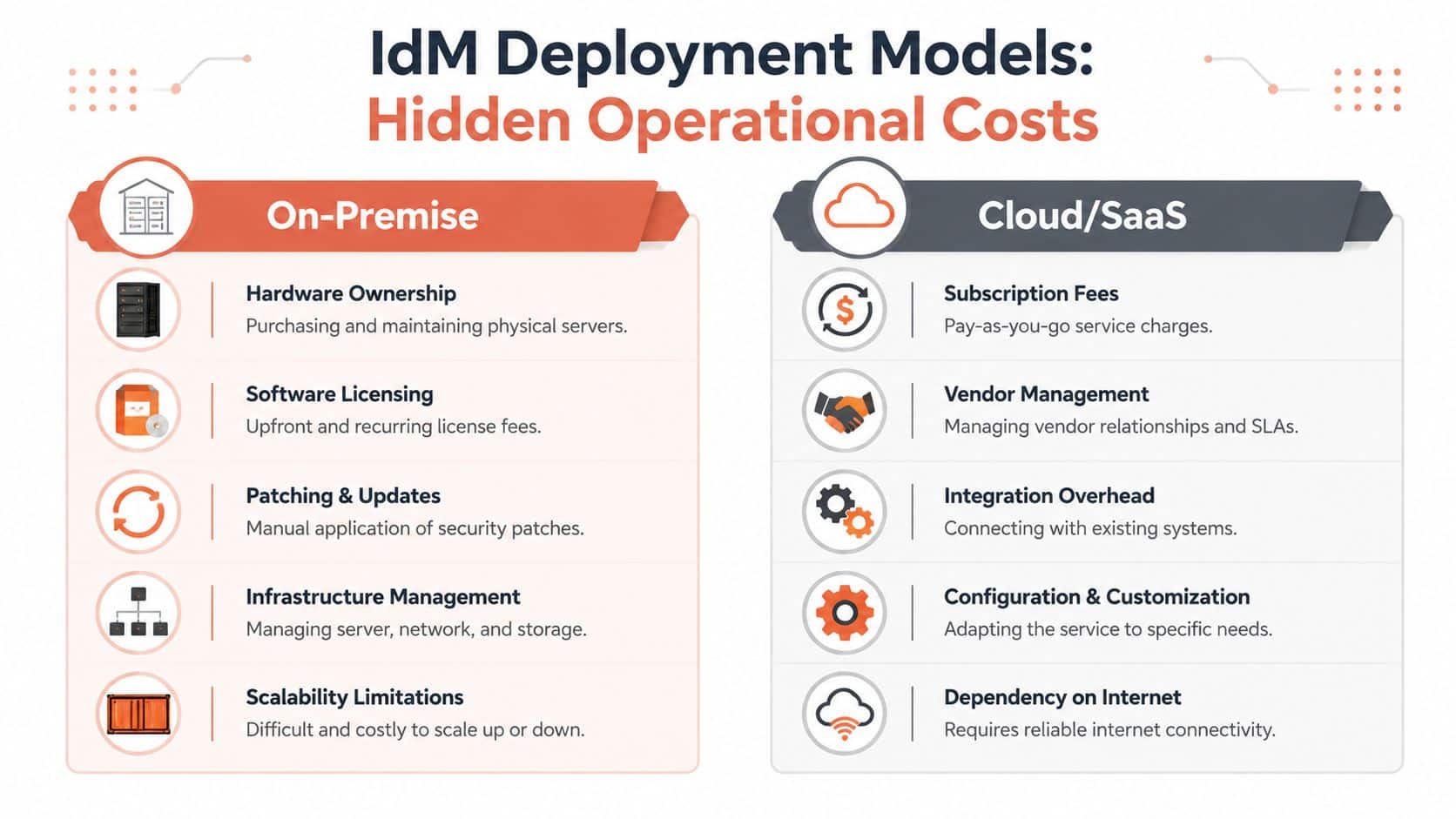
It won't, at least not by itself. The key question isn't whether the product is labelled on-prem, cloud, or hybrid. The key question is who owns the operational burden when upgrades, latency issues, broken integrations, or access incidents hit production.
On-prem and self-managed cloud
On-prem still appeals to teams that want deep control, custom policy logic, or specific data handling patterns. The trade-off is obvious and relentless. You own uptime, patching, scaling, backups, failover design, and every ugly upgrade path.
Self-managed cloud often sounds lighter because the hardware disappears from view. In practice, many teams move the toil. You still manage networking, storage, compute sizing, secret handling, observability, and high availability. “Runs in our cloud” can mean “our team carries the pager.”
SaaS and hybrid
SaaS removes a lot of undifferentiated infrastructure work, but it doesn't remove integration work. You still need to connect directories, cloud platforms, developer tooling, and internal apps. If your environment spans old systems and newer cloud services, hybrid can look like the sensible compromise.
Hybrid often delivers flexibility at the cost of operational clarity. When something breaks, ownership gets murky fast. Is the problem in your directory, the sync bridge, the vendor connector, the cloud policy, or the custom transform script one engineer wrote months ago?
The table below is the one I wish more buyers used early.
| Model | What you control | What you still end up doing |
|---|---|---|
| On-prem | Nearly everything | Infrastructure ops, upgrades, resilience, security patching |
| Self-managed cloud | Runtime and integrations | Platform engineering, hardening, monitoring, reliability work |
| SaaS | Service consumption and policy design | Integration, access modelling, vendor management |
| Hybrid | Mixed control | Mixed failure modes, duplicated policy effort, harder support paths |
For many teams, the operational cost discussion should sit next to broader infrastructure economics. If your identity approach also adds more cloud sprawl, this guide to cloud cost optimisation is worth reading because identity projects rarely stay isolated from the rest of the platform bill.
Integrating Identity into Your CI/CD Pipeline and Cloud
Friday afternoon release. One pipeline needs to push a container image, apply Terraform, rotate a secret, and deploy to production. It fails because a token expired in one step and had too much access in another. Now the team is debugging IAM instead of shipping.
That is the operational reality of identity inside modern delivery systems. Once builds, deploys, and infrastructure changes are automated, identity stops being an IT concern and becomes part of platform engineering.
The hard part is not human login. The hard part is everything your automation touches on the way to production. GitHub Actions, GitLab CI, Jenkins, Argo CD, cloud IAM, registries, secret stores, and deployment targets all need a trust model that is precise enough to reduce risk and simple enough to operate under pressure.
DIY identity work often expands into a larger yak shave. A team starts with one practical goal, get a pipeline to deploy safely. Then it grows into OIDC setup, cloud role mapping, secret rotation, environment scoping, audit trails, exception handling, and incident response. None of that is core product work, but all of it can break releases.
Human access is only half the problem
Many teams still design identity around employees signing into apps. CI/CD systems create a second identity layer made up of runners, service accounts, workload identities, deploy bots, and automation hooks. Those identities often end up with broad permissions because narrowing them takes time and cross-team coordination.
That shortcut gets expensive later. Long-lived cloud keys in repositories, shared service accounts across environments, and copied pipeline secrets are easy to introduce and painful to clean up. They also make audits and incident reviews slower because nobody can quickly answer which workflow had access to what.
A better pattern is short-lived credentials tied to a specific job, environment, and action. That reduces standing privilege and makes failures easier to reason about.
Machine identities need first-class ownership
Many identity programs break down in practice.
The company may have polished SSO for staff and solid MFA coverage, while delivery automation still runs on old API tokens and service accounts nobody wants to touch before a release. The problem is not conceptual. It is operational. Someone has to maintain the trust relationships, policy boundaries, token lifecycles, and logs across CI/CD and cloud platforms.
If the team wants less bespoke engineering in this layer, it should reduce the amount of pipeline machinery it owns outright. This explainer on zero-maintenance CI/CD pipelines is useful because it treats delivery infrastructure as an internal product to simplify, not a pile of scripts to keep alive forever.
What works in practice
Teams that keep this manageable usually standardize on a small set of rules and enforce them in the platform:
- Short-lived credentials: Build and deploy jobs get temporary access instead of static cloud keys.
- Role scoping: Each workflow gets permissions for one environment or action, not a catch-all deployment role.
- Environment separation: Preview, staging, and production have distinct identity paths and approval controls.
- Auditability: The team can trace who triggered a deployment, which role was assumed, and what changed.
- Default policy enforcement: Guardrails live in the platform so engineers do not rebuild them in every repository.
Managed platforms earn their keep here. PushOps is one example. It includes role-based access, permissions management, audit logs, and policy enforcement as part of the deployment platform across AWS, GCP, and Azure. That is materially different from asking application engineers to assemble and maintain identity controls around CI/CD on their own.
The strongest setup is the one that removes repeated identity work from every new service, every new pipeline, and every engineer who just wants to ship a change safely.
An Engineer's Checklist for Choosing a Solution
Feature lists are where identity buying decisions go wrong.
Every vendor says they support SSO, MFA, RBAC, audit logs, and provisioning. Those claims don't tell you how much engineering effort your team will absorb after purchase. The better evaluation method is to ask questions that expose operational ownership.
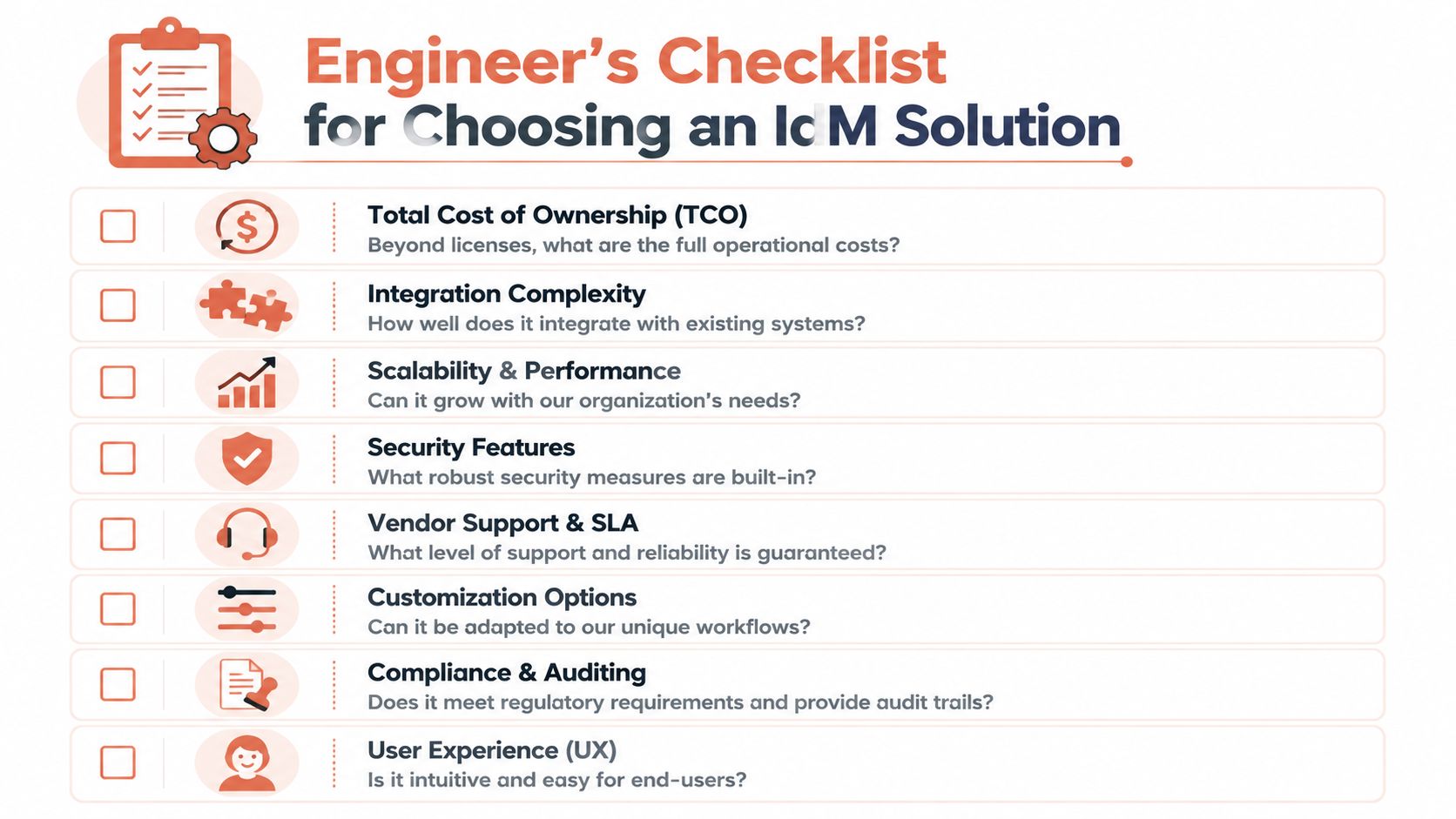
Questions that reveal the real cost
Start with lifecycle and maintenance, not features.
- How many systems must this connect to on day one? A product with broad protocol support can still become painful if every integration needs custom mapping or brittle sync logic.
- Who will own role design? RBAC sounds neat on a slide. In reality, someone has to define roles, review exceptions, and stop privilege sprawl.
- What happens when somebody changes jobs or leaves? If deprovisioning still depends on tickets and memory, the risk remains.
- How does emergency access work? A tool that supports break-glass access but doesn't log it clearly is only half solving the problem.
- Will machine identities be governed in the same model? If service accounts and tokens live outside the main policy framework, you're creating a second-class security path.
Look for operational evidence
I care less about a glossy admin UI than about the answer to basic operating questions.
Ask the vendor or your internal team to show how approvals are logged, how role changes propagate, how partner access is federated, how failed provisioning is detected, and how access reviews are surfaced. If those workflows require multiple disconnected tools, the burden lands back on your engineers.
A second practical lens is regional and regulatory fit. Generic IAM guidance often skips the implementation details that matter in specific markets. In healthcare, for example, IAM is framed around protecting ePHI, monitoring internal access, handling strict onboarding and offboarding, and preserving auditability, which is why sector-specific advice like these healthcare IAM fundamentals and practices tends to be more operationally useful than broad trend pieces.
A short decision filter
Use this filter before you sign anything:
- Can we explain ownership clearly? If the answer to “who fixes this at 3 AM?” is fuzzy, the model is weak.
- Does it reduce engineering toil or shift it? Plenty of tools remove one pain point and add three integration chores.
- Will it scale across humans and machines? If not, you'll revisit the architecture sooner than you think.
- Can auditors and operators both use the evidence? Compliance output that isn't operationally readable becomes dead weight.
- Does this support our product roadmap? Identity should speed delivery safely, not become a parallel platform project.
Stop Building Plumbing and Start Shipping Product
Identity usually becomes a platform problem by accident. A team adds SSO for one enterprise customer, writes a provisioning script for another, patches role mapping for an internal tool, and suddenly senior engineers are on the hook for access failures, audit gaps, and brittle integrations that have nothing to do with the product they were hired to build.
That pattern is expensive because identity is rarely an isolated build. It pulls in secrets management, deployment policy, cloud IAM, logging, alerting, incident response, and compliance evidence. What starts as "we can build this ourselves" turns into a long platform engineering yak shave. The bill shows up as delayed roadmap work, on-call noise, and a growing stack of systems that require specialists to keep them healthy.
The practical build versus buy question is simple. Do you want your team owning identity outcomes, or owning identity plumbing? Mature teams usually want strong policy control, clean integrations, and auditability without carrying every low-level component themselves.
Product logic, customer workflows, and domain models deserve direct engineering attention. Password resets, token lifecycles, federation edge cases, role propagation, and access sync jobs usually do not. Managed identity shifts that burden to a vendor whose job is to keep those mechanics working, while your team keeps shipping.
If you're reviewing options, look for platforms that treat identity as an operated service, not another subsystem your engineers have to assemble and babysit. The Passflow platform fits that model. The point is less about any single feature and more about avoiding a parallel internal platform project.
The same logic applies to the wider stack. Teams that invest in developer platform automation reduce the number of custom control points engineers have to maintain across delivery, security, and operations. Identity belongs inside that foundation, not beside it as another custom service with its own backlog.
Engineering time is the scarce asset. If access control, CI/CD permissions, cloud policy, audit logs, and provisioning glue are pulling attention away from product work, it is worth looking at PushOps. It provides a production-ready platform on AWS, GCP, and Azure with built-in role-based access, permissions, audit logs, policy enforcement, deployment automation, and observability, so teams can spend less time maintaining platform plumbing and more time shipping product.

